
Most paid-search advice tells you to try fewer keywords by abandoning competitive terms and hunting for obscure long-tail phrases. That advice gets the problem backward. Bloated Google Ads accounts rarely bleed cash because they bid on high-demand topics. They bleed cash because they run hundreds of overlapping keywords that compete for the same buyer intent, fracture conversion data, and bury wasted spend across dozens of messy ad groups.
Real demand doesn't live in endless single-use wordings. NP Digital reported in January 2024, based on 579,240 leads, that three- to six-word keywords generated 57.31% of SEO traffic. Searchers cluster around clear, mid-length commercial phrases, and modern ad platforms already match close variations automatically.
Cutting keywords works when you treat it as governance over competing intents and spend at risk, not as a scavenger hunt for tiny search terms. Every pause or removal should function as a reversible experiment backed by a saved performance snapshot, an explicit cost threshold, and a review date on the calendar.
Table of Contents
- The Keyword Triage Table That Sets the Cut
- Run the Keyword Audit in Seven Steps
- Score the Keywords Worth Keeping
- Monitor the First Fourteen Days Without Overreacting
- Avoid the Traps That Rebuild the List
- Make the First Cut This Week
The Keyword Triage Table That Sets the Cut
Most overextended keyword lists contain far fewer distinct buyer intents than their row count suggests. An account holding 400 active keywords often serves only 15 or 20 genuine commercial needs, while the remaining rows fight over identical queries and starve the best performers of clean budget. The efficiency gain comes from stripping out competing intents rather than retreating to low-volume phrases.
Before you pause a single row, pull one uniform baseline export from your ad platform. Export 90 days of data containing impressions, clicks, cost, conversions, CPA, Quality Score, match type, and landing page URL. Save that file as a read-only snapshot with today's date in the filename so every later check compares against untouched history.
Sorting Spend at Risk Before You Pause Anything
Once the baseline is locked, sort every active term into one of three buckets: protect, test, or cut. Judge each row by the money exposed and the intent it serves, using the decision rules below.
| Keyword segment | Signal to check | Action | What it protects |
|---|---|---|---|
| Zero conversions and spend at least 2x target CPA over 90 days | Cost, conversions, CPA | Pause the term and add its irrelevant queries as negatives | Budget for proven intents |
| Duplicate intent or near-duplicate phrase | Same landing page and overlapping search terms | Keep the better converting exact or phrase term and pause the weaker one | Clean attribution |
| Broad match with irrelevant search terms | Search-terms report and wasted spend | Tighten to phrase or exact and add 10-20 recurring negatives | Query quality |
| Close variants already covered by the platform | Plurals, misspellings, abbreviations and similar intent | Remove manual duplicates and stop adding them | Simplicity |
| High-converting term with rising CPA | Conversion rate, impression share and landing-page speed | Keep, then inspect bid, budget, competition and landing page | Volume that pays |
| New service or geo term with spend but no conversions yet | Conversion lag and sales cycle | Keep as a capped test with a 30-day review date | Learning |
| Brand or competitor term | Conversion rate and impression share | Keep brand separate; cap competitor tests | Control |
I use one default cut rule to eliminate hesitation during triage: pause any keyword that has spent at least 2x target CPA over 90 days with zero conversions, unless its search-terms data feeds a proven converting query or supports a documented launch with a capped test budget.
Default cut rule: If a term has burned twice your target CPA over 90 days without a single conversion or assisted search-term win, pause it and move the budget to proven demand.
Information-retrieval science backs up removing noise rather than just shrinking word counts. In a 2009 Carnegie Mellon University study testing long descriptive queries in TREC collections, perfectly removing low-value terms produced an average 30% improvement in mean average precision, while a practical query-reduction classifier delivered a statistically significant average 8% improvement on the test sets. The same paper pointed to earlier findings that strong subqueries commonly hold between two and six terms.
When you finish triage, you hold three concrete assets: a marked-up export flagging 10 to 30 cut candidates, a concise keep list tied to clear landing-page promises, and a dated baseline file ready for comparison.
Run the Keyword Audit in Seven Steps
Trimming an account safely requires a fixed sequence so you can tell which edit moved performance. The visual workflow below maps the full audit from baseline export through scheduled review.
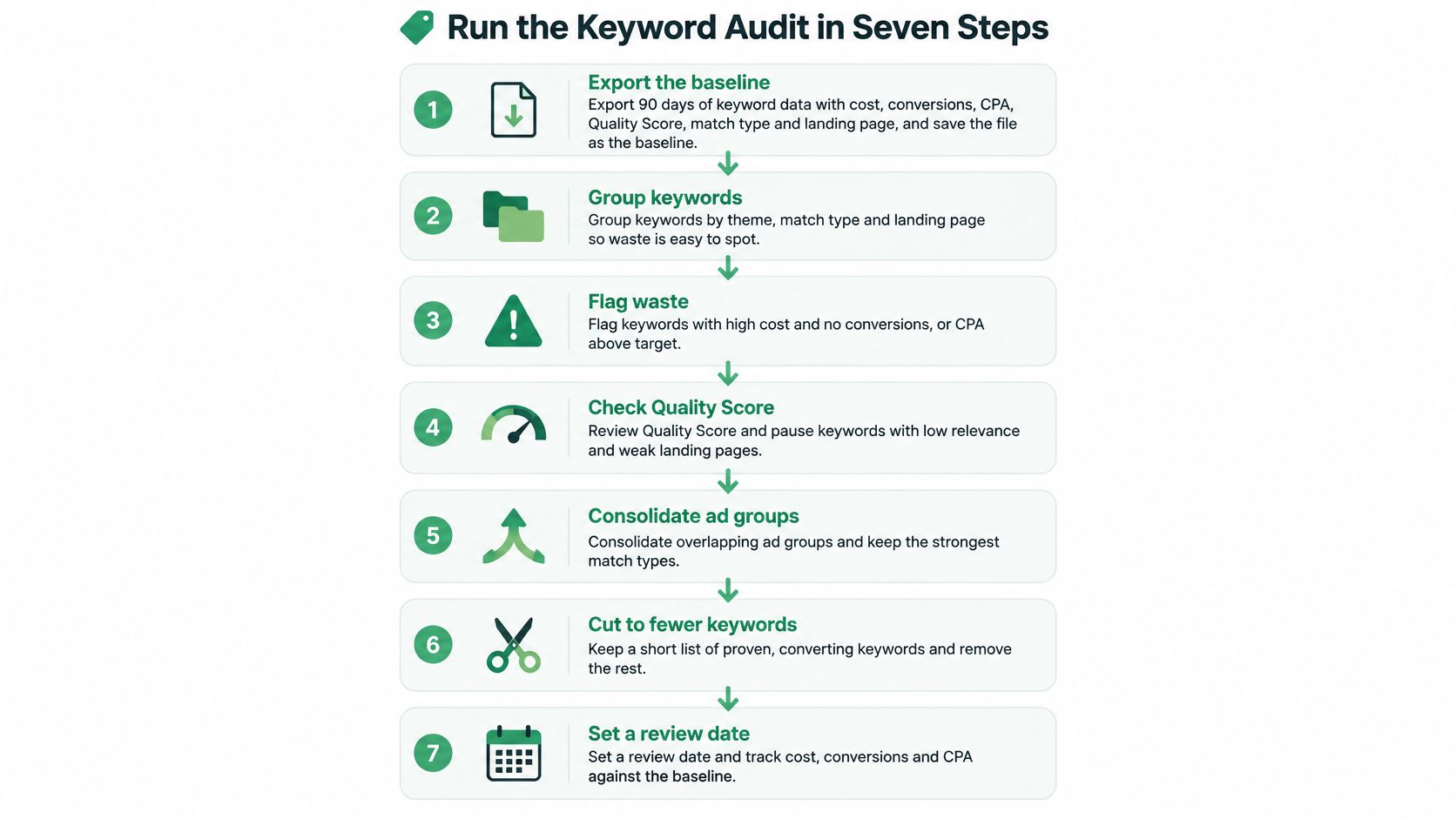
Work through these seven steps in order, keeping each batch small enough to undo cleanly if conversion volume dips.
- Lock the 90-day baseline file. Pull keyword-level cost, conversions, CPA, Quality Score, match type, and final URL from Google Ads or Microsoft Advertising, then save a frozen copy before editing anything.
- Cluster by one intent and one landing-page promise. Sort your spreadsheet by landing page first, then by core topic. Flag any near-duplicate keywords inside the same ad group or across campaigns that match identical searches and split your bid data.
- Assign protect, test, or cut labels. Tag every active keyword against your spend-at-risk thresholds so each row has a clear disposition before you open the ad interface.
- Mine the search-terms report by cost. Sort actual queries from highest spend downward. Exclude recurring off-intent themes as negative keywords in batches of 10 to 20, and promote a search term into its own explicit keyword only when it changes the audience, offer, or buying stage.
- Tighten match types deliberately. Move proven money terms to exact match, keep validated themes on phrase match, and restrict broad match to campaigns paired with an active negative list and a capped daily budget. Microsoft Advertising budget and bid documentation notes that more precise matching generally produces higher conversion rates alongside fewer impressions, making every match-type change an explicit quality-versus-volume trade, while search-query reports track impressions, clicks, CTR, and average position to surface both converters and negatives.
- Ship edits in capped batches. Never overhaul an entire account in one afternoon. Limit each change set to a single intent cluster or no more than 20% of campaign spend, and record the date, exact edit, reason, and owner in a simple change log.
- Calendar both review checkpoints immediately. Set a recurring 10-minute weekly search-term pass for high-spend campaigns and lock a day-14 checkpoint for every batch you approve.
Running the Weekly Pass Without Breaking Attribution
Weekly maintenance keeps cleaned accounts from sliding back into waste. In a structured weekly Google Ads search-term workflow, the agent filters to the last 7 days, strips out converting terms and root-keyword converters, groups the remaining queries by linguistic intent, and proposes negative scope and match types so the operator reviews and approves a single batch.
Running one controlled pass per week stops knee-jerk midweek edits. You preserve clean attribution between each negative-keyword batch and the resulting shift in cost per conversion.
Score the Keywords Worth Keeping
After pausing obvious non-converters, the harder call sits in the middle of the spreadsheet: keywords that convert occasionally, spend steadily, or sit slightly above target CPA. A 100-point priority scorecard replaces gut instinct with repeatable math across six weighted factors.
| Factor | Weight | Cutoff |
|---|---|---|
| Conversion value versus target CPA | 30% | Full score when CPA is at or below target; score zero after 2x target CPA over 90 days with no conversions |
| Search-term intent match | 25% | Full score for transactional queries; low score when research intent dominates |
| Spend and scale headroom | 15% | High spend with weak CPA is a cut, not a scale |
| Quality Score and ad relevance | 10% | QS below 4 with no conversions is a cut |
| Duplication and close-variant coverage | 10% | Keep the best performer only |
| Lead quality or margin | 10% | Full score for qualified leads or healthy margin; zero for leads that never close |
Add the six sub-scores to place every surviving term into an action tier. Keywords scoring 75 to 100 move to protect and scale. Terms landing between 50 and 74 stay active in a controlled test bucket. Anything below 50 gets paused or removed in the next batch.
Worked Examples From High Intent to Research Noise
Say a regional plumbing business audits two active search keywords against its target CPA. Scoring both terms side by side shows how the math separates revenue drivers from filler.
- High-scoring example ("emergency plumber near me"): The term delivers booked calls below target CPA (30/30), carries immediate transactional urgency (25/25), has room to capture more local impression share (12/15), holds a Quality Score of 8 (8/10), owns its exact intent without duplicating another ad group (9/10), and produces high-margin dispatch jobs (9/10). Total score: 93/100, firmly in protect and scale.
- Low-scoring example ("how to unclog a drain"): The term spent more than twice target CPA over 90 days with zero booked jobs (0/30), attracts DIY research traffic (4/25), absorbs budget without profitable scale (2/15), holds a Quality Score of 5 (5/10), overlaps organic help articles (4/10), and generates inquiries that rarely close (1/10). Total score: 16/100, an immediate cut.
Before penalizing a keyword on conversion value, verify that broken tags aren't hiding real sales by running a quick Google Ads conversion audit. Bad tracking turns profitable keywords into false cuts faster than anything else.
Avoid padding your keep list with speculative zero-volume keywords just because a tool flags low competition. When Ahrefs compared low-volume keyword estimates against Google Search Console impressions, each tested low-volume keyword generated 11.3 impressions on average, with most performing roughly in line with the estimates. Demand first-party impressions, clicks, assisted conversions, or closed revenue before spinning up a separate ad group, and split a query out only when it changes the audience, buying stage, geography, product, or required landing-page answer.
Apply the 100-point scorecard to your surviving keywords right after the first cut, then re-rank the list during each weekly review as fresh conversion data comes in.
Monitor the First Fourteen Days Without Overreacting
Cutting wasteful keywords changes auction dynamics immediately, and short-term volatility tempts operators into reversing good work too soon. Treat the first two weeks as a structured observation window governed by preset thresholds rather than daily dashboard checks.
| Metric | Days 1-3 | Day 7 | Day 14 | Red flag and response |
|---|---|---|---|---|
| Impressions | 5-20% drop expected | Stabilizes | Within 20% of baseline | Drop over 40%: restore one phrase keyword |
| Clicks | 5-15% drop expected | Stabilizes | Within 15% of baseline | Drop over 25%: check negatives for converting queries |
| CPA | 5-10% rise possible | Trending back to target | At or below baseline | Over 25% above target by day 14: restore one batch |
| Non-converting spend share | Starts falling | Clear improvement | 5-10% of spend by week 3 | No fall by week 3: review negatives and match types |
| Search-term relevance | Irrelevant queries still appear | Negative themes shrink | Irrelevant share down by half | New irrelevant theme: add negatives weekly |
| Conversion volume | Dip possible | Holds | Holds or grows vs baseline | 20% drop: pause further cuts |
Impressions naturally fall 5-20% and clicks slip 5-15% in the first three days because low-value searches stop triggering your ads. Smart Bidding can also push CPA up 5-10% briefly while algorithms adjust to cleaner traffic. That temporary wobble isn't failure; it's the cost of stripping out noise.
Separating Relearning Noise From Real Demand Loss
When volume drops harder than expected, check the search-terms report before blaming the cut. Google Ads close-variant documentation explains that close variants allow one keyword to match singular and plural forms, abbreviations, accents, stemmed forms, misspellings, and variations sharing the same meaning or intent, explicitly reducing the need for exhaustive keyword lists. Inspecting the report's keyword, match type, and performance columns shows whether a paused duplicate handed its queries to a stronger surviving keyword or whether a broad negative accidentally blocked a buyer term.
Restoring a single logged batch beats layering new cuts onto an unstable campaign. If conversion volume drops 20%, stop trimming and inspect your negative list first.
Stick to the cadence: the weekly search-term review workflow takes about 10 minutes, and most accounts see wasted spend drop into the 5-10% band by week three of consistent weekly reviews. At your day-14 checkpoint, let one metric decide whether you ship the next batch of cuts: qualified conversion volume at or above your baseline.
Avoid the Traps That Rebuild the List
A lean keyword structure rarely stays lean by accident. Without explicit rules, well-meaning optimizations add rows back until the account looks just as fragmented as it did before the audit.
The most common mistake is equating fewer keywords with targeting tiny, low-volume long-tail strings. According to Ahrefs' analysis of its U.S. keyword database, roughly 93% of distinct keywords receive fewer than 10 monthly searches, yet that figure counts unique query strings rather than share of total search volume. That same piece cites research across 3 million searches showing top-ranking pages commonly rank for multiple related keywords. Judge each intent cluster by aggregate impressions, conversions, and revenue instead of chasing dozens of obscure phrases.
Six Account Habits That Undo a Clean Audit
- Chasing ultra-rare long-tail phrases: Splitting budget across tiny queries starves core commercial demand. Fix: map one primary intent per ad group and evaluate cluster-wide conversion value.
- Manually building close-variant lists: Adding separate rows for plurals, typos, and slight rewordings duplicates coverage the ad platform handles natively. Fix: lean on exact or phrase match for uncertain demand and stop adding surface variants.
- Trimming purely by low search volume: Pausing a profitable niche term just because volume looks small sacrifices high-margin conversions. Fix: base every cut on competing intent and spend at risk, never raw volume estimates.
- Editing hundreds of keywords in one session: Massive overnight changes destroy your ability to trace why CPA jumped or clicks vanished. Fix: restrict edits to one scoped batch per week.
- Killing slow-converting terms too early: B2B and high-ticket service keywords often look dead over a seven-day window while deals are still closing offline. Fix: set a written review date aligned with your real sales cycle before judging performance.
- Leaving "strategic" terms uncapped: Keeping non-converting vanity terms active without limits drains budget away from winners. Fix: isolate tests under a capped budget and reinforce boundaries through ongoing Google Ads negative keyword management of 10 to 20 negatives per review.
Fewer keywords is a governance rule for protecting budget and intent clarity, not a search-volume target.
Make the First Cut This Week
Pick one high-spend intent cluster today, pull its 90-day baseline, and cut 10 to 20 underperforming or duplicate terms using the triage rules. One line governs every row: keep terms delivering qualified conversions at or below target CPA, test terms with early signal but incomplete conversion data under a capped budget, and pause terms that have spent more than 2x target CPA with zero conversions.
Log the baseline metrics, the exact batch of changes, and a 14-day review date in your calendar before clicking apply. That single habit turns every cut into a reversible experiment backed by numbers rather than a permanent guess.
Score the remaining keywords on the 100-point scale so your next weekly review starts with a clear priority order, and attach the day-14 checkpoint to the same calendar invite. Whether you manage campaigns in a spreadsheet, Google Ads Editor, or Microsoft Advertising, the entire method works without custom tooling. Hold off on a second round of cuts until day 14 confirms the one metric that matters: qualified conversion volume at or above baseline.
If you want to run these audits and weekly search-term passes directly from an AI client instead of wrestling with CSV exports, connecting Google Ads takes two minutes after a one-time authorization at NotFair. Diagnostic queries run freely across your live account, while every write, including bid changes, negative keywords, ad copy, and campaign state, stays approval-gated and logged with full provenance. For teams managing heavier cleanups, our Growth plan also includes bulk workflows for keywords, ads, budgets, and scripts.