
CPC rose in most industries in the U.S. search advertising sample analyzed for WordStream's 2024 benchmarks. Treat higher click prices as a market condition to investigate before judging your own account. A click is only expensive when the customers it attracts fail to cover what you paid; measure each segment by the revenue and profit a conversion brings back.
Table of Contents
- Google Ads CPC Formula and Benchmarks by Industry
- How Google Decides What You Pay Per Click
- Factors That Push Your CPC Up or Down
- Bidding Strategies That Control Your CPC
- When a Higher CPC Is Worth Paying
- How to Lower CPC Without Losing Qualified Clicks
- Audit Your CPC Segments This Week
Google Ads CPC Formula and Benchmarks by Industry
The average U.S. search advertiser paid $5.26 per click in WordStream's 2025 Google Ads benchmarks, an analysis of 16,446 U.S.-based search advertising campaigns active from April 1, 2024, through March 31, 2025. Whether your own number should sit above or below that figure depends on the formula behind it and the industry you compete in.
Cost per click, or CPC, is the amount you pay each time someone clicks your ad. In Google Ads reports, you'll usually evaluate average CPC, which combines the prices of individual clicks over your selected reporting period.
The calculation is straightforward:
Average CPC = Total cost ÷ Total clicks
Suppose you spend $1,200 during a month and receive 240 clicks. Your average CPC is $5.00. Some of those auctions produced cheaper clicks and others cost more; the average only tells you what you paid overall. Average CPC works like the average price of items in a shopping basket: useful for reading the receipt, silent on whether each item was worth buying.
Benchmarks are reference points, not a price list
The industry averages in the table below come from that same 2025 analysis.
Google Ads search CPC by industry and benchmark, U.S.
| Industry or benchmark | Search CPC | Benchmark period |
|---|---|---|
| Arts and Entertainment | $1.60 | April 2024 to March 2025 |
| Animals and Pets | $3.97 | April 2024 to March 2025 |
| Business Services | $5.58 | April 2024 to March 2025 |
| Dentists and Dental Services | $7.85 | April 2024 to March 2025 |
| Attorneys and Legal Services | $8.58 | April 2024 to March 2025 |
| All industries, average | $5.26 | April 2024 to March 2025 |
| All industries, median | $5.42 | 2025 to 2026 |
The final row comes from a newer benchmark set and reports a different summary measure. Digital Applied's account of WordStream by LocaliQ's 2026 benchmarks puts the median search CPC at $5.42 for a later sample that also includes Microsoft campaigns.
Don't read the last two rows as a clean, like-for-like price trend. They summarize different samples over different periods using different measures. A median marks the middle observation, while an average totals values across the sample. When the two disagree, the distribution is skewed: a minority of very expensive clicks can pull an average up while leaving the median near the middle of the pack.
Compare the right number in your account
Find Avg. CPC in your Google Ads campaign, ad group, and keyword reports. Use the same date range across reports, and separate branded searches from nonbranded acquisition traffic before drawing conclusions. Branded terms tend to earn cheaper clicks, so folding them into one account-wide figure makes acquisition costs look better than they are.
Start with your industry row, then investigate any substantial gap. Your geography, service mix, search intent, and competitive environment may explain it.
Benchmark rule: A CPC above your industry reference is a question to investigate, not a verdict on performance.
Read Avg. CPC beside conversions and cost per conversion rather than on its own. An $8.58 legal click that produces signed cases beats a cheaper click that produces none, and an inexpensive traffic source that rarely generates useful inquiries is no bargain. Judge each segment's CPC by what the clicks return.
How Google Decides What You Pay Per Click
Someone searches for an emergency plumber. Several plumbing businesses may be eligible to advertise, but Google doesn't award every placement to whoever offers the largest bid.
Instead, it evaluates Ad Rank. According to Google's explanation of actual CPC, the auction considers your bid, auction-time ad quality, Ad Rank thresholds, competition, search context, and the expected impact of assets and other ad formats.
The process is easier to understand as a sequence:
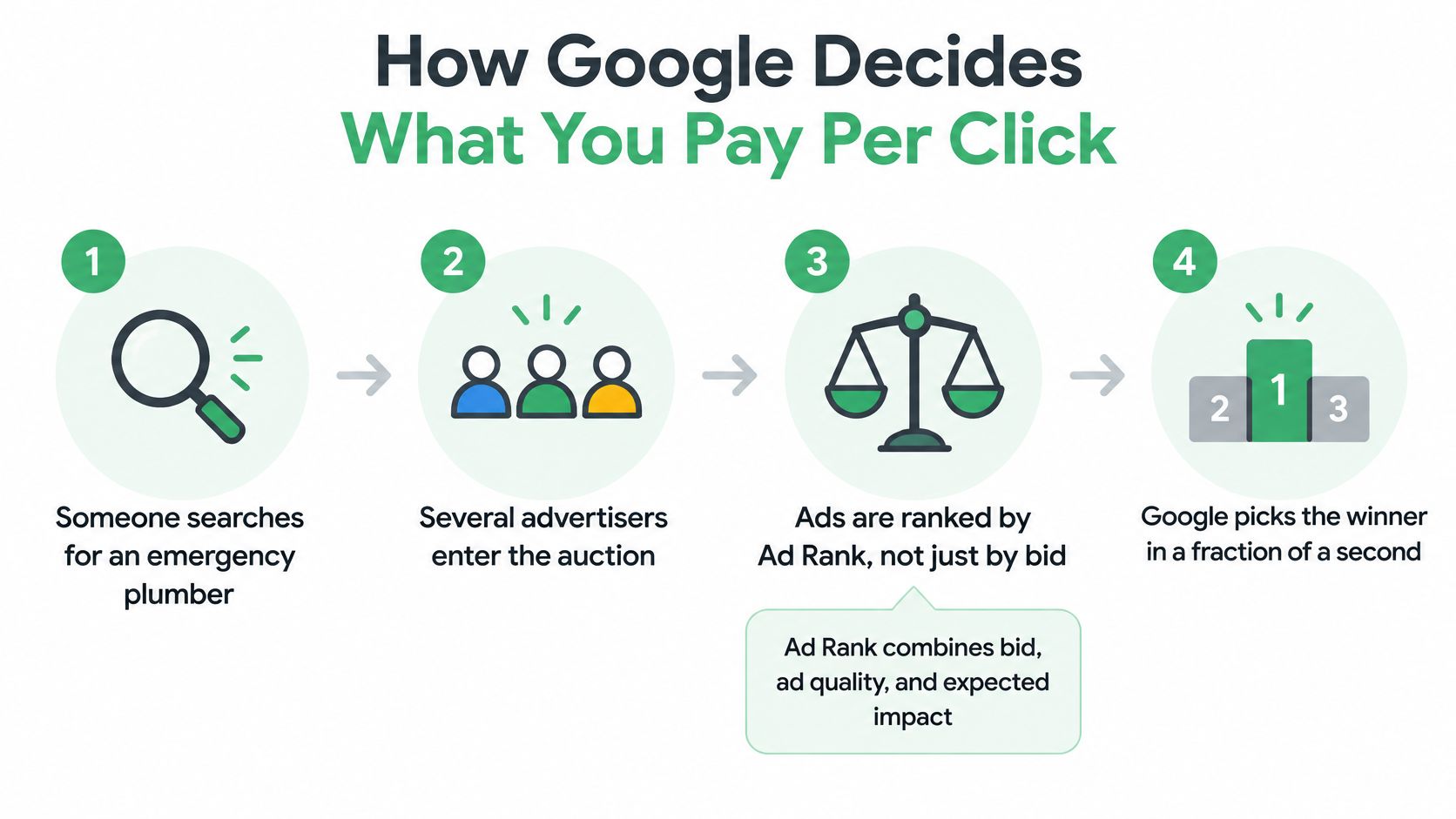
From search query to reported cost
- Google identifies eligible ads. Your targeting, keyword matching, campaign settings, and other eligibility conditions determine whether your ad can enter the auction.
- Google calculates Ad Rank. Your bid matters, but so does how useful your ad appears for that particular search.
- The auction determines the click price. You generally pay the amount needed to clear the relevant Ad Rank threshold and exceed the next competitor's Ad Rank.
- Your reports summarize the resulting charges. Individual click costs contribute to the Avg. CPC you see for the reporting period.
The distinction between maximum CPC and actual CPC matters. A maximum bid expresses what you're willing to bid under the applicable bidding setup. It isn't a fixed keyword price or a promise that each click will cost that amount.
For the plumber, an ad describing emergency callouts in the searcher's service area is more relevant than a generic home-maintenance message. Sending that visitor to a matching emergency plumbing page also gives them a clearer path to contacting the business.
Why raising bids isn't a complete fix
A larger bid can improve eligibility or position, but it doesn't repair an irrelevant offer or a confusing landing page. You might pay more to attract visitors who still can't find what they need.
Before changing bids, inspect:
- Search queries and match types to identify changes in the auctions you enter.
- Device and location to isolate expensive traffic segments.
- Top and absolute-top visibility to understand placement changes.
- Conversion value to judge what those placements produce.
With Smart Bidding, don't apply manual maximum-bid assumptions mechanically. Google adjusts auction-time bids around the strategy's objective, so the relationship between your configured target and observed CPC isn't direct.
Factors That Push Your CPC Up or Down
Some CPC drivers are within your control, such as ad relevance and targeting. Others, including rival advertisers' bidding decisions, are conditions you can observe but can't dictate.
Use the following checks to distinguish an account problem from a change in auction conditions. The directions are tendencies, not guarantees for every campaign.
CPC drivers, their effect and the check to run first
| Factor | Effect on CPC | What to check first |
|---|---|---|
| Competition in the auction | More aggressive rival bids can raise the price needed to compete | Auction Insights and impression-share trends |
| Query intent | Commercial and high-value queries can command higher prices | Search terms grouped into buying and research intent |
| Quality Score components | Weaker quality signals can increase the bid needed to compete | Keyword component ratings alongside spend |
| Device | Different device auctions can produce different costs | CPC and conversion rate by device |
| Location | More competitive locations can cost more | CPC and conversion rate by location |
| Match type | Wider matching changes the auction mix and can increase costs | Search terms drifting away from your offer |
| Ad position | Competing for prominent placements can increase CPC | Top visibility alongside conversion value |
| Industry | Commercial economics influence competitive pressure | Your relevant industry benchmark |
Use Quality Score as a diagnosis
Google describes Quality Score as a keyword-level diagnostic on a 1–10 scale, based on expected click-through rate, ad relevance, and landing-page experience, with component comparisons over a recent 90-day window, in its Quality Score documentation.
Each component can be below average, average, or above average. The displayed score itself isn't an auction-time input. Real-time quality signals related to those components influence Ad Rank.
Don't chase an account-wide average score. Prioritize expensive keywords with a specific below-average component, then make the corresponding repair:
- Expected click-through rate: Separate distinct intentions and make the offer clearer in headlines and assets.
- Ad relevance: Match the message to the actual service or product the searcher wants.
- Landing-page experience: Improve content alignment, mobile usability, loading performance, navigation, and the path to conversion.
Check outcomes rather than chasing a score
A better diagnostic rating doesn't establish that your campaign became more profitable. Validate the work against actual CPC, impression share, conversion rate, and conversion value.
Quality improvements are useful when they help you compete for worthwhile traffic, not merely when they improve a dashboard score.
For external changes, monitor Auction Insights and impression share, including losses attributed to rank or budget. These can flag a competitive shift, although they don't prove exactly what competitors bid or why demand changed.
Bidding Strategies That Control Your CPC
Choosing a bidding strategy means deciding what you want Google to optimize and how much direct control you need. Manual CPC controls bids directly; automated strategies pursue traffic, conversions, or conversion value within your settings.
Those objectives aren't interchangeable. A strategy that generates more visits hasn't necessarily generated more customers.
Bidding strategies and how much CPC control they keep
| Strategy | What sets the bid | CPC control | Best fit |
|---|---|---|---|
| Manual CPC | You set maximum bids per keyword or ad group | High direct control | New accounts or tightly controlled keyword tests |
| Maximize Clicks | Google seeks clicks within the budget | Limited, with an optional CPC cap | Building relevant traffic |
| Target CPA | Google pursues your target cost per conversion | Indirect through the target, not a click-price cap | Accounts with dependable conversion measurement |
| Target ROAS | Google pursues your target return on ad spend | Indirect through the return target | Ecommerce with reliable conversion values |
| Maximize Conversions | Google seeks conversions within the budget | Low direct control | Testing conversion volume |
| Maximize Conversion Value | Google seeks conversion value within the budget | Low direct control | Accounts with differing conversion values |
| Enhanced CPC | Previously adjusted manual bids by conversion likelihood | Not available for Search and Display | Retired strategy |
Google states that Enhanced CPC became unavailable for Search and Display effective the week of March 31, 2025, in its bidding and measurement guidance. Automated bidding uses auction-time context such as device, location, time, language, operating system, and remarketing-list information; the guidance also identifies limits on some click-ID-keyed conversion exports when ad_user_data consent is denied.
Choose targets your measurement can support
Manual CPC can be a sensible starting point when you need a clear bid ceiling and have limited trustworthy conversion history. It still requires active search-term and performance reviews.
For conversion-focused automation, establish that the intended actions are tracked consistently. Choose a Target CPA from observed acquisition economics, not the cost you wish you could achieve.
For value-based bidding, distinguish valuable purchases or qualified outcomes from low-value actions. Otherwise, Google may optimize toward the wrong definition of success.
Separate spend controls from click-price controls
A daily budget controls spending, while a CPC cap constrains bids where that setting is supported. They don't do the same job, and a budget alone doesn't guarantee inexpensive clicks.
When CPC changes after a strategy switch, inspect the change history, conversion settings, consent implementation, and conversion lag before declaring the strategy inefficient.
- Check the auction mix: Did automation pursue different queries or locations?
- Check measurement: Did reported conversions become delayed or incomplete?
- Check outcomes: Did qualified conversions or revenue improve?
Ask whether competition changed, or whether the account's bidding instructions and available signals changed.
When a Higher CPC Is Worth Paying
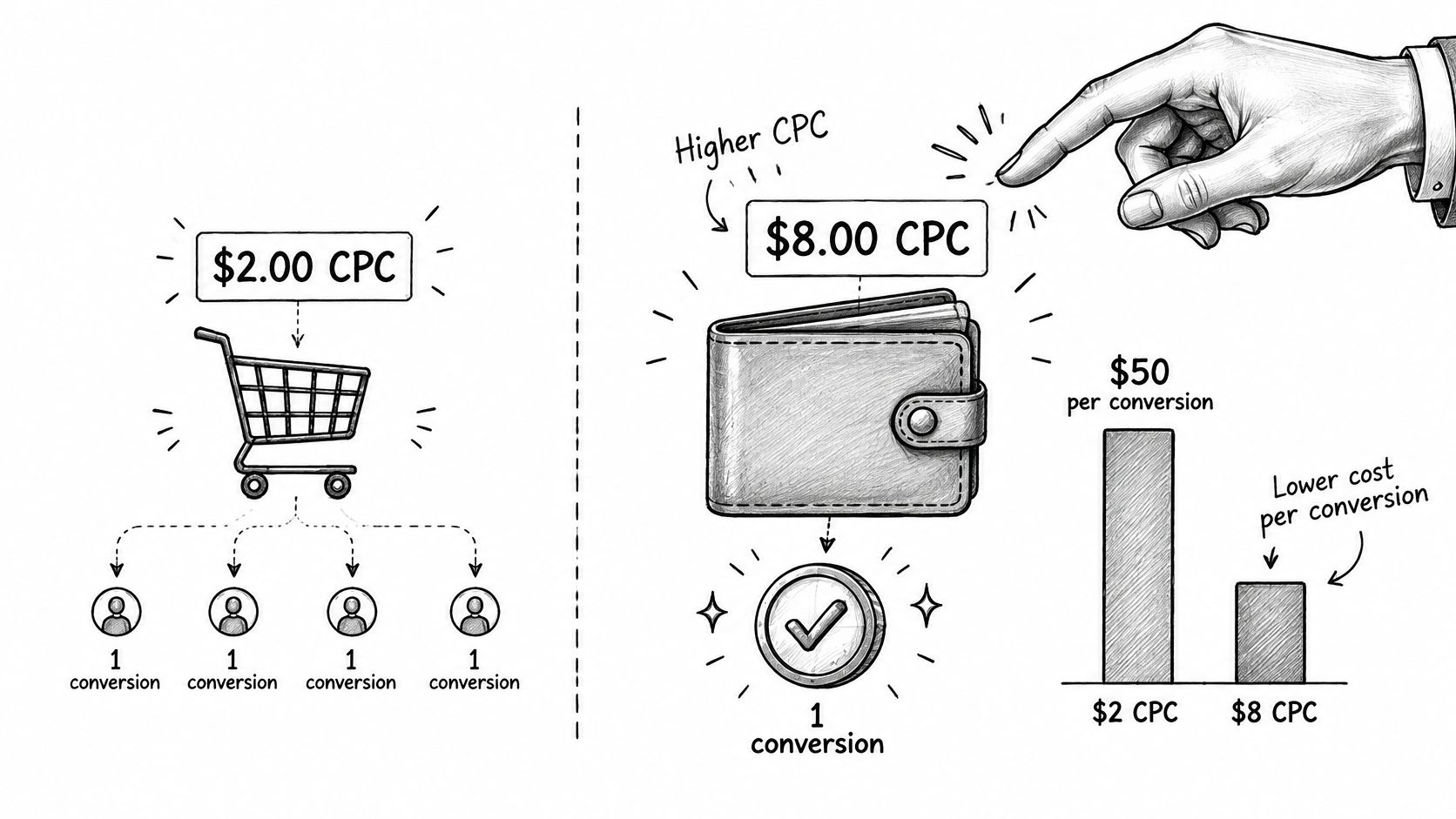
Consider a hypothetical keyword comparison, not an industry benchmark. Keyword A attracts cheaper clicks, but Keyword B converts a larger share of its visitors.
Keyword A vs Keyword B, cost per conversion
| Keyword | CPC | Conversion rate |
|---|---|---|
| Keyword A | $2.00 | 4% |
| Keyword B | $8.00 | 20% |
For this example:
Cost per conversion = CPC ÷ Conversion rate expressed as a decimal
Keyword A produces a $50 cost per conversion, calculated as $2.00 ÷ 0.04. Keyword B produces a $40 cost per conversion, calculated as $8.00 ÷ 0.20.
The more expensive click delivers the cheaper conversion. That's why cutting bids solely because CPC looks high can remove productive traffic.
The difference between buying inexpensive visits and buying useful outcomes is illustrated below.
Follow the lead beyond the form submission
A conversion isn't always a customer. A campaign can generate inexpensive forms from people outside your service area, applicants seeking jobs, or buyers who can't afford the offer.
Calculate cost per qualified opportunity by dividing spend by qualified opportunities. Then calculate customer acquisition cost using acquired customers, and compare it with contribution margin and realistic customer lifetime value.
A Google Ads conversion audit should establish which recorded actions represent business outcomes before those actions guide bidding.
Judge clicks against distinct benchmarks
Use separate reference points:
- Market price: What comparable auctions tend to cost.
- Account efficiency: How effectively your clicks become meaningful conversions.
- Revenue efficiency: Whether those conversions produce profitable customers.
The broader pattern supports this distinction: 87% of industries experienced higher CPCs, yet 65% improved conversion rates, according to Search Engine Land's coverage of the U.S. search benchmark. Those industry-level findings don't establish profitability for an individual advertiser, and U.S. search results aren't global targets.
Profitability test: Keep paying more only when the additional traffic produces enough additional business value to justify its cost.
Evaluate the marginal return, meaning what the next increment of spending produces. If pricier auctions add cost without proportionate qualified conversions or revenue, tighten targeting or reduce exposure.
How to Lower CPC Without Losing Qualified Clicks
The objective is to remove unnecessary auction costs while preserving traffic that produces business. A lower account average is useful only if the remaining clicks still support your acquisition goals.
Use this checklist to organize the work.
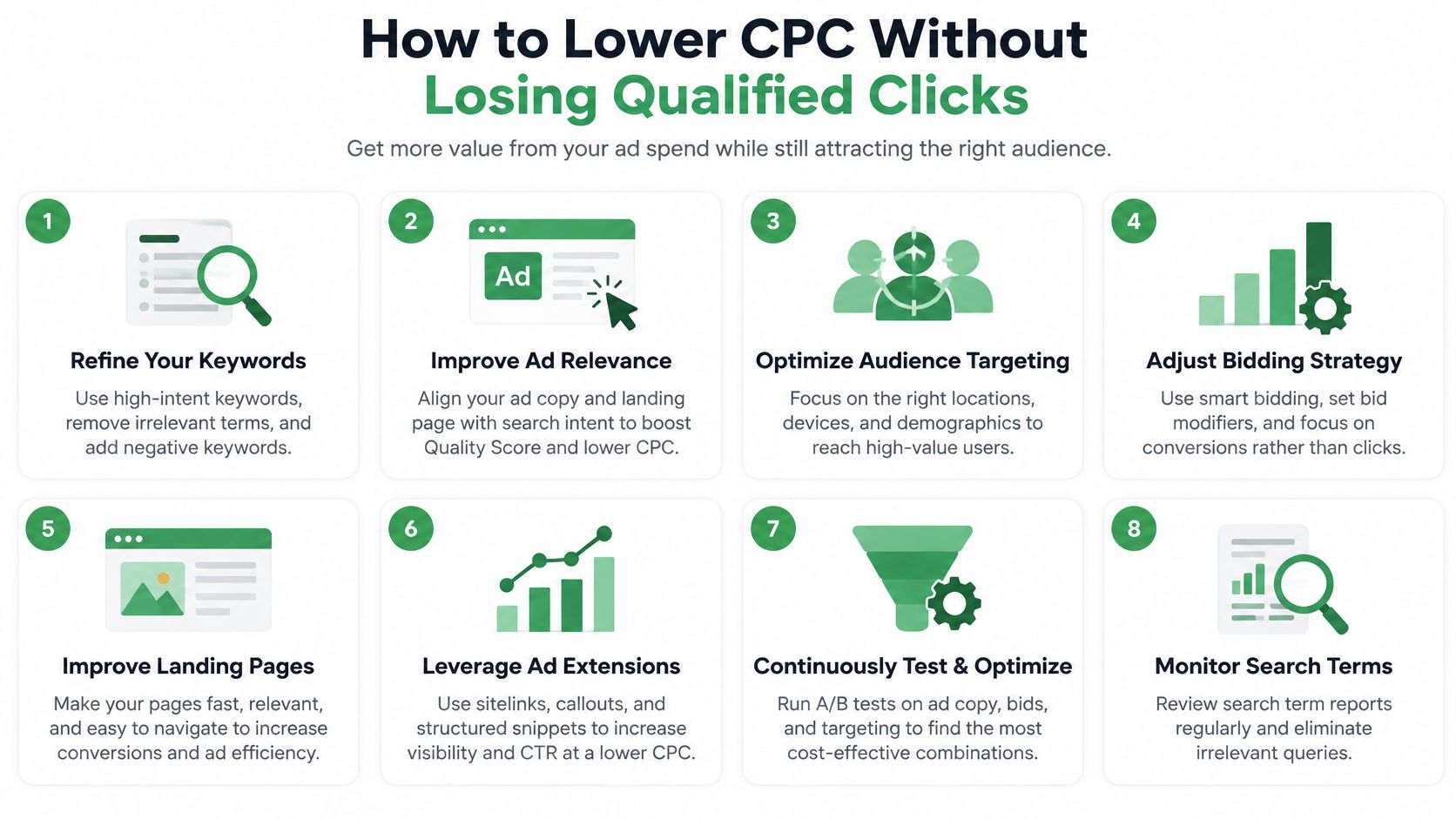
Tighten targeting before cutting useful traffic
Review recent search terms. Pull a practical working window, such as the past month, and identify queries that clearly don't fit your offer. Use a negative keyword review to exclude irrelevant intent, choosing the narrowest appropriate scope so you don't block valuable searches.
Build service-specific ad groups. Separate themes that need different messages or landing pages, such as emergency repairs and planned installations. In our campaign process, we build around the client's services and service area, set up conversion tracking before launch, and cut wasted spend as search terms arrive.
Reduce exposure selectively. Inspect impression share and expected click-through rate alongside business outcomes before lowering manual bids on weak keywords. Don't pause a keyword merely because its diagnostic rating is below average if it still brings profitable customers.
Improve the experience and contain the experiment
Repair the destination page. Match the headline to the searcher's task, make the offer visible on mobile, remove unnecessary form fields, and test the contact path yourself. These changes address landing-page friction rather than paying less for the same disappointing visit.
Use device and location evidence. Compare both cost and conversion performance before making adjustments, and confirm whether your bidding strategy supports the adjustment you intend. An expensive device segment may still deserve investment if it produces stronger customers.
Put limits around traffic-focused automation. For Maximize Clicks, set an appropriate budget and consider a supported maximum CPC limit. Choose those settings from allowable acquisition costs, not just a desire to increase site visits.
Review changes after conversions have had time to arrive. Schedule an initial follow-up after a short observation period, then extend it when your sales cycle requires more time. Reverse changes that reduce worthwhile conversion value beyond the spend they save, and keep a change log so the cause remains traceable.
For a complementary walkthrough, use the video below while reviewing your account settings.
Don't assume removing irrelevant traffic will always lower average CPC. You might eliminate cheap, useless visits and leave a more expensive but more profitable traffic mix.
Audit Your CPC Segments This Week
Set aside a working week for diagnosis and controlled changes, then schedule a follow-up. Keep the date range, attribution settings, and segment definitions in a shared sheet so another team member can reproduce the review.
Start with exposure, then verify outcomes
- At the start of the week: Export recent CPC by bidding strategy, device, location, and query intent. Use a search-term analysis to distinguish service buyers from irrelevant or exploratory searches.
- During diagnosis: Put conversions, cost per conversion, and conversion value beside each segment. Flag rising CPC with flat or declining outcomes, then rank the affected segments by spend at risk.
- Before editing: Check consent behavior, conversion-action status, recent tracking changes, and reporting delays. Fix missing or misleading signals before using them to justify a bid change.
- Before the week ends: Act on the highest-exposure segments with tightly scoped negatives, message improvements, landing-page repairs, or supported bidding changes.
Record what changed, who approved it, and what outcome would justify keeping or reversing it. Schedule the next review after an appropriate conversion window rather than treating the first movement in CPC as a final answer.
Your audit should finish with a decision about business value, not a target to make every click cheaper.
NotFair connects your Google Ads account to an AI client for live diagnosis and approval-gated campaign changes, with previews, logged history, and undo controls. Visit NotFair to investigate costly search terms and draft bid, budget, or keyword edits you can review before approving.