

Meta ads status is not the same thing as whether one campaign is delivering. The phrase can refer to a platform-wide incident, a degraded Meta Ads Manager experience, an API problem, or an account-level delivery issue caused by approval, budget, billing, audience, auction, or tracking conditions. Treating all four as “Meta is down” leads to bad decisions: duplicated campaigns, unnecessary edits, and false explanations in client reports.
This explainer gives paid media managers, agencies, and automation builders a practical way to check the platform, isolate the failure, and decide whether to wait, investigate, or make a reversible change. It also explains where automated checks can mislead you, especially when a campaign appears active in the interface but is not producing the expected impressions or conversions.
What “Meta Ads Status” actually covers
There are several different states hiding behind the same search phrase. A useful diagnosis starts by separating the platform state from the account state and the measurement state. A Meta-wide incident can affect many advertisers at once, while a rejected ad or exhausted budget can affect only one campaign. A tracking failure can leave delivery healthy while making performance look broken.
- Platform availability: Meta services, Ads Manager, ad delivery systems, reporting, or related APIs may be unavailable or degraded.
- Account and campaign delivery: An account, ad set, ad, payment method, audience, or budget may prevent impressions or spend.
- Review and policy state: An ad may be in review, rejected, restricted, or limited even when the rest of the account works normally.
- Measurement state: The ad may deliver, but events, attribution, reporting, or a connected analytics system may be delayed or incomplete.
- Automation and API state: A tool may fail to read or change campaigns even though the Meta user interface remains available.
The first check should be the official Meta Status page. It is useful for confirming whether Meta has published a service incident, but a clear status page does not prove that your account is healthy. Status pages report what the provider has identified and chosen to communicate; they do not inspect your billing setup, ad review decisions, audience size, or event quality.
For technical teams, the distinction between the interface and the API matters. Meta’s official Marketing API documentation describes the API surface used to manage and measure advertising objects. A successful login to Ads Manager does not guarantee that every API endpoint, token, permission, or reporting request is operating normally. Conversely, an API error does not necessarily mean that ad delivery has stopped.
A status check is evidence, not a diagnosis
Use the status page as one input in a broader evidence chain. If several unrelated ad accounts cannot load campaign data at the same time, the probability of a platform or API issue rises. If one account has a single rejected ad while other accounts spend normally, an account-level explanation is more likely. The same logic applies to reporting: a missing purchase column is not proof that delivery stopped.
Record the time in UTC or the account’s reporting timezone, the affected account, the exact error text, and whether the problem appears in the interface, the API, or both. This turns a vague complaint into a reproducible incident. It also prevents a common agency mistake: comparing a client’s local timestamp with a platform report that closes the day in a different timezone.
Why the distinction matters for performance decisions
A platform incident and a weak campaign require opposite responses. During an outage, editing targeting, budgets, bids, and creative can add noise without fixing the underlying fault. During a normal platform period, waiting for Meta to recover from a problem that exists only in your account wastes budget and delays corrective action.
The practical cost is not limited to lost impressions. Unnecessary edits can reset learning conditions, create version confusion, and make later analysis harder. A manager who duplicates an ad set during a reporting delay may eventually see both the original and duplicate spend. An analyst who pauses campaigns because purchase reporting is late may turn a measurement issue into a real delivery loss.
Separate delivery from reporting
Start with a question that can be answered independently of the conversion column: did the ad receive impressions? Then ask whether spend, reach, clicks, landing-page sessions, and conversion events are moving. If impressions and spend are present but conversions are absent, investigate the funnel and measurement layer before labeling the campaign inactive.
Meta’s reporting and data interfaces can expose different failure modes. The official Graph API rate-limiting documentation explains that API requests can be limited based on usage. That means a reporting connector may stop retrieving data or return errors while the campaign continues to serve. A connector’s last successful sync time is therefore a separate operational metric from the campaign’s last impression.
For a useful incident record, preserve at least these observations:
- Whether Ads Manager loads and whether the affected account is selectable.
- Whether the campaign, ad set, and ad show an active or restricted delivery state.
- Whether spend and impressions changed after the suspected start time.
- Whether the same symptom appears in another account or business portfolio.
- Whether first-party site analytics, server logs, or landing-page sessions show traffic.
- Whether an API request fails with a permission, rate-limit, validation, or server error.
These observations support different actions. A broad interface failure calls for incident monitoring and a communication plan. A single rejected ad calls for policy review. Impressions without conversions call for event and funnel investigation. API-only failures call for connector and credential checks, not immediate campaign restructuring.
Use a change freeze when the evidence is ambiguous
An illustrative agency policy might be to freeze nonessential campaign edits for 30 minutes while collecting evidence during a suspected platform incident. That is a starting policy, not a universal benchmark. A business selling time-sensitive inventory may choose a shorter window; a low-volume lead campaign may tolerate a longer one.
The point of a freeze is not passivity. It is to preserve a clean before-and-after record. During the freeze, you can verify account access, inspect delivery statuses, test a read-only report, check the status page, and compare an unaffected account. Avoid changing five variables while the system is uncertain.
How to check Meta Ads Status step by step
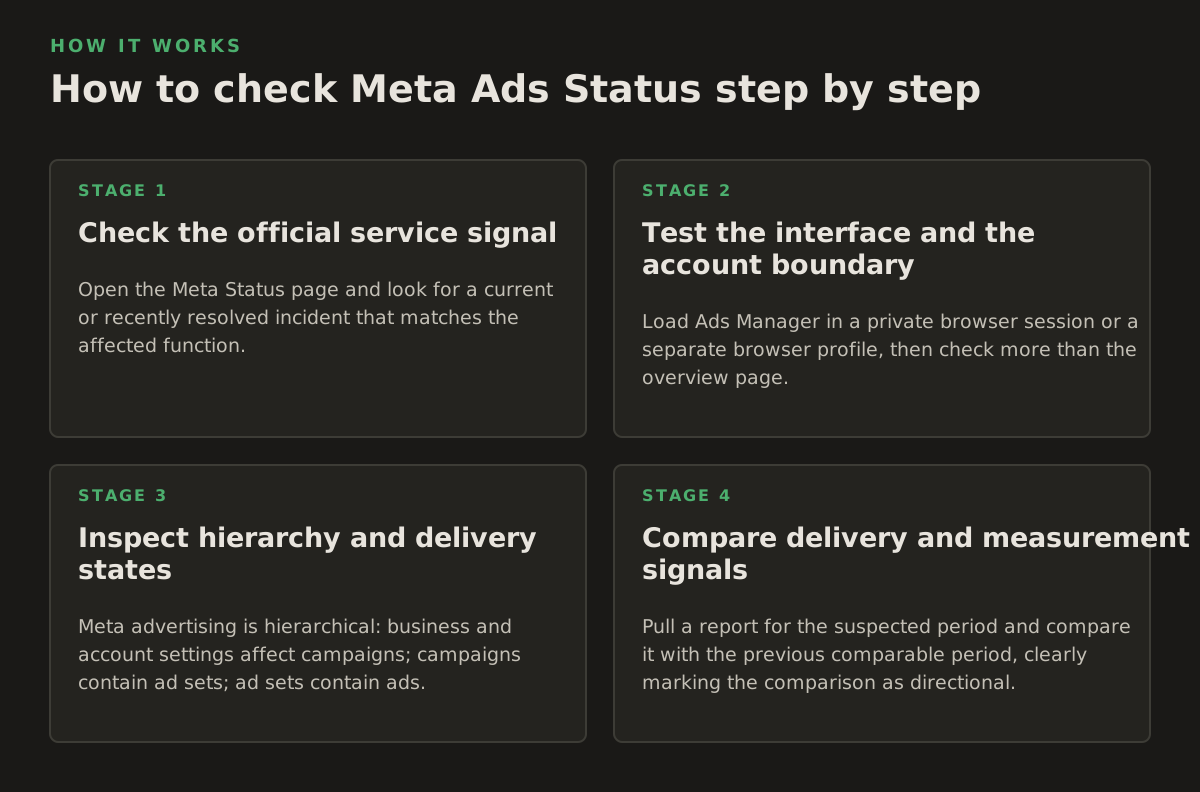
A robust check moves from the broadest signal to the narrowest. This avoids spending twenty minutes diagnosing a campaign when the platform has already acknowledged an incident, while also avoiding the opposite mistake of blaming an outage for an ordinary account problem.
1. Check the official service signal
Open the Meta Status page and look for a current or recently resolved incident that matches the affected function. Read the scope and timestamps rather than relying on a green or generic page header. If no relevant incident is listed, continue investigating; no posted incident is not proof of no incident.
Capture a screenshot or URL and note the timestamp. Status information can change as an incident is updated. For client communication, describe it accurately: “Meta has listed a reporting issue” is different from “all campaigns are offline.” Do not promise a resolution time unless Meta has supplied one.
2. Test the interface and the account boundary
Load Ads Manager in a private browser session or a separate browser profile, then check more than the overview page. Try opening the affected account, campaign, ad set, and ad. If the account selector fails for every business, the issue may be broader than one campaign. If only one account fails, inspect business permissions, payment status, and account restrictions.
Ask another authorized operator to reproduce the symptom. This helps distinguish a service issue from a stale browser session, expired login, permission change, or local network problem. Avoid interpreting a browser error page as an ad delivery status until the result is reproduced or corroborated.
3. Inspect hierarchy and delivery states
Meta advertising is hierarchical: business and account settings affect campaigns; campaigns contain ad sets; ad sets contain ads. A parent object can be active while a child object is rejected, off, in review, scheduled for later, or constrained by a spending condition. Inspect the lowest level that can explain the symptom.
Look for:
- Review or rejection messages: read the specific reason instead of treating “not delivering” as a generic outage.
- Schedule boundaries: confirm the ad set has started and has not ended or been limited to a future window.
- Budget and spending controls: check daily or lifetime limits, account spending limits, and recent changes.
- Payment problems: verify that the account can charge the selected payment method.
- Audience constraints: examine estimated audience size, exclusions, location, age, and placements.
- Creative availability: confirm that every ad in the ad set is approved and eligible to serve.
Do not infer causality from an “active” label alone. An active object can have zero delivery because its audience, bid strategy, schedule, or available inventory does not currently produce an eligible auction opportunity. The label indicates configuration or eligibility at a point in time; it is not a guarantee of spend.
4. Compare delivery and measurement signals
Pull a report for the suspected period and compare it with the previous comparable period, clearly marking the comparison as directional. Then check a source outside the ad interface: website analytics, CRM lead receipt, server logs, or a payment system. If clicks are reported but server sessions are absent, investigate redirects, consent handling, URL parameters, bot filtering, and analytics collection.
For conversion campaigns, verify the event path rather than only the final result:
- Did the ad generate an impression?
- Did someone click or view the relevant content?
- Did the landing page load?
- Did the expected event fire?
- Did the event reach Meta or the analytics destination?
- Was it attributed inside the selected reporting window?
Each step has a different owner and failure mode. A platform-status check cannot answer whether a consent banner prevented an event from firing. Likewise, a browser pixel test cannot prove that Meta’s reporting pipeline has fully processed yesterday’s conversions.
5. Test automation separately
If an agency or internal team uses a connector, query the API with the smallest read-only request that can confirm access. Then classify the response. Authentication failures, permission errors, validation errors, rate limits, and server-side errors should not be lumped into one “Meta is down” alert.
An automation system should log the object ID, request type, timestamp, response class, and last successful read. For write operations, require an explicit approval step and retain the previous value. NotFair’s Meta Ads MCP is relevant when the job is to connect an AI client to Meta campaign data and actions, but the same operational rule applies: diagnosis should be read-heavy; changes should be approval-gated and reversible.
Where Meta Ads Status checks break down
Status checking is valuable, but it has blind spots. The most dangerous failures are not obvious outages; they are partial failures that look normal in one place and broken in another.
Partial outages and regional symptoms
A service may work for one account, region, endpoint, or object type and fail for another. A successful login proves little about reporting exports or campaign edits. A successful read request proves little about publishing a creative. Treat every test as evidence about a particular path, not the entire platform.
For this reason, use the narrowest claim supported by your evidence. “The account cannot load campaign insights through the API” is defensible if reproduced. “Meta Ads is down” is a much larger claim and usually requires corroboration across accounts, interfaces, or an official incident notice.
Delayed data looks like stopped delivery
Reporting delay is especially confusing for agencies whose pacing dashboards depend on hourly or near-real-time imports. If spend has moved in the account but the warehouse has not, the delivery system and data pipeline disagree. Check the last successful ingestion timestamp, API response, row counts, and data freshness before changing budgets.
Retries can make this worse. An automation job that repeats failed requests aggressively may hit rate limits or create duplicate records. A safer design uses exponential backoff, idempotent writes, and alerts based on freshness rather than a single failed request. The exact retry policy depends on the API and system, so treat these as engineering principles rather than Meta-specific guarantees.
Account restrictions are not platform incidents
Account-level problems often have familiar symptoms: ads are rejected, delivery falls to zero, billing cannot complete, or a business asset loses access. These may happen while other advertisers are spending normally. Escalating to a platform-outage workflow can delay the appropriate appeal, payment correction, or permission fix.
Keep a separate record of:
- Account quality or restriction notices.
- Payment failures and account spending limits.
- Business Manager roles and asset assignments.
- Ad review decisions and appeal status.
- Recent changes to targeting, creative, budget, bid strategy, or schedule.
Recent change history is important because the timing of a failure is often more diagnostic than its wording. If delivery stopped five minutes after a payment method was replaced, that is a stronger lead than a generic “active” state. If five accounts stopped reporting at the same minute, a shared connector or platform issue becomes more plausible.
Attribution and conversion loss can be downstream
Meta Ads can deliver while a consent-management update, broken tag, server-side event, landing-page error, CRM import, or attribution-window change affects reported results. The business consequence may still be serious, but the repair is not a campaign-status change.
Use a layered alert model:
- Availability alert: interface or API cannot be reached.
- Delivery alert: impressions or spend fall below the account’s expected operating range.
- Measurement alert: events, sessions, or CRM records diverge from delivery signals.
- Business alert: qualified leads, revenue, or margin fall after validation.
Each alert should point to a different runbook. Combining them into one “campaign performance down” alert creates noisy automation and encourages the wrong person to make the wrong change.
How practitioners apply the diagnosis
The best status workflow is operational, not merely informational. It tells a media buyer what to do now, an account strategist what to tell a client, and an automation engineer what not to let an agent do without approval.
Worked example: a sudden zero-spend morning
Consider this illustrative scenario: an account normally spends about $600 per day, but by 10:00 the report shows $0 spend and zero impressions. The $600 figure is an example, not a benchmark. The manager should not immediately increase budget or duplicate the ad set.
- Check whether Ads Manager loads and whether the account is selectable.
- Check the official Meta Status page for a matching incident.
- Inspect account billing, spending limits, and active restrictions.
- Open one campaign, one ad set, and one ad to identify the lowest-level delivery message.
- Compare the account with a second account using the same agency workflow.
- Run a read-only report and compare its freshness with the interface.
- Check whether any impressions or spend appeared after the suspected start time.
- Freeze nonessential edits until the evidence supports a specific fix.
If the status page shows a reporting incident but the account’s spend and impressions are visible elsewhere, pause reporting changes and communicate a data-freshness issue. If payment failed only in this account, resolve billing. If every account and API report fails, escalate as a platform or connector incident. The numbers do not decide the diagnosis by themselves; the pattern across systems does.
Worked example: clicks are present, leads are missing
Now use a different illustrative case: 4,000 impressions, 80 clicks, $240 spend, and zero recorded leads in a day. Those figures are examples for reasoning, not expected performance targets. The presence of impressions, clicks, and spend makes a complete ad-delivery outage unlikely. Investigate the conversion path.
- Confirm the landing page returns a successful response on mobile and desktop.
- Check whether the form submits and whether the CRM receives a test lead.
- Verify that the event fires after consent where required by the site’s implementation.
- Compare browser or server events with Meta’s reported event count.
- Check whether the reporting window or attribution setting changed.
- Review lead quality separately from lead volume; an empty dashboard may hide a CRM sync issue.
In this scenario, pausing the ads because the lead column is zero could destroy a functioning acquisition stream. If the landing page is broken, pausing may be appropriate, but that is a funnel decision supported by an observed failure—not a conclusion drawn from the phrase “Meta ads status.”
Build a status-aware operating policy
Agencies and in-house teams should define what happens at each confidence level. An illustrative policy might look like this:
| Evidence | Likely interpretation | Recommended action |
|---|---|---|
| Official incident plus matching failures across accounts | Platform or shared service issue | Monitor, document, communicate, and avoid unrelated edits |
| One account fails; other accounts operate normally | Account, permission, billing, or configuration issue | Inspect account hierarchy and restrictions |
| Spend and impressions continue; conversions disappear | Measurement or funnel issue is plausible | Trace events, landing pages, CRM, and attribution |
| Interface works; API reads fail | Connector, token, permission, rate-limit, or endpoint issue | Use read-only diagnostics and technical escalation |
| Ads show active but spend is zero | Eligibility, auction, audience, bid, schedule, or billing constraint | Inspect child objects and delivery explanations |
The table is a decision aid, not an automatic classifier. A campaign can have two simultaneous failures—for example, a reporting delay and an account restriction. Preserve the raw evidence so a later explanation does not overwrite the original state.
Use AI and MCP automation with guardrails
AI is useful for correlating timestamps, summarizing delivery states, comparing accounts, and turning error messages into a prioritized investigation list. It is less reliable when asked to infer a single cause from incomplete data or to make irreversible changes during an incident.
A sensible agent workflow is:
- Read status, delivery, billing, review, and reporting signals.
- State competing hypotheses rather than forcing one explanation.
- Identify the smallest safe test for each hypothesis.
- Show the evidence and expected side effects to the operator.
- Require approval before pausing, duplicating, changing budget, or publishing creative.
- Record the prior value and provide a rollback action.
For teams working across channels, a similar diagnostic pattern can connect Meta evidence with Google Ads, analytics, CRM, and search-console signals. NotFair’s Google Ads MCP can support the parallel Google Ads side of that workflow, while Meta-specific checks remain grounded in the relevant account and API data. Cross-channel context is useful only when timestamps, attribution definitions, and data freshness are explicit.
Recommendation: make “status” a triage layer, not a campaign strategy
Use the official Meta Status page first, but never stop there. Confirm the affected surface, reproduce the symptom, inspect the account hierarchy, separate delivery from measurement, and classify API failures independently. That sequence gives you a defensible answer to the questions clients and stakeholders actually ask: what is broken, when did it begin, which campaigns are affected, and what action is safe now?
For 2026 operating practice, adopt a written incident policy with a short evidence-gathering window, explicit change approvals, freshness monitoring for reporting pipelines, and a rollback record for every automated write. The policy should define different responses for platform incidents, account restrictions, tracking failures, and connector errors rather than sending every anomaly to the media buyer.
If you want to connect AI clients to advertising data while keeping campaign changes reviewable, NotFair offers hosted, approval-gated MCP workflows for this kind of diagnosis and controlled execution: NotFair.
Authored with NotFair SEO