

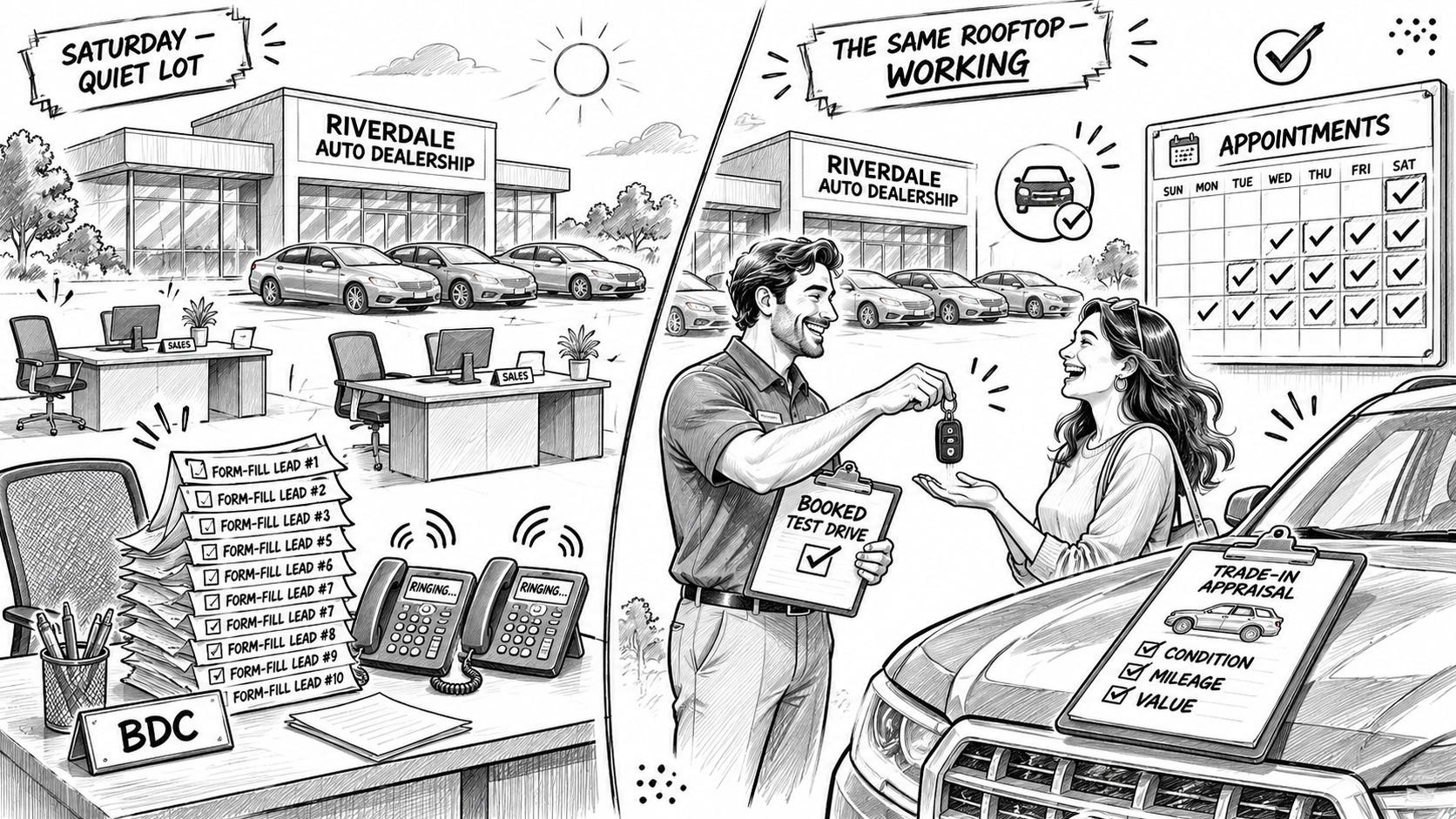
A Saturday morning can look productive in Ads Manager and still feel quiet on the lot. The BDC has a stack of new form fills, only a couple of shoppers answer, and nobody has booked a time to visit. The problem may not be a shortage of leads. It may be that the campaigns are optimized for the easiest action to count instead of the visit the dealership needs.
Car dealership Facebook ads work best when each campaign has a clear job, the offer matches the inventory or department, and someone owns the handoff. A form fill is a conversation starter. A kept appointment is a more useful measure of whether the advertising is doing its work.
Table of Contents
- What a Rooftop Ad Program Must Produce
- Budgets Objectives and Offers to Run
- How to Launch the First Campaigns
- Audiences and Creative That Fill Appointments
- Fixes When Leads Cost Too Much
- Approve One Campaign and Review It Weekly
What a Rooftop Ad Program Must Produce
On a Saturday morning, the BDC sees ten new form fills. Two people answer the phone, one says they were only browsing, and the rest don't respond. The sales floor is still waiting for shoppers. Those forms may look like a win in a dashboard, but they haven't produced a booked test drive, trade appraisal, or service visit.
A working program gives each campaign a job. One lane promotes new models or payment offers. Another features specific used vehicles that are in stock. A third supports fixed operations, such as tires, brakes, and seasonal service. Combining all three into one campaign makes it harder to match the creative to the shopper or tell which department is getting useful appointments.
Before spending, make sure the people and systems behind the ads can handle the response. The CRM or BDC should call or text new leads within five minutes. The ad needs a click-to-call number, and any inventory or offer page should load cleanly on a phone. Set up the Meta pixel and Conversions API so the store can track Lead and Schedule events, plus Purchase or a custom Appointment event where that fits the sales process.
Instant forms and website leads need different follow-up. An instant form lands inside the platform and may contain limited context, so the BDC should quickly confirm the shopper's vehicle interest and preferred time. A website inquiry may include a specific vehicle or offer, so reference that detail instead of sending a generic reply. A lead with no agreed time isn't an appointment yet.
If you're setting campaign goals alongside staffing, inventory, and operating plans, building your dealership business plan can help connect marketing decisions to the wider business. Keep the media measure tied to an actual calendar entry and visit, not the raw number of names collected.
Checkpoint: If the store can't contact a lead the same day, fix the handoff before raising the budget.
Budgets Objectives and Offers to Run
| Lane | Objective | Starting daily budget | Offer | Keep it if |
|---|---|---|---|---|
| Test drives and finance chats | Leads | $20–$40 | Book a drive or get a payment | Cost per kept appointment is acceptable to the GM |
| Named in-stock units | Traffic | $15–$30 | Price or payment on a specific vehicle | Mobile VDP views and calls rise, not just link clicks |
| Broad inventory browsing | Sales with catalog | $30–$60 | Shop vehicles that match the feed | Feed-matched leads or content views stay efficient |
| Warm site and video visitors | Sales or Leads, retargeting | $10–$20 | Finish the deal or value the trade | Appointment rate beats cold traffic |
| Service, tires and parts | Leads | $15–$30 | Dated service special | Cost per booked RO is below the special's margin |
These figures are planning ranges, not universal benchmarks. Set the starting spend around the market, the department's capacity, and the CRM's ability to connect a form to an appointment and visit. Increase the budget only when the campaign produces appointments at a cost the desk accepts. Cheap leads that never book or show are not a win.
A dealership new to Meta should start with one lead campaign and one retargeting campaign, rather than trying to run all five lanes at once. Concentrate the budget where the store has a credible offer and staff ready to respond. Keep retargeting aimed at shoppers already familiar with the dealership. Split campaigns for new vehicles, used inventory, and service so each offer and outcome can be judged on its own.
For inventory ads, feed quality comes before catalog scale. Remove sold vehicles, check that each listing has current photos and pricing, and make sure the destination page works on mobile. Keep the advertised vehicle available, and make the next step clear: book a visit, call, or ask about that specific unit. A clean, presentation-ready lot supports useful photos and a better in-person visit. The dealership inventory cleaning cost guide can help with planning that operational work.
Choose one primary lane for the first 14 days. Judge it by appointments and visits, not form fills alone. Keep other campaign ideas on the planning sheet until the first lane shows whether its offer brings shoppers through the door.
How to Launch the First Campaigns
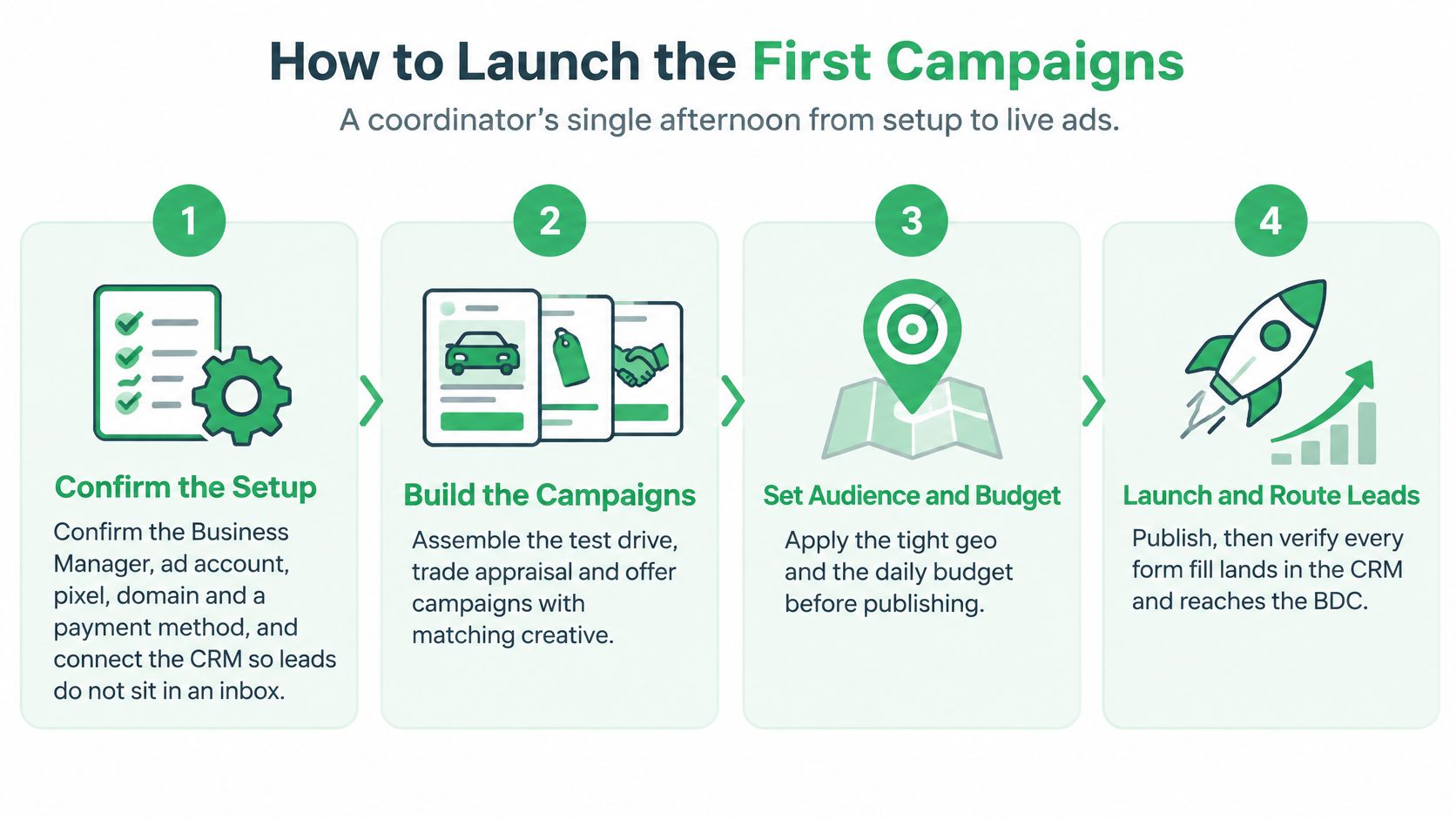
Run the setup as one sequence, and don't publish until the lead route has been tested.
Confirm account access and lead routing. Verify the Meta Business Manager, ad account, pixel, domain, and payment method. Connect the CRM before launch so leads don't sit in an inbox that nobody owns.
Prepare the destination. Refresh the vehicle feed or build a focused offer page with accurate price, useful photos, store hours, and a map. A shopper who taps an ad should be able to understand the offer and plan a visit without hunting through the site.
Build from the chosen campaign lane. Start with one campaign and one ad set, using the low end of the lane's test budget. Splitting a small budget across many ad sets makes it harder to tell which message or audience is working.
Set the drive market. Use a location that reflects where customers can reasonably travel from, often a radius of 15 to 30 miles, and exclude recent purchasers from sales campaigns. Don't widen the map just to make the audience look larger if the dealership can't serve those shoppers.
Write one clear offer and prepare the creative. Draft two versions of the primary text and create at least three visuals: a real vehicle photo, a price or payment frame, and a short walkaround video. Put the model, offer, and next step where mobile viewers can see them quickly.
Add useful qualification to lead forms. Ask for name, phone, email, vehicle interest, and a preferred time. Use higher-intent settings or an appointment question rather than making the form a one-tap collection exercise. A little friction can discourage casual submissions that the BDC can't turn into a conversation.
Tag and test the destination. Add URL parameters so the CRM and analytics can identify the campaign. Open the form or landing page on a phone, complete a test inquiry, and check that the page, contact details, and confirmation behave as expected.
Publish and verify the handoff. Submit a test lead and confirm it reaches the CRM and the right BDC queue. Check that the record contains enough campaign and vehicle context for a useful first call.
Give the first structure time to run. Leave the campaign alone for about seven days unless spend is stuck or the form is broken. Frequent edits make the result harder to interpret; fix a genuine failure promptly, but don't rebuild the audience every day.
A simple BDC script keeps the first response focused: call, then text if the shopper doesn't answer, mention the vehicle or offer they requested, and ask which time works for a visit. Log the appointment in the CRM. Logging only that a lead arrived gives the manager no way to distinguish an active opportunity from an unanswered form.
For a more detailed view of how ads can be managed alongside other marketing platforms, see Meta ads management and workflows.
After the lead route is confirmed, use this walkthrough as a visual companion to the setup steps.
Audiences and Creative That Fill Appointments
Start with the people the dealership can serve. Set a tight geographic area, then use Advantage+ audience or relevant in-market auto-shopping signals as a starting point. Don't pile on unrelated interests in the hope of making the audience more precise. Give the platform a coherent market and an offer that says who should act.
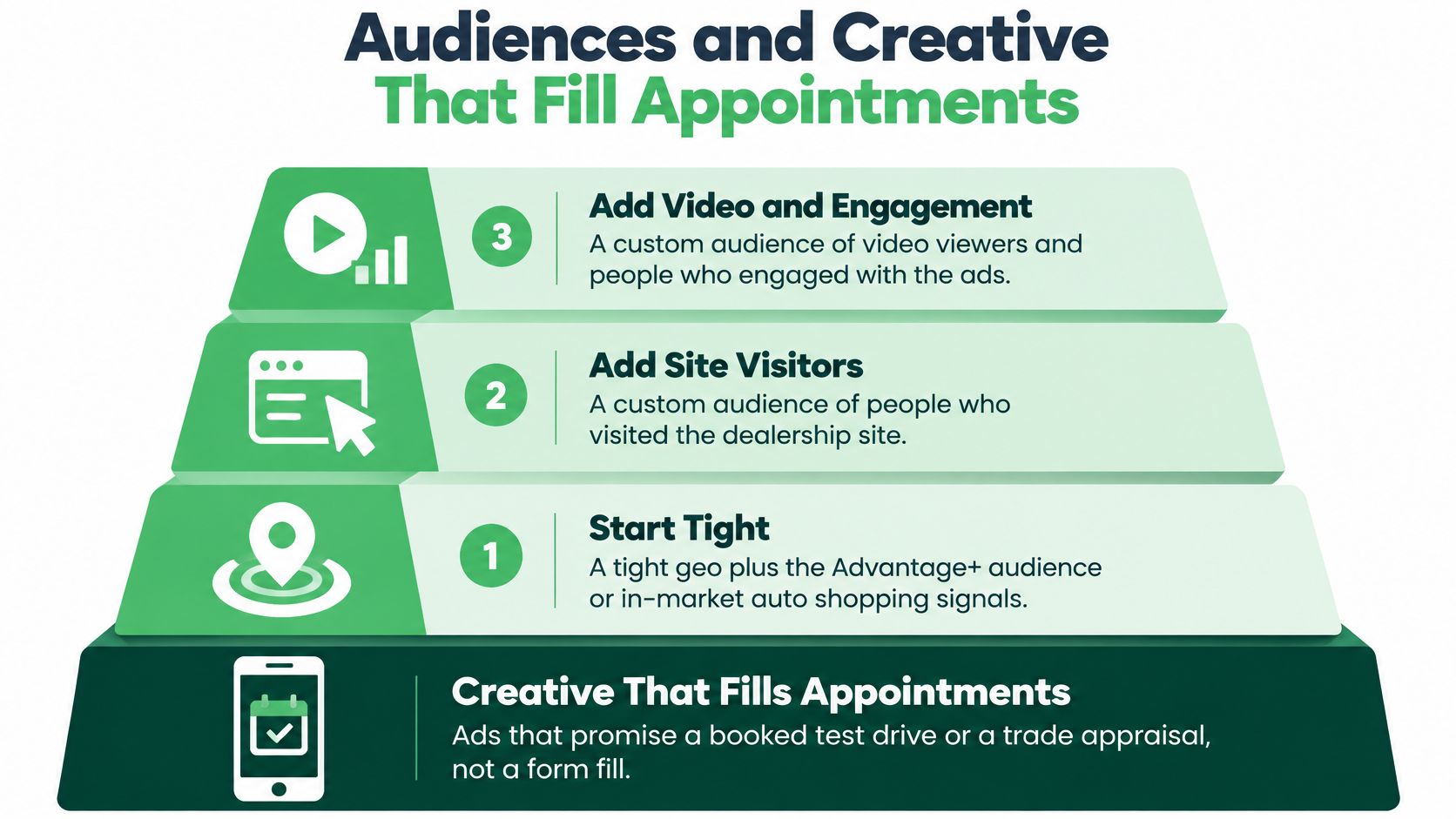
Add warm audiences as a separate layer. Site visitors, video viewers, and CRM leads who haven't purchased can receive a message that answers a different question from the cold ad. A shopper who visited a vehicle page may need a trade appraisal or a test-drive invitation; someone who watched a service video may need a clear way to book.
Lookalikes of past buyers or kept appointments make more sense after the CRM seed is substantial enough to describe the customers the store wants. Keep service campaigns oriented toward current owners, and widen their radius only when the service department has room to book and complete the work.
Creative does the qualifying before the form does. Put the payment, out-the-door story, or trade offer in the opening line. Name the model or say what's available, then put the dealership and next step on the image or video. Real lot photos and a short walkaround give shoppers a better reason to inquire than a generic brochure shot. Keep at least three ads in the ad set so the creative can rotate, and replace a vehicle's price or image when that unit sells.
Say a dealership has a used truck ready to promote. The ad leads with its monthly payment, shows the actual truck on the lot, and asks shoppers to choose a Saturday test-drive slot. That message gives the buyer a reason to act and gives the BDC a practical first question: which time should we hold?
For a deeper creative review, use this guide to recognizing Meta ads creative fatigue.
The ad's job is to put a time on the calendar. Every asset should name the visit, not just the brand.
Fixes When Leads Cost Too Much
Review the whole path once a week: amount spent, leads, cost per lead, contact rate, appointment rate, show rate, and vehicles sold or repair orders written. The sequence matters. If the form count looks healthy but the show rate is weak, buying more forms can enlarge the wrong problem.
| Symptom | Usual cause | Fix this week |
|---|---|---|
| Cost per lead keeps climbing | Budget split or a vague offer | Use one ad set and lead with a payment or dated special |
| Many leads, almost no answers | One-tap form and slow BDC | Ask for a preferred time and call within five minutes |
| Clicks but no vehicle page views | Slow page or sold inventory in the feed | Improve mobile speed and remove sold VINs |
| Frequency over 4 and rising CPL | Retargeting pool is too small | Add fresh photos this week, then widen the seed |
| Stuck in learning | Too many ad sets under the budget | Consolidate and avoid daily edits |
| Leads in Ads Manager, none in the CRM | Broken pixel, CAPI, or lead routing | Submit a test lead the same day before adding spend |
Match the fix to the failure point. If leads don't answer, add a preferred-time question and get the BDC to call within five minutes. If clicks don't become vehicle-page views, test the page on a phone and inspect the feed for sold units. If Meta records leads that never arrive in the CRM, check the form integration and routing before changing the offer or spending more.
A small retargeting pool can tire quickly. When frequency rises and cost per lead follows, replace the photos first; widen the audience only after the cold campaign is producing meaningful visits. For campaigns stuck in learning, consolidate ad sets and stop making daily structural changes. A new stack of interests won't repair a budget spread too thin.
Separate a tracking break from a media problem. If events stopped after a site change, verify that the pixel and Conversions API still send the expected events, then submit a test lead and trace it into the CRM. That's a same-day check. A new audience needs a fair run, so avoid judging it from a brief burst of delivery.
Pause a sold VIN or repair a broken form immediately. Other changes, such as testing a new audience, need a full week to produce a useful comparison. The Meta wasted-spend diagnosis guide can help organize that review around money at risk rather than vanity metrics.
Spend order: Fix the largest active waste first. A sold vehicle still taking clicks or a lead route dropping records deserves attention before a minor copy edit.
Approve One Campaign and Review It Weekly
Choose one lane, then put the offer, daily budget, and appointment goal on a single line for the GM. Agree on what makes a kept appointment worth continuing, and confirm that the BDC owns every incoming lead. Don't add another campaign just because the first one has started delivering.
Meta campaigns run across Facebook and Instagram, with ad copy and images built from the dealership's offer. Paid ads can send leads once they're live and approved, while SEO and AI search visibility build over months. That makes paid media useful when the store needs a direct response, but it still can't replace a working follow-up process.
Review the first 14 days against kept appointments, not just submitted forms. Keep the campaign if the desk accepts the cost and shoppers are showing. If people inquire but don't book, change the offer or the follow-up before expanding the structure.
For a store already managing Meta alongside other platforms, a hosted connector such as NotFair can read the live account from Claude or a similar client, draft a pause or budget move, and show the proposed changes for approval with a logged undo. Connect the account at NotFair only after the offer, CRM handoff, and first campaign choice are settled.
NotFair connects ad platforms and marketing tools so teams can review live account performance and prepare approval-gated campaign changes. If your dealership is ready to manage Facebook and Instagram ads with a clearer view of what to pause or adjust, visit NotFair.