

The most popular advice on Keywords in Google AdWords is to build a longer list. Add every close variant, split every theme into tiny ad groups, and you'll gain control. That advice is backward. A keyword list isn't a set of fences that keeps bad traffic out. It's a set of inputs into an auction that keeps changing, and you can't even see every query those inputs matched. Control comes from different work. You pick a match type that fits your evidence, you check the queries you can see, you name what you can't see, and you write down when you'll act and when you'll leave a term alone.
Table of Contents
- Match Types and What a Keyword Actually Buys
- How to Research and Launch a Keyword Set
- Quality Score Components to Fix in Order
- Search Terms You Cannot See and Negatives
- When Broad Match Beats an Exact-First List
- Approve One Weekly Keyword Batch
Match Types and What a Keyword Actually Buys
Pick your row first. The table below is the decision, and everything after it explains why that choice doesn't buy you a fixed position or a fixed price.
| Match type | Steering | Reach | Use when |
|---|---|---|---|
| Exact | Greatest | Smallest | High-value queries with known conversion intent |
| Phrase | Moderate | Beyond exact wording | A theme needs controlled expansion |
| Broad | Least literal | Related searches without the keyword words | Conversion tracking is reliable and bidding has enough signals |
Why the three rows overlap
Phrase match already includes exact coverage, and broad match includes phrase and exact. Adding the same idea in all three match types doesn't create three independent controls. It creates one idea with overlapping eligibility, and the auction still decides which ad enters and where it lands. Say a plumber lists "emergency plumber" in exact, phrase, and broad. That isn't three layers of protection. It's one theme that can match a narrow query, a wider one, and related searches that don't contain those words at all.
If you want a practical walkthrough of how that overlap creates waste, this guide will help you reduce wasted spend with keyword matching. Use it to check whether a duplicate keyword is steering traffic or just cluttering the account.
What the auction does with your keyword
Google defines a keyword as a word or phrase selected when setting up a campaign, and Google Ads Help on Ad Rank explains that Ad Rank is calculated twice in each auction, first to determine eligibility and again to establish ranking among eligible ads. That calculation considers your bid, auction-time ad and landing page quality, minimum Ad Rank thresholds, auction competitiveness, search context, and the expected impact of assets such as sitelinks.
Search context includes location, device, time of search, the nature of the query, other ads and organic results on the page, and additional user signals. That's why the same keyword produces different outcomes across searches. Your competitor raises a bid at 8 a.m., a searcher switches to mobile, or a stronger asset becomes eligible, and your position and price move even though you changed nothing.
A keyword buys you a chance to enter an auction under certain conditions. It doesn't buy a slot.
Benchmarks are context, not targets
Use market averages to sanity check an account, not to set your price. The average click-through rate for Google Ads search campaigns across all industries was 6.66% in 2025, based on an analysis of 16,446 campaigns by WordStream and LocaliQ, according to Shno's Google Ads statistics summary. The average cost per click for Google Ads search campaigns was $5.26 in 2025, based on LocaliQ's analysis of 16,446 campaigns across 23 industries, reported by Search Engine Land on rising Google Ads costs. At the extreme, the most expensive Google Ads keyword reported for 2024 was "motorcycle injury lawyer," with an average cost per click of $210, according to data cited by Semrush from Fraud Blocker.
Those three numbers describe very different auctions, which is the point. Choose your match type row from intent certainty and conversion history, not from search volume. If you know the query converts and a wrong click is expensive, start with exact. If you know the theme but not the exact wording, use phrase. If you don't have reliable conversion data yet, broad isn't a shortcut. It's a risk you're not ready to price.
How to Research and Launch a Keyword Set
Separate discovery from activation. You research widely, then you launch narrowly, because a long candidate list tells you what people might search while a launched keyword starts spending money immediately.
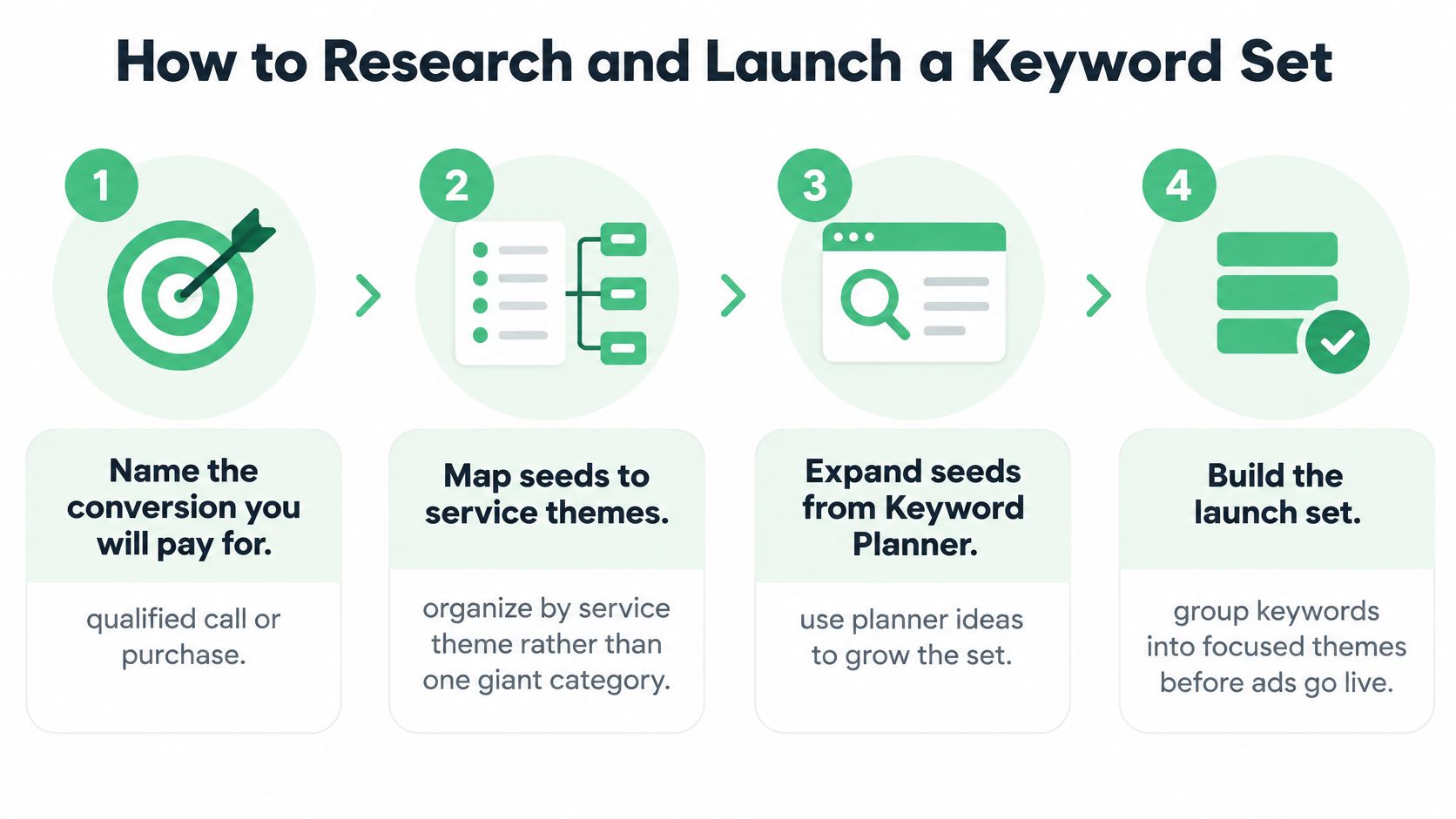
The visual below maps the launch sequence in order, so you can see where research stops and buying starts.
A launch you can defend later
- Name the conversion you'll pay for because every later decision needs a yardstick, so write "qualified call" or "completed purchase" before you open any tool.
- Map seed terms to service themes because one giant category forces one ad to answer unrelated searches, so group "burst pipe" separately from "water heater install."
- Expand seeds from Keyword Planner, site search, and past queries because each source shows a different slice of demand, and don't chase ideas Planner won't return for some health or finance terms under privacy rules.
- Put one intent in each ad group because your headlines can only answer a search closely when the searches in that group want the same thing.
- Launch exact on known high-value queries and phrase for moderate expansion because Google Ads Help on keyword matching options states that exact match provides the greatest steering but the smallest reach, phrase match expands beyond exact intent, and broad match can reach related searches that do not contain the keyword's literal wording.
- Give the new theme a contained budget because it needs enough spend to produce evidence without letting one untested theme consume the whole account.
- Write down the day 7 Search Terms review date because a launch without a review date drifts, and you'll otherwise judge it on impressions instead of queries.
Take a plumber as the working example. You'd launch exact match on "emergency plumber near me" because that intent is clear and valuable. You'd use phrase match on "clogged drain repair" because homeowners phrase that problem several ways. You wouldn't add broad match until call conversions are recording cleanly, because broad needs bidding signals to distinguish a homeowner with a flooded kitchen from someone researching plumbing careers.
Practical rule: If you can't say what conversion proves a keyword worked, you're not ready to launch it.
Judge the launch by four measures. Check query-level conversion rate to see which searches produce buyers, cost per qualified conversion to see what those buyers cost, the share of irrelevant search terms to see how much steering you're losing, and useful queries you couldn't have listed in advance to see whether expansion earned its keep. Don't judge it by keyword count. A launch that adds forty keywords and finds no new converting queries hasn't expanded your coverage. It's expanded your maintenance work.
Quality Score Components to Fix in Order
Quality Score is a diagnostic, not the auction. Google Ads Help on Quality Score describes it as a standardized scale from 1 to 10 based on expected click-through rate, ad relevance, and landing page experience, and it explicitly distinguishes that displayed score from the calculations used to determine Ad Rank. The live auction uses auction-time quality that incorporates the exact query and additional factors. Raising the visible number doesn't directly buy a higher position.
This diagram shows how the three components sit under that single score.
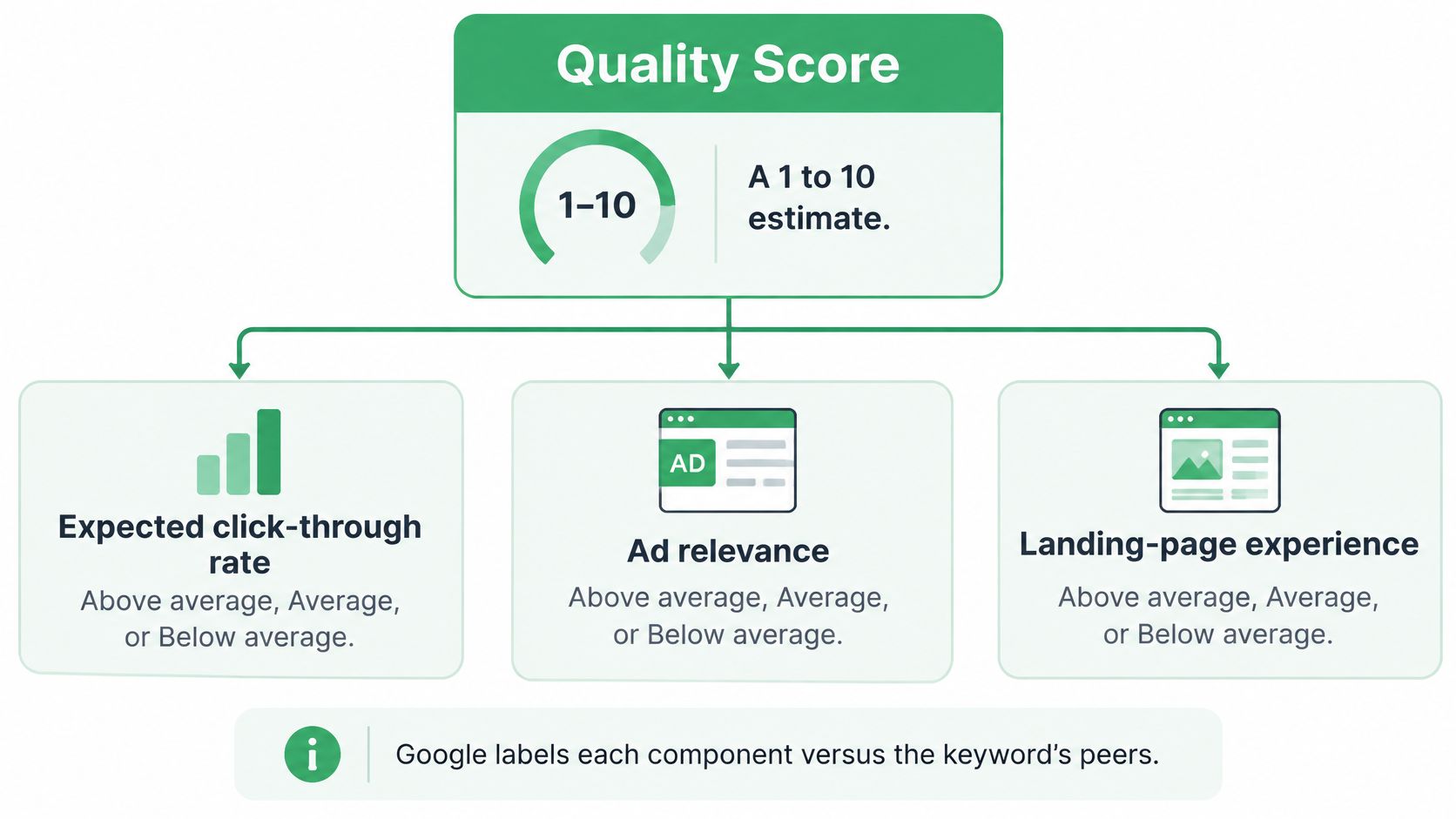
Google evaluates each component as Above average, Average, or Below average relative to advertisers showing for the same searches during the previous 90 days, according to Google Ads Help on checking Quality Score. That same guidance warns that changing a keyword from broad to phrase or exact doesn't directly change the score, because the score is based on historical impressions for exact searches. Changing match type to chase the number is wasted motion.
The fix order
| Component | First fix if Below average |
|---|---|
| Expected CTR | Align the message to the query and test query-specific assets |
| Ad relevance | Split mixed intents into separate ad groups and match headlines to the search |
| Landing-page experience | Improve relevance, clarity, mobile use, and keyword-to-page continuity |
Work the table top to bottom, but only where a component is Below average. If expected CTR is low, searchers are seeing your ad and not choosing it, so tighten the message to the query and test stronger, query-specific assets before you touch the page. If ad relevance is low, your ad group probably mixes intents, so split it and rewrite headlines to answer one search intent at a time. If landing page experience is low, fix relevance, clarity, and mobile usability, and make the path from keyword to ad to page feel like one continuous answer.
The video below walks through reading those component statuses before you change anything, which keeps you from rebuilding a page when the problem is a mixed ad group.
Wait for a fresh set of impressions before you judge a fix. Device, location, time of day, and assets can move results without showing up fully in the score, so a score that doesn't budge can still sit next to better economics. That's why it's worth learning to measure paid search beyond vanity metrics and track cost per qualified conversion alongside the component labels.
Prioritize by spend at risk and qualified conversions lost, not by the lowest score in the account. A 4 on a keyword that spends little matters less than a 6 on your main revenue term. Keep a before and after note for each change, run it on one theme first, and use a structured review like a Google Ads audit to order the work before you rebuild anything account-wide.
Search Terms You Cannot See and Negatives
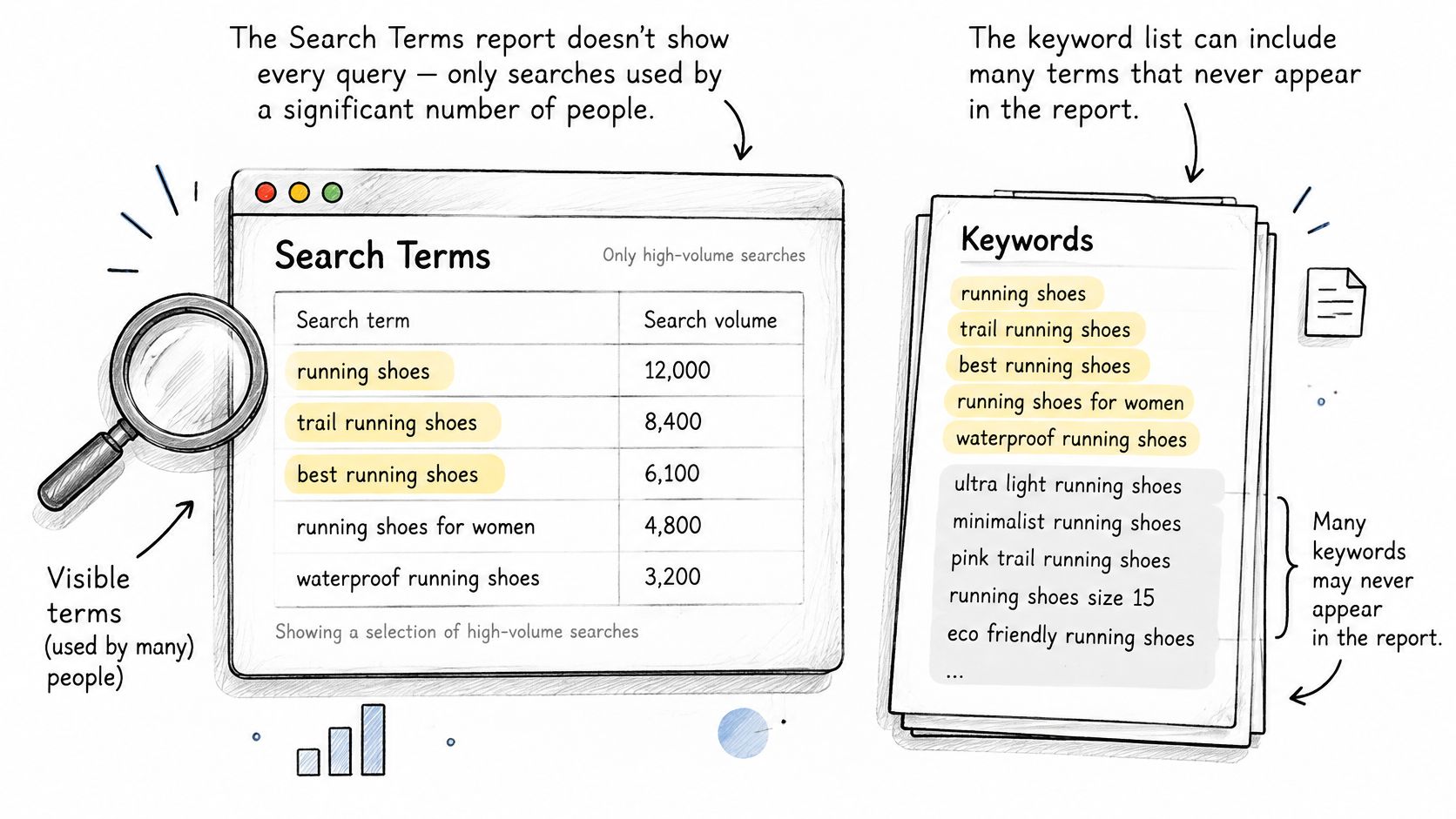
Start with the limit, because it changes every decision that follows. Google Ads Help on the Search terms report states that the report contains searches used by a significant number of people, not necessarily every query that triggered an ad. Your keyword list isn't a complete record of user intent, and the report can differ from that list depending on your matching options.
The illustration below contrasts the high-volume terms you're shown with the wider set of queries your keywords can match.
Sort every visible term four ways
| Action | Use when | Apply at |
|---|---|---|
| Keep | The query converts or fits the current keyword's intent | Current keyword |
| Promote | The query is relevant, repeats, and converts | Dedicated keyword in its own ad group |
| Exclude | An irrelevant modifier repeats with meaningful spend | Negative keyword at ad-group or campaign level |
| Observe | The evidence is a handful of clicks | No change until more data arrives |
Use the report's match type field while you sort, because it tells you which matching behavior produced the click. A junk query arriving through broad match is a different problem from the same query arriving through phrase. The first points at expansion that's too loose for your signals. The second points at a theme that needs a cleaner split or a targeted negative.
Promotion deserves restraint. A query earns its own keyword and ad group when it repeats, converts, and would benefit from its own headline and landing page. Promoting every converting query on sight recreates the giant list problem, just with better looking terms.
Estimating waste you can't itemize
For spend the report doesn't itemize, compare total campaign cost and conversions against the totals from visible terms. The gap is inferred waste or inferred value, not a hidden list of negatives waiting to be typed. Label it that way in your notes. Then look for supporting evidence in landing page intent, conversion quality, and geographic patterns before you act on the inference.
More keyword granularity does not automatically produce more control. When query data is incomplete, heavy restructuring creates false confidence.
Act when the same irrelevant modifier, place, or landing page mismatch repeats and the spend is large enough to matter. Leave a keyword unchanged when your evidence is a handful of clicks, because you'd be rebuilding structure around noise. Say three queries for "plumber salary" appear in a week on a campaign selling plumbing services. That justifies a jobs negative. One click from a nearby city you don't serve yet doesn't justify a location rebuild.
Placement matters as much as the word itself. Put account-wide junk such as "jobs," "free," or "DIY," when you sell done-for-you work, at campaign level or in a shared list when several campaigns face the same waste. Use ad group negatives when one theme steals another theme's query, and a dedicated workflow for Google Ads negative keywords helps you keep that scope straight. Use exact match negatives for one junk variant and phrase negatives for a modifier family such as "jobs" or "free." Never negative a converting root term because one odd variant looked wasteful, since you'd cut the traffic that's paying for the account along with the waste.
When Broad Match Beats an Exact-First List
Broad match can find useful searches your keyword list does not contain. Exact match gives you a tighter starting boundary. Neither provides control by itself: control comes from query evidence, conversion signals, and clear rules for what the campaign is allowed to spend.
The conditions that make broad safer
Broad match is safer when conversion tracking records meaningful outcomes, not just button clicks; your brand traffic is separated from prospecting; and you set a cost-per-qualified-lead or margin ceiling before the test. Smart Bidding can adjust bids using auction-time signals, but that does not make every query a good fit. Your goal is to give the system enough reliable conversion evidence while limiting the cost of a poor match.
Broad match can use signals such as the landing page, other keywords in the ad group, prior searches, and location to match a query. That wider reach can uncover relevant demand, but it can also expose confusion in your account. A page about emergency repairs, for example, gives a clearer signal than a general page that mixes repairs, careers, and DIY advice.
Phrase match sits between the two in reach. You can compare broad and phrase match keywords to see how each option changes the searches your keywords may match.
When exact-first is still the right default
Use an exact-first structure when conversion history is too thin for bidding decisions, a shared budget could let exploratory traffic crowd out proven terms, or a wrong lead is expensive. A small set of high-intent keywords keeps the initial test easier to interpret. Broad match can still be tested, but it needs its own budget boundary and a written rollback rule.
Search-term reports do not show every query. Low-volume searches may be hidden, so the visible terms are evidence, not a complete inventory. That makes broad match a poor fit for “add every query we see” management. It can be a reasonable way to find new demand when conversion tracking is dependable, the campaign is contained, and someone is prepared to judge the visible terms alongside overall lead quality.
- Contain the test: Use one campaign or experiment, rather than changing the whole account.
- Review the evidence: Check visible search terms for intent and lead quality, while recognizing that low-volume queries may be missing.
- Add negatives selectively: Use repeated evidence of waste, not one ambiguous search, to block a term.
- Set a rollback rule: Pause or reverse the test if cost per qualified lead stays above your ceiling for two review cycles or lead quality drops.
The safest structure is the one that makes uncertainty visible. If you cannot tell whether the unseen queries are likely to fit, or whether your conversion data is strong enough to guide bidding, keep the test narrow and gather more evidence before expanding it.
Approve One Weekly Keyword Batch
Your weekly rule is simple. Keep or change a keyword only when observed queries, or a clearly labeled inference, support the move. Everything else is observation, and observation is a legitimate outcome.
This week's routine
- Filter search terms to the last 7 days so you're judging current matching behavior, not last month's structure.
- Remove converters and queries that already convert on the root keyword so your batch doesn't "fix" traffic that's already working.
- Group what remains by linguistic intent so "salary," "hiring," and "jobs near me" become one decision instead of three separate negatives.
- Propose one batch of promotions, negatives, and match type changes with the scope and match type stated for each item.
- Snapshot performance before the edit so next week's review compares against a record, not a memory.
- Approve only after checking spend, conversions, and landing page intent so a cheap query with terrible lead quality doesn't slip through on cost alone.
That cadence is exactly the workflow behind a structured review of Google Ads search terms, where the agent filters to the last 7 days, removes converters, groups terms by intent, and proposes one batch for approval. Connecting Google Ads takes two minutes. You authorize once at notfair.co, then open an AI client and ask questions about the account.
If an AI assistant drafts the batch, the approval step isn't optional decoration. With NotFair, every write, including bid changes, negative keywords, ad copy, and campaign state, waits for your approval and is logged with full provenance, while read-only diagnostic queries run freely. You see the explicit diff before anything changes, and you keep a rollback note ready for the next review.
One approved batch you can undo beats a full account rebuild you can't explain.
End the week with that single batch, not a restructure. Note what you observed but didn't change, because next week's evidence will either strengthen that inference or kill it. After new impressions arrive, check whether query quality and cost per qualified conversion moved the way your batch predicted. If they didn't, roll back and record why. That record, kept week after week, is the keyword control system.
Run your next weekly batch from chat instead of a spreadsheet. NotFair connects your Google Ads account to your AI client in two minutes, drafts promotions, negatives, and match type changes as explicit diffs from your last 7 days of search terms, and applies nothing until you approve it. Visit NotFair to connect your account and approve your first batch this week.