

The most popular advice about Google Ads bidding is to switch to automation as soon as you can. That's backwards. Choose a strategy based on what your conversion tracking can reliably tell Google, not on how advanced the strategy sounds. Automation can make useful decisions from clean signals, but it can also spend confidently toward duplicate leads, low-value actions, or values that don't reflect real business outcomes.
If your conversion data isn't ready, use manual control or optimize for traffic while you fix measurement. If it is ready, start with a volume-focused strategy, give it time to learn, then consider a target or value-based approach when the economics support one.
Table of Contents
- Compare Google Ads Bidding Strategies at a Glance
- Check Your Conversion Data and Decide Whether to Switch
- How to Roll Out a Conversion-Based Bidding Strategy
- When Value-Based Bidding Helps and When It Misleads
- Fixing Bidding Problems When Data Breaks or Goals Change
- Monitoring Your Bids Across Two Conversion Cycles
Compare Google Ads Bidding Strategies at a Glance
The practical rule is simple: use the most automated strategy your conversion data can support, and keep manual control until it can. Manual CPC puts you in charge of the maximum click price. Conversion-based strategies hand bid calculations to Google, which uses the campaign goal and available conversion data to guide auction-time decisions.
| Strategy | Who sets the bid | Conversion data needed | Best for |
|---|---|---|---|
| Manual CPC | Advertiser, per ad group or keyword | None | New accounts and tight click-cost control |
| Maximize Clicks | Google, within budget | None | Traffic goals without conversion tracking |
| Maximize Conversions | Google, within budget | Reliable Primary conversion actions; no fixed target | Accounts with steady volume but no stable CPA target |
| Target CPA | Google, toward a set cost per acquisition | At least 50 conversions per month suggested; 15 in the previous 30 days for Search and Shopping eligibility | Lead generation with a known acceptable CPA |
| Target ROAS | Google, toward a set return on ad spend | 50 conversions suggested for evaluation; 15 in the previous 30 days minimum | Ecommerce with reliable order values |
| Maximize Conversion Value | Google, within budget, toward recorded values | Reliable conversion values with at least two distinct values | Revenue or margin goals with trusted value data |
Start with the least data-dependent option
With Manual CPC, you set a maximum cost per click at the ad-group level and can override bids for individual keywords or placements. That's useful when you need direct control over click prices, but it requires regular bid management. Maximize Clicks also doesn't require conversion data. Google sets bids within your budget to pursue traffic, so it can suit a campaign whose immediate purpose is visits rather than measured conversions.
Maximize Conversions is a step toward automation when you have a reliable Primary conversion action but don't yet have a defensible cost target. It aims to get as many conversions as possible within budget. Target CPA adds an average acquisition-cost goal, while Target ROAS adds a return goal. Both can produce poor decisions when the conversion history or measurement behind the goal is weak.
Maximize Conversion Value focuses on the values recorded for conversions, rather than treating every conversion as equal. That can be useful when order values or qualified-lead values are meaningful and trustworthy. A value-based strategy can be the wrong choice if the values are just guesses.
Google describes Smart Bidding as auction-time optimization for conversions or conversion value, using contextual signals such as device, location, time of day, language, and operating system. The distinction is operational: manual bidding requires you to manage bids, while Smart Bidding adjusts bids for eligible auctions toward the selected goal. Google's Manual CPC and Smart Bidding guidance also explains why conversion-based strategies depend on correct tracking and the right actions being marked Primary.
Enhanced CPC used to sit between manual bidding and fuller automation, but Google removed it from Search and Display campaigns effective the week of March 31, 2025. Older campaigns that weren't migrated were effectively placed on Manual CPC, so check the actual bid setting rather than assuming a legacy campaign still has automated bidding.
If your team also manages paid social, editable landing pages for paid social can help keep the destination experience aligned with campaign changes. For Google Ads, settle the measurement and bid strategy first. Automation is a setting, not evidence that the account is ready for it.
Check Your Conversion Data and Decide Whether to Switch
Before changing a bid strategy, answer one question: does the campaign have enough clean conversion history for the new strategy to learn from? The number of recorded conversions matters, but so does whether those conversions represent the business outcome you want. A high count of duplicate or low-quality actions isn't a strong foundation.
Google's guidance suggests supporting Target CPA with at least 50 conversions per month for more accurate predictions. A separate Google Ads help reference lists at least 15 conversions in the previous 30 days as an eligibility threshold for Search and Shopping, showing that minimums can differ by strategy, campaign type, and account configuration. Those are different decision points: minimum eligibility doesn't mean a strategy has enough history for a stable performance assessment. See Google's conversion-based bidding requirements when checking your campaign's eligibility and measurement setup.
Run four checks before you switch
Confirm the goal. In conversion settings, verify that the action you want the bidder to pursue is marked Primary and included in the campaign's bidding goal. If several unrelated actions feed that goal, Google may optimize toward a different outcome than the one you intended.
Count recent conversions. Review both the previous 30 days and the last full month, then compare the totals with the relevant threshold. Don't treat a brief eligibility pass as proof that performance is ready to judge. A new target on thin history can make ordinary variation look like a strategy failure.
Find duplicates and weak signals. A form submission and a thank-you-page view can both fire for one lead, turning one prospect into two recorded conversions. Check tags and imported actions, and remove or exclude actions that double-count the same outcome or don't represent a meaningful result.
Check attribution timing. Make sure the conversion window gives the campaign a fair chance to capture the outcome. For example, a short window can miss sales that happen after a longer B2B process, leaving the bidding system with an incomplete picture of which clicks ultimately mattered.
Once those checks are done, separate insufficient data from genuine underperformance. If the tracking is sound but conversion history is limited, avoid repeated target edits made in reaction to short-term fluctuations. If volume is below the relevant thresholds, retain Manual CPC or use Maximize Clicks while you fix tracking and consider consolidating fragmented campaigns so the data isn't split across too many small pools.
When account changes need review, NotFair's Free plan lets users preview bid, budget, keyword, audience, and ad edits before approving them. Users can also propose changes such as pausing campaigns or adjusting budgets and bids, with each change gated behind confirmation. A Google Ads conversion audit can help organize the checks around actions, attribution, and the campaign goal.
Go or no-go: Set no target until the data passes these checks, and don't switch until the measurement is clean.
How to Roll Out a Conversion-Based Bidding Strategy
A successful rollout is a controlled test, not a one-click leap from Manual CPC to an ambitious target. The first job is making sure the bidder receives one consistent signal that represents a real business outcome. Then give the strategy enough time to encounter conversion outcomes before deciding whether it works.
Google recommends confirming that the intended action is Primary, selected in the campaign's bidding goal, and recorded consistently. It also recommends consolidating fragmented campaigns or ad groups where practical, evaluating performance over at least 30 conversions and a month or longer, and allowing at least two full conversion cycles before judging a rollout. For Target ROAS, evaluation generally benefits from at least 50 conversions. Those thresholds and sequencing are described in Google's conversion-based bidding rollout guidance.
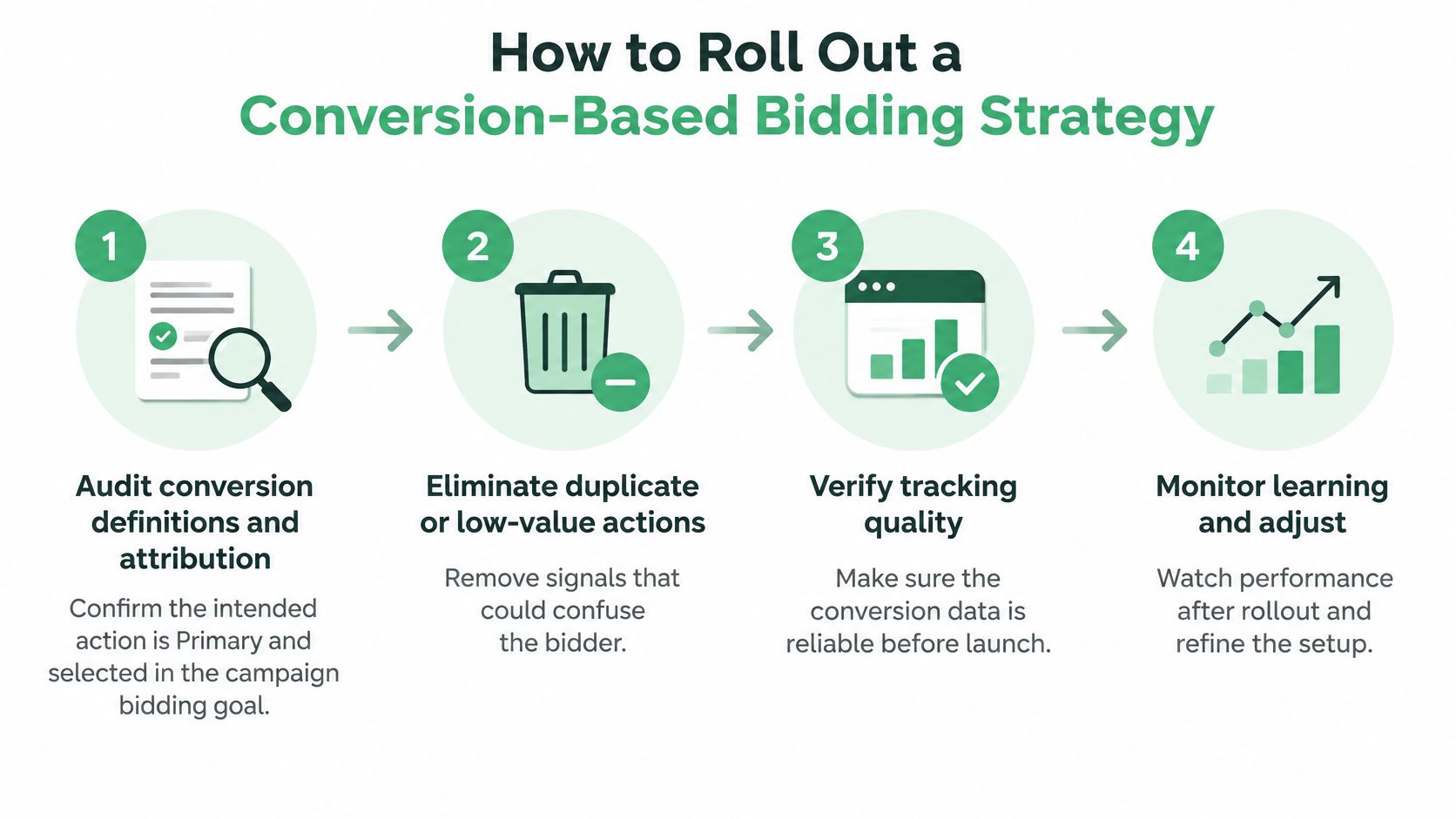
Use a staged rollout
Audit conversion definitions and attribution. Confirm the intended action is Primary, selected in the campaign's bidding goal, and recorded consistently. Review how the conversion is attributed before treating the campaign's reported total as a reliable measure of its outcome.
Eliminate duplicate or low-value actions. Remove duplicate events and actions that don't reflect a meaningful result. One clean signal is more useful than a larger count assembled from several inconsistent events.
Consolidate where practical. If similar campaigns pursue the same goal, consider bringing their learning data together rather than splitting a limited number of outcomes across separate campaigns. For example, four lead campaigns with eight conversions each usually learn more slowly than one campaign with 32, all else being equal.
Start without an aggressive target. Choose Maximize Conversions or Maximize Conversion Value, based on whether the valid goal is count or value. Let the strategy operate without a target first, so you can observe what the account's current economics support instead of forcing an aspirational CPA or ROAS onto thin history.
Wait through the learning window. Allow at least two full conversion cycles before judging the result, and don't treat day-to-day movement as a verdict. Google reports that Display accounts with fewer than 30 conversions can see CPA or ROAS fluctuations of up to 100%, compared with up to 20% at roughly 100 conversions.
Test one major change at a time. Use an experiment when possible, and avoid changing the budget, target, and conversion goal together. If several inputs change at once, you won't know which one caused the performance shift.
The common failure is setting an aggressive Target CPA or Target ROAS before enough history exists, then changing it again before the system has had a fair evaluation period. After a target-free cycle, set the first target using the observed average cost per acquisition or return from the last full month, not a desired future number. Adjust it only after the next full cycle and when the business economics justify the change.
The video below adds a visual walkthrough of a conversion-based bidding strategy rollout.
Run this checklist before launch: Primary action confirmed, duplicate and low-value actions removed, related campaigns consolidated where practical, and no target added for the first cycle. If any item fails, fix that item before switching.
When Value-Based Bidding Helps and When It Misleads
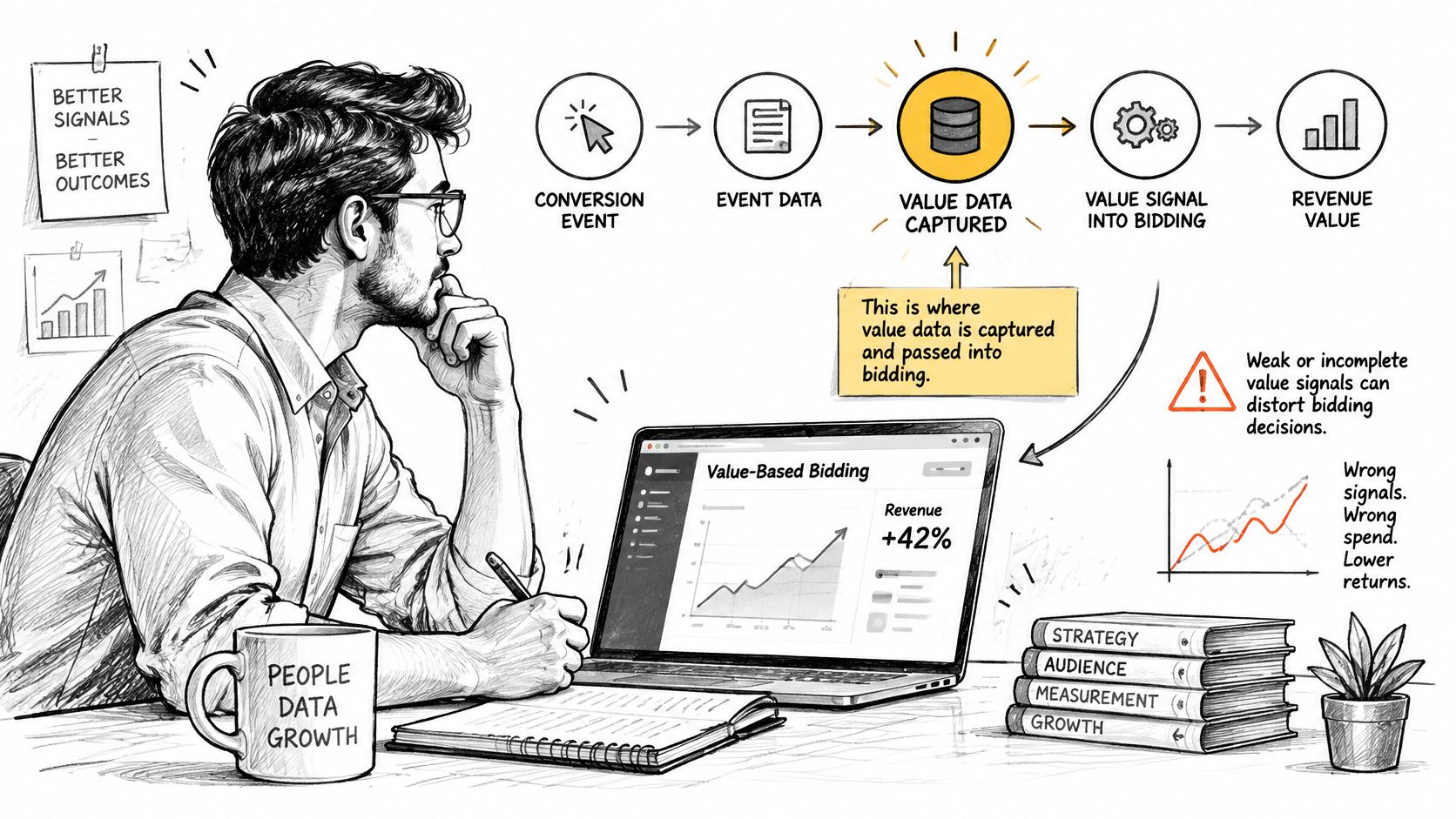
A value-based strategy is only as good as its value signal. Recording a number for each conversion doesn't make that number economically useful. The measurement design matters more than the automation label: if the signal rewards low-margin sales, guessed lead values, or outcomes uploaded long after they happened, the system can faithfully optimize toward the wrong result.
Before activating Target ROAS, choose one economically meaningful stage in the funnel and pass at least two distinct conversion values. Map the route from click to sale, then choose a stage that balances accuracy with reporting delay. Google recommends sending offline outcomes regularly, with daily uploads described as optimal, and preloading value data for three weeks or one to two conversion cycles, whichever is longer. It also prefers upload latency of under seven days. Google's Target ROAS and conversion-value guidance makes clear that the minimum of 15 conversions in the previous 30 days is an eligibility threshold, not a guarantee of stable optimization.
Choose a value model that reflects real economics
Revenue is straightforward for ecommerce, but it can overvalue a large order with a thin margin. If a business has meaningful differences in product costs, revenue alone may not tell the bidder which orders contribute most to profit.
Gross profit can be a better signal when it can be calculated and transmitted reliably. But a margin value that's stale or inconsistent across products can be less useful than a simpler, accurate value. Validate dynamic values before using them to steer bids.
Customer lifetime value may better reflect a customer relationship than a first purchase, but it can arrive long after the ad interaction. If the CRM outcome is delayed or uploaded in irregular batches, the bidding system receives late feedback rather than a timely learning signal.
Qualified-lead scores can help B2B and SaaS advertisers when sale values take time to confirm. A static score that's merely guessed, however, can reward lead volume without accounting for whether those prospects close. Make the proxy reflect real differences in lead quality, and keep it consistent.
Google allows advertisers to use real economic values, proxies such as lead scores, dynamic values, and conversion-value rules based on factors including location, device, or audience. Pick the signal that best connects the ad interaction to business value, and make sure the team can deliver it consistently. If CRM values are incomplete, stale, or invented, stay on Maximize Conversions and fix the measurement pipeline before moving to value-based bidding. A cross-platform ROAS view can also help teams compare advertising outcomes with the value reported outside the ad platform.
Fixing Bidding Problems When Data Breaks or Goals Change
The most expensive mistake is assuming a bad week proves that the bidding strategy failed. A broken tag, a changed Primary goal, or irregular offline uploads can make a functioning bidding model appear ineffective because the system is receiving an incomplete or distorted signal. Don't respond to corrupted measurement by raising the budget or changing the target.
Google says Smart Bidding depends on accurate conversion measurement, recommends consistent Primary goals, and supports data exclusions when a tracking problem corrupts a period. Its Smart Bidding troubleshooting guidance also supports treating upload consistency and evaluation time as operational issues, not just bid-setting details.
| Symptom | Likely cause | Response |
|---|---|---|
| CPA or ROAS swings by more than 20% week to week | Too few conversions for stable learning | Keep the strategy and evaluate over at least 30 conversions |
| Spend rises while conversions fall | Low-quality or duplicate conversion action | Audit Primary actions and remove duplicates |
| Conversions drop to near zero after one date | Tracking broke on that date | Apply a data exclusion for the affected dates only |
| Results change after every target edit | Targets changed too often within one cycle | Freeze targets for one full conversion cycle |
| Value strategy underperforms against CRM revenue | Delayed or backfilled offline uploads | Upload within seven days and send data regularly |
| Bids jump after a goal change | Primary goal changed during the learning period | Restore the previous goal and wait for a stable period |
Use a failure-response playbook
Start by freezing unnecessary target changes. Then identify whether the issue affects conversion volume, recorded value, or attribution timing. A tracking outage and an actual drop in qualified leads can look similar in the campaign view, but they call for different responses.
If a measurement problem affected specific dates, exclude only those dates rather than allowing corrupted information to train bidding. Keep one stable Primary goal while you diagnose the issue. A goal change during a learning period can make performance harder to interpret, especially if the team also changes targets or budgets.
More automation isn't always safer. Maximize Conversions can scale spend toward a broken or low-quality event faster than manual bidding would, so rising spend alongside falling conversions calls for an audit, not an automatic budget increase. Once tracking is sound, evaluate performance over an adequate period. Google's guidance supports using at least 30 conversions for many assessments and 50 for Target ROAS, rather than drawing a firm conclusion from a brief fluctuation.
For accounts where search-term waste is part of the problem, a Google Ads wasted-spend review can help identify terms and changes to investigate alongside the conversion issue.
First-hour checklist: Note the date the problem began, check the affected conversion action, confirm the offline upload log, and decide whether the dates need a data exclusion before touching bids.
Monitoring Your Bids Across Two Conversion Cycles
A bidding test needs a calendar, not a daily glance. Check the signals that tell you whether the setup is working, but resist changing targets every time results move. The job is to distinguish a tracking or traffic problem from normal variation while the strategy collects enough outcomes to evaluate.
| When | What to check | What to do |
|---|---|---|
| First week | Conversion counts and offline upload timing | Hold targets; verify that actions are recording consistently |
| Second week | Spend pacing and the search terms report | Exclude clearly irrelevant search terms as they appear |
| End of the first conversion cycle | Conversion volume and tracking quality | Check whether the campaign has enough evidence for a fair read |
| End of the second conversion cycle | CPA or ROAS against the business goal | Adjust only when the observed economics justify it |
| Ongoing | Primary actions after site, form, or CRM changes | Re-audit tracking so changes don't quietly alter the signal |
The search terms report gives you a way to catch irrelevant traffic without disturbing the bid strategy itself. Separate those clean-up tasks from target adjustments: if you change too many inputs at once, you'll lose clarity about what affected the result. Likewise, a CRM or website change can alter conversion tracking even when the campaign settings haven't changed.
Judge the strategy on the economics of two full conversion cycles, not on any single week.
NotFair connects Google Ads to AI clients so you can inspect account performance and stage proposed campaign or bid changes for approval. Use it to review what the account is optimizing toward, examine suggested edits before they're applied, and visit NotFair to see how approval-gated Google Ads operations can fit into your bidding workflow.