

You open Google Ads to find yesterday's spend has already become today's problem. A search term that looked harmless in the morning has consumed budget by afternoon, while the dashboard you exported before lunch can't tell you whether the damage came from a loose match, a weak landing page, or a conversion action that shouldn't be bidding at all.
That's the operational reality of AI Google Ads optimization. The useful question isn't whether to switch on an AI feature. It's whether your workflow can read the live account, diagnose the cause, draft a precise change, show you the diff, and reverse the change when the result doesn't hold.
Table of Contents
- Moving Beyond Static Exports to Live Account Reads
- Diagnosing Waste and Drafting Negatives with AI
- Smart Bidding, Broad Match, and Measurable Lifts
- Performance Max Turnaround and Threshold Management
- Building End-to-End Workflows Across Tools
- Governance, Rollback, and Choosing Your Path
Moving Beyond Static Exports to Live Account Reads
Static exports create a delay at exactly the point where paid search needs speed. You download search terms, open a spreadsheet, compare campaigns in another dashboard, and eventually prepare recommendations from data that may already describe a different auction environment. By the time a negative keyword list reaches the account, the query pattern may have shifted and the budget may have moved elsewhere.
The problem isn't that CSV files are useless. They're useful for archival analysis, stakeholder reporting, and controlled comparisons. They become a liability when marketers treat them as the only interface for live diagnosis.
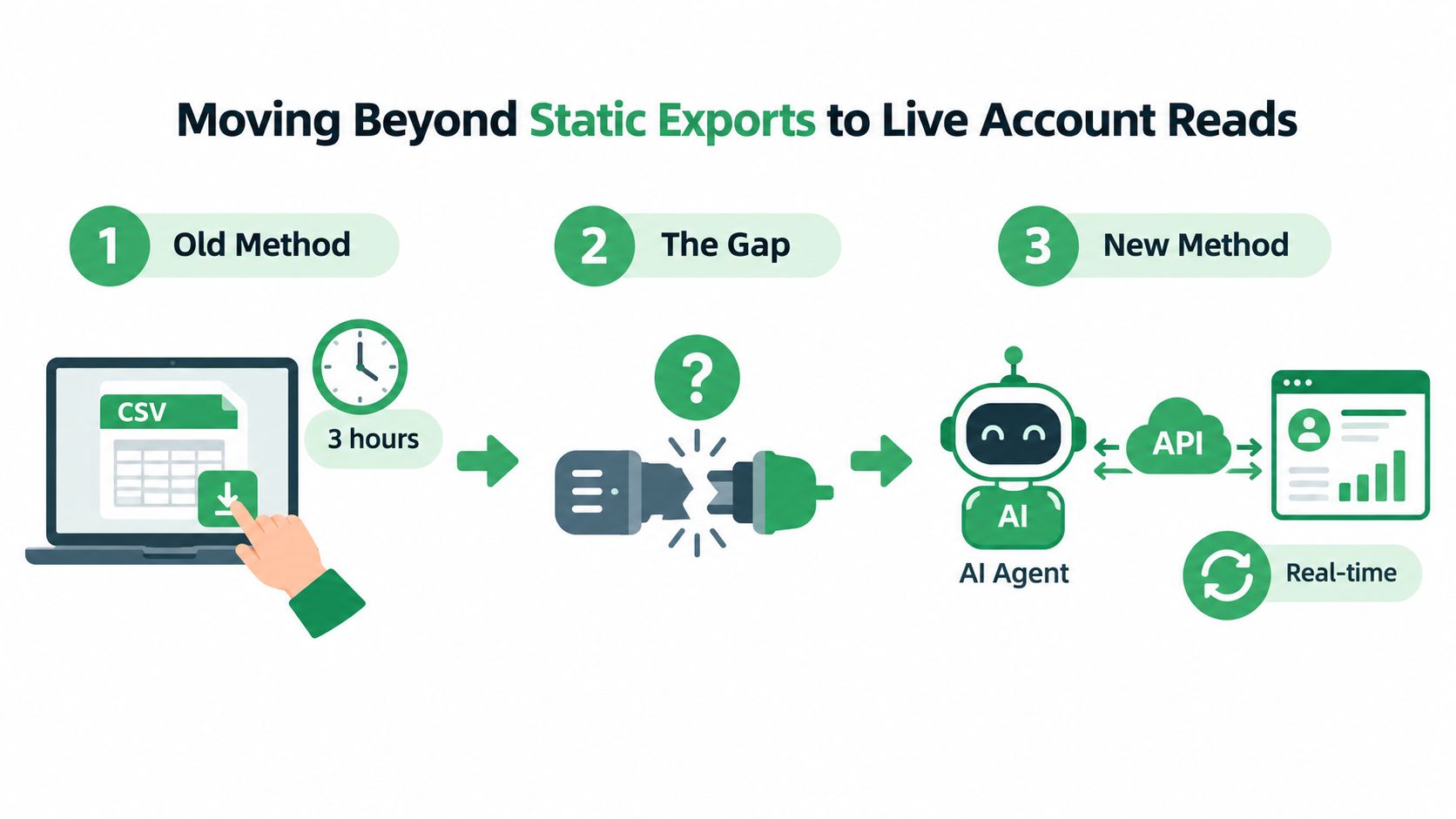
A live account read changes the sequence. Instead of asking an analyst to assemble tables before an investigation can begin, an AI agent can inspect current spend, search terms, keywords, budgets, and campaign status in the same working session. Hosted Model Context Protocol servers make that connection available to AI clients such as Claude or ChatGPT, so the agent can work from account data rather than a manually prepared snapshot.
The difference between reporting and diagnosis
A report tells you what happened in a selected date range. A diagnostic workflow asks why it happened and what should change next.
That distinction matters when a campaign's cost per lead rises. A static report might show higher spend and lower efficiency. A live read can compare recent search terms, identify new query themes, inspect the corresponding match types, and check whether budget or bidding changes happened at the same time. It can then separate a genuine demand shift from an avoidable account-structure problem.
The agent still needs judgment. It shouldn't be allowed to turn every unusual query into a negative keyword or pause every expensive term. Its value comes from making the investigation faster and more complete, while the marketer retains responsibility for the decision.
Operational rule: Use live reads to find the next decision, not to outsource the decision itself.
Google Ads has moved optimization beyond manual keyword-only bid management. Industry coverage describes automated bidding, targeting, creative assembly, and budget pacing across most campaign types, with current Google Ads automation coverage also reporting widespread use of Smart Bidding and AI-driven campaign types. That environment makes stale analysis more dangerous because the platform is already changing bids and reach while the team is still preparing its explanation.
A practical setup starts with read access. Connect the account, ask the agent for a campaign-level summary, then narrow the investigation to search terms, conversion actions, budgets, and recent changes. Only after the account context is clear should you consider write access. A hosted Google Ads connector for live account workflows can support that separation between reading the account and approving an edit.
The best live-read prompt is specific. Ask for campaigns with spend but no meaningful conversion signal, search terms that have consumed budget without producing the selected conversion, new query clusters, and changes that could explain a sudden efficiency shift. Then ask the agent to show the evidence behind each finding. You're building an audit trail, not requesting a magic recommendation.
Diagnosing Waste and Drafting Negatives with AI
Waste diagnosis should begin with the search term, not the keyword. The keyword is your targeting instruction. The search term is what the user typed, and it's the evidence you need before deciding whether to exclude, restructure, or keep traffic.
A reliable AI workflow separates four actions:
Read the account: Pull active campaigns, ad groups, keywords, match types, search terms, spend, conversions, and conversion values for a defined period.
Group the evidence: Cluster queries by intent, product fit, audience, geography, and funnel stage instead of treating each row as an isolated decision.
Rank the risk: Prioritize findings by spend at risk, relevance, conversion evidence, and the scope of the proposed exclusion.
Draft the change: Prepare campaign-level or ad-group-level negatives, structural moves, budget recommendations, or landing-page investigations for review.
The ranking step prevents a common failure mode. An account can contain hundreds of irrelevant queries, but not all of them deserve immediate attention. A query that spent little and appeared once is less urgent than a recurring theme that has taken meaningful budget from a campaign with no corresponding business outcome.
Review intent before writing the negative
A negative keyword is a business rule, not merely a spelling correction. “Free,” “jobs,” “tutorial,” or “template” might be irrelevant for one offer and valuable for another. The agent should explain why a term is being proposed and identify the scope of the exclusion. A campaign-level negative can affect a wide range of traffic, while an ad-group exclusion may solve the conflict with less collateral impact.
Ask for the proposed action in a compact review format:
| Review field | What to inspect |
|---|---|
| Search-term theme | What users are actually seeking |
| Spend at risk | How much budget the theme has consumed |
| Conversion evidence | Whether the traffic produced the chosen outcome |
| Proposed scope | Campaign, ad group, or individual term |
| Reversal path | How to remove the change if intent was misread |
That last field is easy to overlook. Approval-gated write tools should show an explicit diff before applying changes. The diff needs to name the campaign, identify the added negative, state the match type, and show whether the edit affects one ad group or several campaigns. A sentence such as “cleaned up irrelevant traffic” isn't sufficient for production work.
For teams formalizing review criteria, an AI content moderation guide from Exerta offers a useful parallel: automated systems need clear policy boundaries and human review when context changes the decision. Search-term exclusions require the same discipline. The system can classify and prioritize, but a marketer must decide what the business is willing to exclude.
Let the agent draft, then approve the diff
The safest sequence is read, explain, draft, approve, verify. Don't combine all four into a single instruction such as “fix wasted spend.” That wording gives the agent too much room to choose the diagnosis, the scope, and the write operation without showing its assumptions.
A better request asks the agent to list the top waste themes, include supporting search terms, propose negatives with their scope, and stop before writing. After review, approve only the specific edits that match the account's commercial intent. Then reread the affected campaigns and search-term patterns to confirm that the change landed as expected.
Use the same workflow for structural fixes. If an AI agent recommends moving a query to another ad group, changing a budget, or pausing a keyword, require the proposed state and current state side by side. The Google Ads negative keyword workflow is most useful when it turns recommendations into reviewable operations rather than an opaque batch edit.
A negative list can reduce noise, but it won't repair poor conversion tracking. Before scaling exclusions, check that the selected conversion action represents a meaningful business outcome, duplicates aren't inflating counts, and the campaign isn't being rewarded for a low-value micro-conversion. Otherwise, the agent may produce a technically tidy account that continues optimizing toward the wrong result.
Smart Bidding, Broad Match, and Measurable Lifts
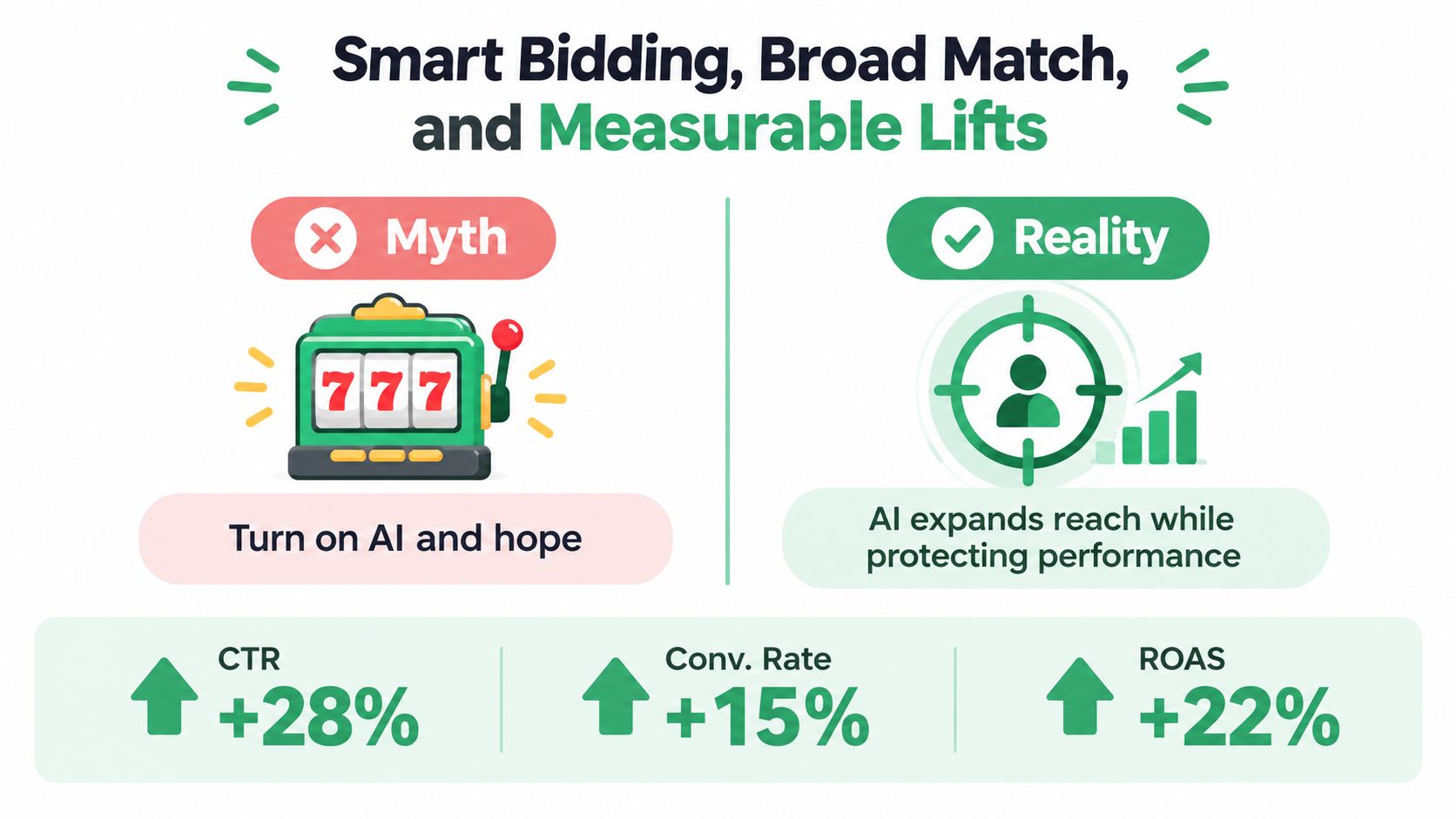
Smart Bidding evaluates device, location, audience, time, query context, and conversion history for each auction. Manual bid changes cannot match that speed. The practical question is not whether AI should replace keyword management. It is whether the account has enough clean signal and control to test broader demand safely.
Google reports different outcomes for different expansion scenarios:
| Test condition | Reported lift | Required signal integrity and negative coverage |
|---|---|---|
| Phrase to broad match with target CPA | about 25% more conversions | Reliable conversion actions, stable target CPA, and negatives covering clearly irrelevant demand |
| Phrase to broad match with target ROAS | about 12% more conversion value | Accurate revenue values, a credible ROAS target, and enough query coverage to assess commercial intent |
| Exact to broad match with target CPA | Average 35% increase in conversions | Clean conversion data, strong exclusion categories, and enough search-term volume to judge quality |
These figures come from Google's broad match and Smart Bidding guidance. Treat them as reported benchmarks, not forecasts for every account. Choose broad match expansion when conversion tracking and negative coverage are dependable. Use manual expansion when the account has weak signals, strict query requirements, or too little volume to distinguish useful discovery from waste.
Expansion needs a readiness test
A campaign can support broader matching when its conversion action reflects a meaningful lead, sale, or qualified business outcome. The bidding target must match that objective, the landing page must fit the wider intent, and the team must be able to inspect new queries without guessing. Unused budget alone is not a readiness signal.
Before changing match types, record the current query mix, conversion definition, target, and budget conditions. Check existing negatives and group exclusions by business rule, such as irrelevant services, locations, or audiences. Then define the approval threshold: retain the expansion if incremental conversions remain commercially useful, restrict it if query quality falls, and roll it back if the new traffic changes efficiency or intent.
Manual expansion gives tighter control over the terms entering an account. AI-assisted matching can identify demand that a manually maintained list would miss. The trade-off is visibility. Broader automation can affect query interpretation, ad text, and final URL selection, so the agent should show the proposed changes, affected campaigns, and rollback state before anyone approves the write.
Compare automation approaches in the best AI tools for Google Ads comparison before selecting an agent or workflow. The useful distinction is operational: can the tool read the live account, explain the proposed fix, present a reviewable diff, and restore the previous state quickly?
Responsive search ads provide a separate example of controlled automation. Google-reported figures summarized in coverage of AI-managed Google Ads performance show an average 7% increase in conversions at a similar cost per conversion when expanded text ads were replaced with responsive search ads using the same assets. The result supports testing automated combinations without treating asset quality as a solved problem.
Use AI to draft the expansion and diagnose the result, not to hide the experiment. Review whether incremental conversions came from valuable intent or a higher volume of weak actions. If you also want to turn ideas into ad videos, apply the same approval process to creative changes.
The working model is simple: clean the signal, propose the change, approve the diff, inspect the traffic, and keep rollback available.
Performance Max Turnaround and Threshold Management
Performance Max becomes difficult when advertisers ask it to optimize before the account has supplied enough reliable evidence. A campaign can spend, generate activity, and still lack the conversion volume needed for predictable automated decision-making. Adding a hard target too early can narrow delivery before the system has learned which users and placements produce the desired outcome.
Google and industry guidance point to a conversion threshold before aggressive Performance Max optimization. One source cites Google recommending at least 15 conversions in the previous 30 days for lead generation, while another describes learning as more predictable around 30 conversions in a 30-day period. These thresholds are reported in Performance Max lead-generation guidance, and they should guide readiness decisions rather than function as an automatic launch rule.
Give learning room before tightening control
Start by verifying the conversion action. If the campaign counts form views, duplicate submissions, or other weak events alongside qualified leads, the system may optimize toward volume that looks successful in the interface but fails in the sales process.
Then review the campaign's information inputs:
- Conversion data: Use accurate primary actions and remove duplicate or misleading signals.
- Audience signals: Supply useful first-party and customer context where available, without treating audience signals as rigid targeting.
- Creative assets: Give the system clear value propositions, product details, and compliant variations.
- Landing-page coverage: Check that final URLs support the different intents the campaign may discover.
Delay hard tCPA or tROAS constraints until the campaign has enough clean conversion history to respond to them. If the target is too aggressive at launch, the system may reduce delivery, slow learning, or avoid auctions that could have produced useful evidence. Once the campaign has a stable signal, adjust targets gradually and observe both volume and business quality.
A turnaround plan should also distinguish between a learning problem and a measurement problem. If spend is low because the target is restrictive, loosening the constraint may help. If spend is low because tracking fails or the offer is mismatched, changing the target only obscures the cause.
Performance Max requires governance because it can make more decisions about reach, creative combinations, and routing than classic keyword campaigns. Ask the agent to surface where traffic came from, which asset groups are underperforming, what conversion action is being optimized, and what changed before performance moved. The goal isn't to recreate manual control. It's to make the automated system explainable enough to manage.
Building End-to-End Workflows Across Tools
A click-level Google Ads metric can point in the wrong direction when it's separated from the customer journey. A costly query may look inefficient in the ad account while producing qualified opportunities in the CRM. A cheap lead may look excellent until sales marks it as unworkable. AI Google Ads optimization becomes more reliable when the agent can connect acquisition data to downstream evidence.
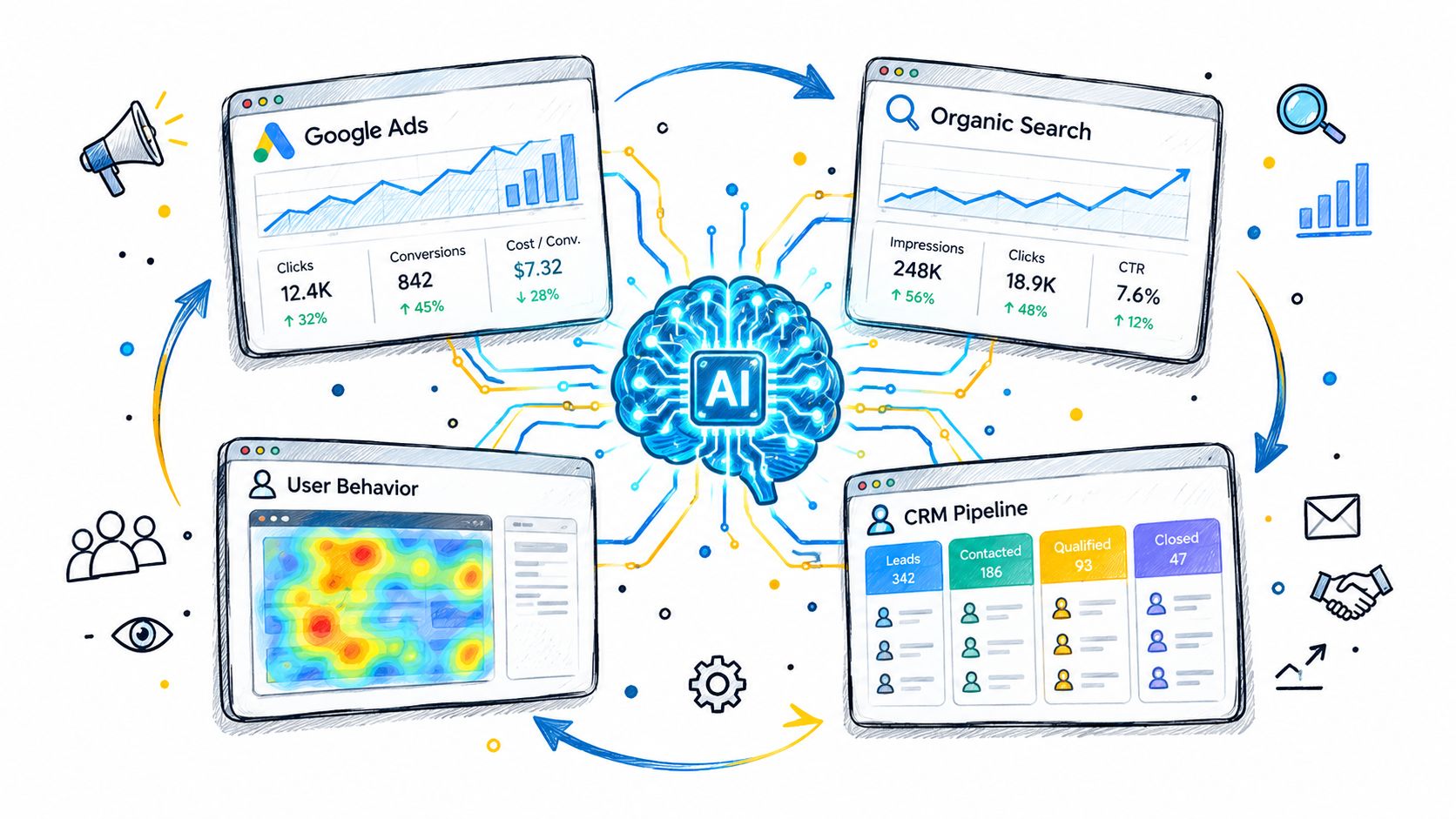
A useful workflow gives each system a distinct role:
- Google Ads shows spend, queries, clicks, conversions, budgets, bids, and campaign changes.
- Google Search Console adds organic query patterns, impressions, clicks, and index coverage that can reveal demand or landing-page weaknesses.
- GA4 provides onsite behavior and conversion paths after the ad click.
- GoHighLevel or another CRM supplies lead status, pipeline movement, and revenue context.
The agent doesn't need to flatten all of these sources into one enormous dashboard. It needs to ask a better question across them. Instead of “Which keyword has the highest cost per lead?” ask “Which paid queries generate qualified pipeline, and what does their combined acquisition cost look like after CRM status is considered?”
Let the customer journey change the decision
Suppose a high-cost keyword produces fewer form fills than another term. A click-only review might recommend reducing its budget. A cross-platform read could show that its leads spend more time on the site, reach a sales-qualified stage more often, or progress further in the CRM. The correct action might be to preserve the term, improve its landing page, or adjust the conversion model rather than pause it.
The opposite can happen with a cheap keyword. Strong front-end conversion volume may hide poor lead quality, duplicate records, or contacts that never progress. A CRM check can turn an apparent winner into a candidate for tighter targeting.
Ask the agent to produce a joined diagnostic with these fields:
| Question | Source context |
|---|---|
| What did the user search? | Google Ads search terms |
| Did the visitor engage meaningfully? | GA4 behavior and conversion paths |
| Is organic demand changing? | Search Console query and visibility context |
| Did the lead become commercially useful? | CRM stage and pipeline status |
| What action follows? | Approved campaign or measurement change |
This approach also improves landing-page decisions. If paid and organic queries reveal the same unmet intent, the issue may be content or page alignment rather than bidding. If ads attract relevant users but GA4 shows weak engagement, the campaign may be doing its job while the page fails to continue the conversation.
The workflow should preserve source distinctions. Search Console data isn't a substitute for paid search terms, GA4 isn't a revenue ledger, and a CRM stage isn't automatically a closed sale. The AI agent should state which system supports each conclusion and flag gaps instead of presenting an artificial single truth.
The operational payoff is a better optimization queue. Search-term negatives, budget moves, landing-page fixes, conversion tracking repairs, and CRM feedback loops can be ranked together. That keeps the account focused on commercial outcomes rather than whichever metric happens to be easiest to export.
Governance, Rollback, and Choosing Your Path
Automation becomes practical when every write has a boundary. Before an AI agent changes a campaign, you should know the current state, the proposed state, the reason for the change, and the fastest way to undo it. Without those controls, speed only makes mistakes arrive sooner.
An approval workflow should include:
- Explicit diffs: Show every changed campaign, keyword, negative, budget, target, or status.
- Scoped permissions: Separate read access from write access and limit the accounts the agent can affect.
- Logged history: Record who approved the change, when it ran, and what the account looked like before it.
- Post-change verification: Reread the affected entities and confirm that the platform applied the intended values.
- One-call undo: Keep reversal available without reconstructing the previous state from memory.
DIY connectors can work well for teams with engineering support and a clear appetite for maintaining prompts, permissions, monitoring, and integrations. You control the agent behavior and can tailor diagnostics to your account structure, but you also own connector reliability, access management, and the discipline required to review every proposed write.
A managed route suits teams that want live account reads and approval-gated operations without adding that maintenance burden. NotFair provides hosted MCP connections for advertising, analytics, and CRM platforms, with diagnostic workflows, explicit diffs, change history, and reversible campaign operations. The right choice depends less on enthusiasm for AI than on who will maintain the operating system around it.
The standard is simple: If you can't explain the change, approve the diff, and reverse the result, don't automate the write.
Start with read-only diagnostics on one account. Define the conversion signal, identify the searches and campaigns that deserve attention, and make the first changes small enough to verify. Then expand the workflow only when the evidence, permissions, and rollback process are working together.
NotFair helps performance teams connect AI agents to live Google Ads, analytics, and CRM data, diagnose waste, and approve reversible campaign changes with an audit trail. Visit NotFair to review the connector and workflow options, then use a live account read to identify your next safe optimization.