

U.S. search advertising generated $114.2 billion in revenue in 2025, representing 38.8% of total digital advertising revenue, according to the IAB/PwC Internet Advertising Revenue Report. At that scale, small campaign inefficiencies can add up quickly. Good PPC management isn't just about setting bids. It's about making sure the right searches trigger relevant ads, the clicks reach useful pages, and the conversions you optimize toward reflect real business results.
Table of Contents
- What PPC Ad Campaign Management Covers
- How Campaign Structure Runs from Account to Keyword
- How Auctions and Bidding Strategies Decide Results
- Metrics That Matter and What Quality Score Tells You
- Measuring Conversions and Attribution Without Guesswork
- The Weekly Optimization Routine, Step by Step
- Set Approval Limits Before You Automate
What PPC Ad Campaign Management Covers
PPC ad campaign management is the ongoing work of deciding what to bid on, what to say in ads, where clicks should land, how much to spend, and how to judge the results. You repeat that work as searches, competitors, and customer behavior change. A campaign that was well built at launch can still drift if nobody checks what searches triggered it.
Think of a campaign like a market stall. The owner needs to reprice products, restock, and rearrange the display as shoppers and competing stalls change. Putting up a sign once and walking away won't keep the stall profitable. In the same way, setting a budget and publishing an ad doesn't finish the job.
The management cycle
Say a plumbing company launches a campaign for emergency repairs. Its ads initially attract people searching for urgent help, and the campaign produces leads. If the team doesn't review search terms, however, the ads might start drawing clicks from people looking for plumbing courses, DIY instructions, or replacement parts. The launch may have been sound, but the campaign's traffic has changed.
The working cycle is straightforward: set goals, build structure, launch, measure, optimize, report, and repeat. That cycle includes five connected jobs:
- Structure the account so campaigns, ad groups, keywords, ads, and landing pages have clear roles.
- Manage auctions and bidding to compete for relevant searches without treating the maximum bid as the amount you'll always pay.
- Read performance metrics to spot problems with relevance, cost, visibility, or conversion.
- Measure business outcomes so advertising decisions rely on meaningful leads or sales, not just activity.
- Review and approve changes so routine optimization doesn't turn into uncontrolled automation.
A useful resource for readers comparing paid search with retail marketplace advertising is Headline Marketing Agency's PPC guide. Its focus on Amazon PPC offers a different context for thinking about campaign structure and ongoing management.
If the account is new, start by making the structure and conversion tracking clear before spending. If it's stalled, inspect search terms, ad relevance, and landing-page fit. If the numbers seem unreliable, check conversion definitions and reconcile platform results with analytics and CRM records before moving budget.
How Campaign Structure Runs from Account to Keyword
Start at the top of the account, then work down. Each level should make it easier to control spending and match an ad to a person's search.
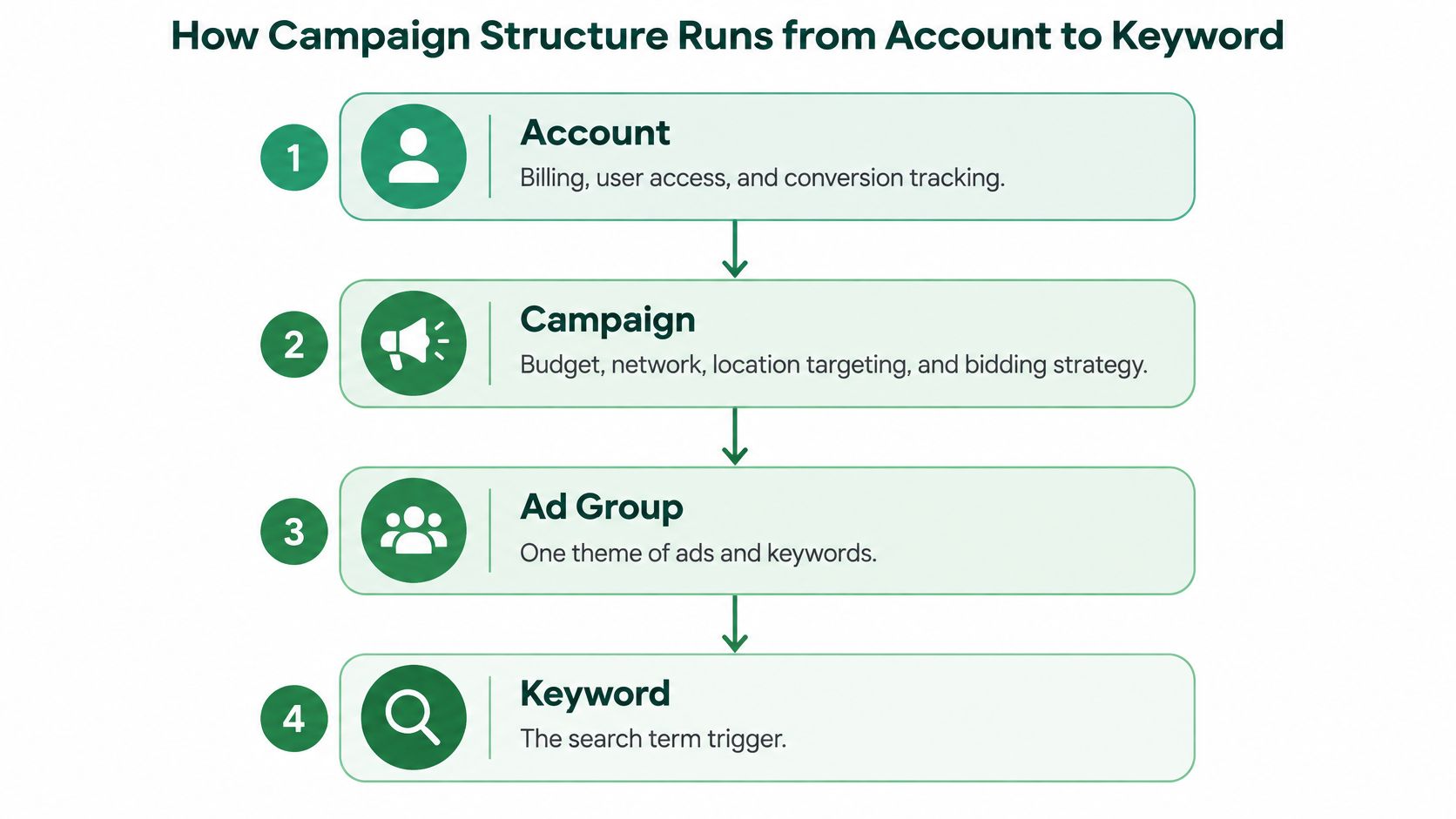
An account holds billing, user access, and conversion tracking. For a plumbing company, that account should contain the advertising activity for the relevant business entity, rather than unrelated companies mixed together. At the campaign level, the team sets the budget, network, location targeting, and bidding strategy. Separate campaigns for emergency repairs and boiler installation let the company set goals and budgets for each service.
Inside each campaign, ad groups organize closely related keywords and ads. An emergency-repair campaign could have separate ad groups for burst pipes and blocked drains. This lets the company write specific ads for each need. Grouping boiler installation and emergency plumbing in one ad group would force the ads to speak in general terms, and make it harder to identify which service or message is working.
Keywords define which searches may trigger the ads. Exact and phrase match can help focus a campaign on core terms, while negative keywords exclude searches that aren't useful. Broad match without an active negative keyword list can send a campaign into irrelevant searches. Ads then contain headlines and descriptions; responsive search ads can accept up to 15 headlines and 4 descriptions. Finally, the landing page receives the click. A person searching for boiler installation should reach a page about that service, not a generic homepage.
| Level | What It Controls | Typical Setup | Common Mistake |
|---|---|---|---|
| Account | Billing, user access, and conversion tracking | One account per business entity and currency | Mixing unrelated businesses in one account |
| Campaign | Budget, network, location targeting, and bidding strategy | One campaign per product line, service, or goal | Sharing one budget across unrelated goals |
| Ad group | Shared keywords and the ads written for them | One tight theme of closely related keywords | Grouping many services under one generic theme |
| Keyword | Match type and bid for each search term | Exact or phrase match for core terms, with negatives for waste | Using broad match with no negative keyword list |
| Ad | Headlines, descriptions, and display URL | Responsive search ads with up to 15 headlines and 4 descriptions | Using identical ad copy across different services |
| Landing page | Post-click experience and conversion path | One page per clear search intent | Sending every ad to the homepage |
A structure is easier to manage when you can explain the purpose of each ad group in one sentence. “This group reaches people looking for emergency blocked-drain help” is clear. “This group covers plumbing” is probably too broad.
Start your structure audit by looking for shared budgets across unrelated services, ad groups mixing different customer needs, broad keywords without negatives, and ads that send every click to the same page.
How Auctions and Bidding Strategies Decide Results
Say a software company sets a $6 maximum CPC for a search related to starting a product trial. After its team improves the ad and landing page, the actual CPC might be about $3.40 while the ad keeps the same position. That's an illustrative scenario, not a guaranteed outcome. The key idea is that a maximum CPC is a ceiling, not necessarily the amount charged.
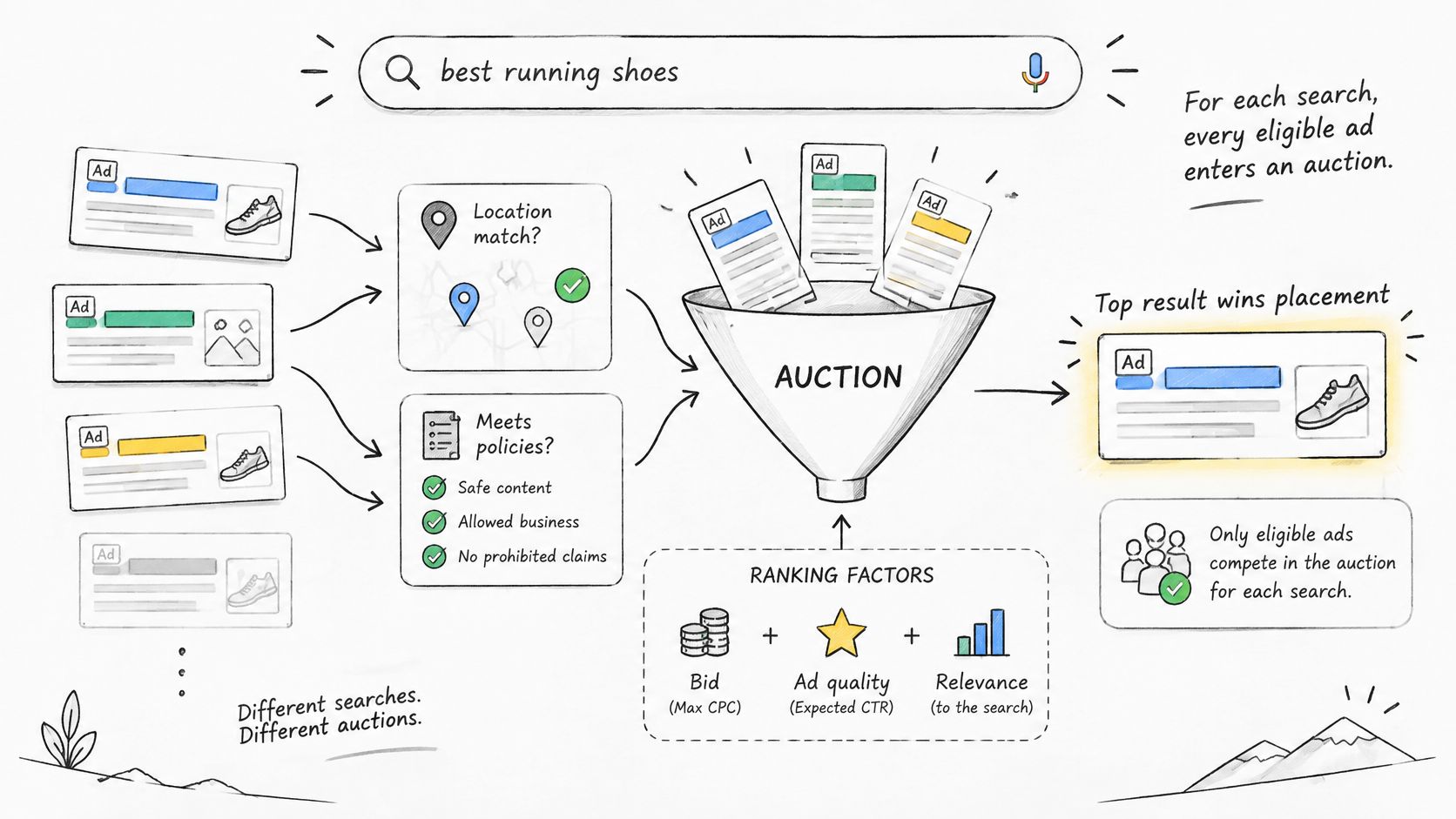
In Google Search Ads, each eligible ad enters an auction for each search. Google first filters ads based on factors such as location targeting and policy eligibility, then uses Ad Rank to determine whether an ad can appear and where it may be positioned. Ad Rank takes into account the bid, ad and landing-page quality, competition, the search context, minimum thresholds, and expected impact from assets such as sitelinks. Google also calculates Ad Rank twice, first for eligibility and then for position among eligible ads. The Google Ads explanation of how the ad auction works makes clear why raising a bid isn't the only way to improve results.
Your actual CPC is often lower than your maximum CPC. In general, an advertiser pays the minimum amount needed to clear the relevant Ad Rank threshold and beat the next eligible competitor, rather than automatically paying the full bid. That's why improving relevance can support both position and cost control.
Practical rule: Treat a higher bid as one possible auction lever, not as a substitute for a better match between search, ad, and landing page.
Match the bidding strategy to the signal
Bidding strategies differ in how much control you keep and what outcome you ask the system to pursue. The right choice depends on the campaign goal and whether the conversion data is useful enough to guide automated bidding.
| Strategy | Best When | What You Control | Main Risk |
|---|---|---|---|
| Manual CPC | New accounts or campaigns needing direct control | Maximum cost per click | Slow to scale and needs frequent manual edits |
| Maximize clicks | Traffic goals with little conversion data | Budget only | Spend on low-intent clicks |
| Target CPA | Conversion volume is steady and there's a known cost target | Target cost per acquisition | Volume falls if the target is set too low |
| Target ROAS | Reliable revenue values are recorded for each conversion | Target return on ad spend | Under-delivery if the target is set too high |
| Maximize conversions | The campaign has conversion activity and flexible cost | Budget only | Chases cheap but low-quality conversions |
If conversion data is thin, manual CPC or Maximize clicks can help you keep control while you learn which searches attract useful visitors. Once conversions are steady and the target is realistic, consider Target CPA. Don't change bidding strategies just because a short run of results looks unusual, and avoid changing one while another major campaign change is still being evaluated.
To judge a strategy, compare cost per acquisition and impression share with the campaign's targets over two to four weeks. If results miss the goal, check whether the problem is weak conversion quality, limited visibility, or a bid target that doesn't fit the auction.
Metrics That Matter and What Quality Score Tells You
Google Ads rates Quality Score from 1 to 10 at the keyword level, as Google's Quality Score guidance explains. That makes it a diagnostic, not a budget-setting metric. A weekly KPI review should change a decision: which ad group needs tighter copy, which auction is getting expensive, which landing page loses people after the click. The guidance describes the score as a combination of expected click-through rate, ad relevance, and landing-page experience, each compared with advertisers who appeared for the same search in the previous 90 days. The number you see is a retrospective summary, not the real-time quality signal used in the auction.
| Metric | What It Signals | Check When | Action If Off |
|---|---|---|---|
| Click-through rate | Ad relevance to the search query | Weekly by ad group | Tighten headlines to match query wording |
| Cost per click | Price paid in the auction | Weekly | Review Quality Score, bids, and competition |
| Impression share | Share of eligible auctions won | Weekly | Separate losses to budget from losses to rank |
| Conversion rate | Fit between landing page, offer, and visitor | Weekly | Test a landing page or offer change |
| Cost per acquisition | Spend efficiency per lead or sale | Weekly and monthly | Compare with target and check conversion quality |
| Return on ad spend | Revenue generated per ad dollar | Monthly | Verify conversion values before changing budgets |
| Quality Score | Keyword-level diagnostic from 1 to 10 | Monthly | Fix the weakest of the three components |
Read the rows in pairs. Click-through rate and ad relevance explain whether the right people click. Cost per click and impression share explain what access to the auction costs. Conversion rate, cost per acquisition, and return on ad spend explain whether those clicks become business outcomes.
Use Quality Score to find a cause
If expected click-through rate is weak, tighten the match between the search and the ad message, or make the offer clearer. Below-average ad relevance points to a mismatch between keyword intent and ad-group copy. Weak landing-page experience suggests the page may be irrelevant, hard to use, or difficult to explore.
Consider a legal-services ad group with a strong click-through rate but a poor conversion rate. The ad is attracting attention, so the next question is what visitors find after clicking. Check that the landing page clearly matches the service they searched for, explains the next step, and makes it easy to contact the firm. Changing the headline again may not solve a page problem.
A useful diagnosis links one metric to a specific action. A lower score by itself doesn't tell you which part of the campaign to change.
Compare each metric with the account's own history before reaching for a generic benchmark. Benchmarks vary by industry, offer, and campaign context, so an average from another group of advertisers can send you chasing a target that never fit your account. For wider market context, dentsu's forecast projected global search advertising spending to grow 8.3% in 2025 across 56 markets. That is a direction-of-travel signal, not a cost target for one account.
Broad diagnosis is where automation earns its place: pull every keyword with a weak component, every search term that spent money without a conversion, every ad group whose click-through rate fell while its cost per click rose. The change itself needs a tighter boundary. Decide who can pause a keyword, raise a bid, or move budget, and what conversion evidence is required before that happens. If conversion tracking is thin or unverified, a Quality Score fix can improve click-through rate while pushing spend toward clicks that never become leads.
If click or conversion patterns look suspicious, investigate before assuming the campaign has become less efficient. A practical overview of invalid traffic signals for store owners can help you identify signs worth checking.
Measuring Conversions and Attribution Without Guesswork
A conversion should represent a meaningful business outcome. For a lead-generation company, that might be a qualified lead, not merely a form submission. Page views and other early actions can still be useful, but keep them as secondary reporting signals so automated bidding doesn't treat every visit like a sale.
Suppose Google Ads reports 120 leads in a month, while the CRM marks only 45 as qualified. If the campaign optimizes toward raw form fills, it may keep funding the other 75 even if those contacts never become viable opportunities. Reconcile platform conversions with GA4 and CRM stages, checking for duplicate events, conversion lag, and lead quality before changing bids or budgets.
Choose attribution to match the question
Attribution models assign credit for a conversion to different interactions along a customer's path. The model can help you see how touchpoints contribute, but it can't make an unreliable conversion definition trustworthy.
| Model | How It Assigns Credit | Data Needed | Best Use |
|---|---|---|---|
| Last click | 100% to the final click before conversion | Click-level data only | Simple reporting and low-volume accounts |
| First click | 100% to the first interaction | Click-level data | Judging discovery and awareness campaigns |
| Linear | Equal credit to every interaction on the path | Full path data | A balanced view of longer journeys |
| Time decay | More credit to interactions closer to conversion | Path data | Short sales cycles with clear recent triggers |
| Data-driven | Credit based on converting and non-converting paths | At least 200 conversions and 2,000 ad interactions in 30 days | Mature accounts with enough volume |
For data-driven attribution, Google recommends at least 200 conversions and 2,000 ad interactions for a supported conversion action within 30 days before relying on the model for sufficiently informed attribution. Google compares converting and non-converting paths across supported campaign types, then gives more credit to interactions associated with higher conversion probability. Its data-driven attribution guidance also makes this a practical threshold for deciding when a model has enough information to be useful. If your account falls short, consider consolidating fragmented campaigns or conversion actions so the signal can stabilize.
Use platform-reported conversions when the primary action is a qualified lead or sale, duplicates and lag have been reconciled with GA4 and the CRM, and the attribution approach has enough data. Don't trust the numbers blindly if automated bidding is learning from low-quality leads, duplicate conversions, or heavily modeled events. When you need to know whether advertising caused an outcome, rather than only claimed credit for it, consider a holdout or geo experiment. If channel spending is substantial and customer journeys include offline sales or overlap across platforms, marketing-mix modeling may help answer questions click paths can't.
Recent work from the IAB's research program identifies attribution, incrementality, and marketing-mix modeling as active areas of AI-supported measurement, alongside unresolved questions about governance and oversight. Choose which source you'll trust before moving budget, then check attribution findings against CRM quality and conversion lag. Teams auditing their Google Ads setup can also use this Google Ads conversion audit to examine whether the conversion signals support sound decisions. For another view of advertising formats used to reach business buyers, see this guide to platform-native ads for B2B buyers.
The Weekly Optimization Routine, Step by Step
A reliable review doesn't start by moving budget. It starts by checking which searches the campaign matched, then works through visibility, ad and page performance, and business outcomes.
- Pull the last seven days of search terms. Review recent queries and flag searches that don't match the intended service or offer.
- Tag irrelevant queries. Mark the searches that are wasting spend or bringing the wrong visitors.
- Add negative keywords. Block clearly irrelevant searches once you've checked their meaning and potential effect on other campaigns. This guide to Google Ads negative keywords can help you build a practical review habit.
- Check impression share. Separate lost visibility caused by budget limits from lost visibility caused by rank.
- Review ad-group performance. Compare CPC, click-through rate, and conversion rate with the account's own history. Flag outliers for investigation rather than changing several things at once.
- Inspect Quality Score components. For high-spend keywords, note whether expected click-through rate, ad relevance, or landing-page experience is the weakest signal.
- Check budget pacing and tests. Move money only within limits the team has approved. Test one variable, such as a headline or landing page, and set a stop date to review its effect.
- Log changes and reconcile outcomes. Record the date, reason, and expected result for every change. Compare CRM-qualified outcomes with platform conversions, then note any gap that remains.
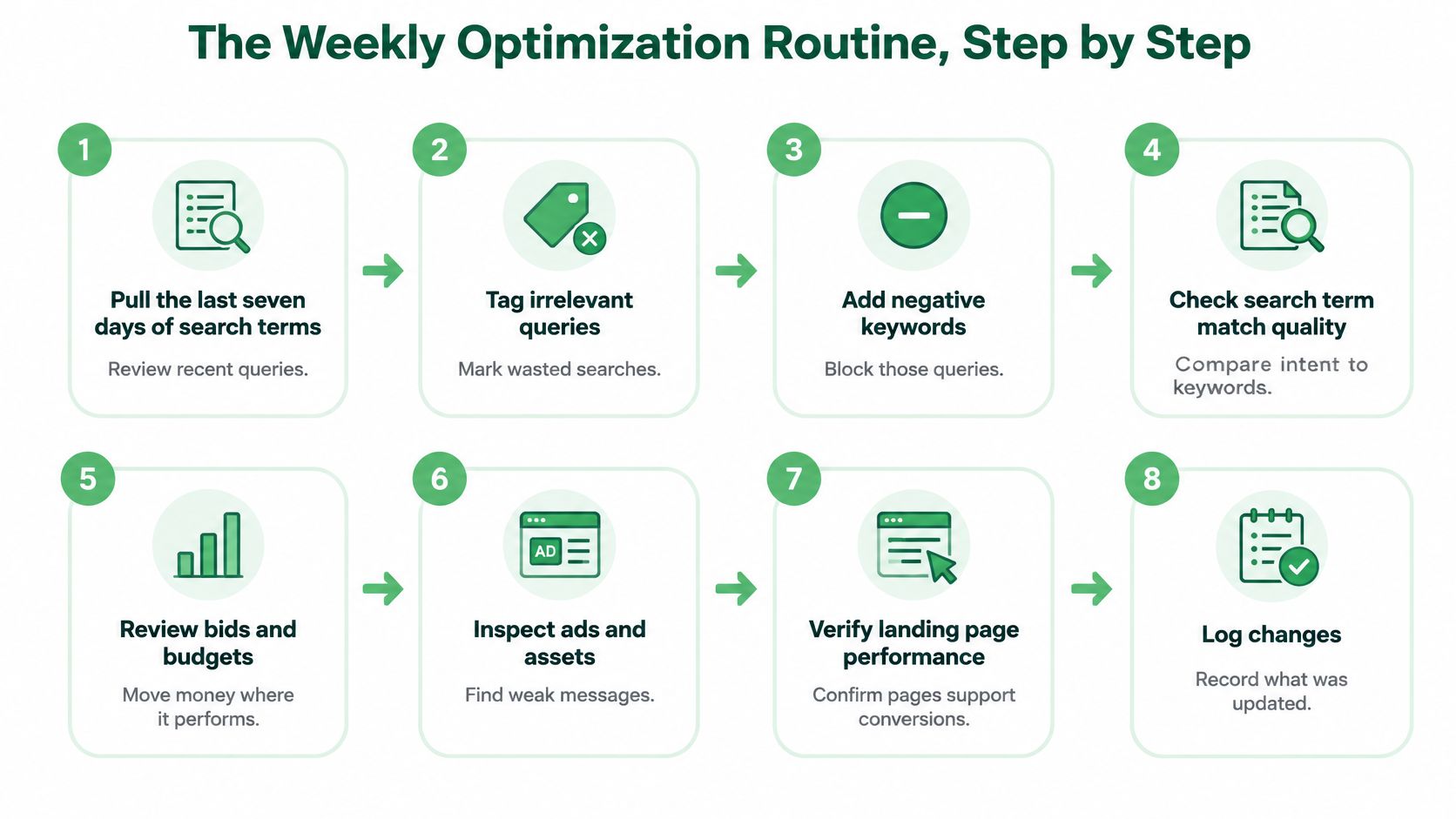
The sequence matters. If you test new ad copy before removing irrelevant searches, you may mistake poor traffic for a weak message. If your conversion records aren't trustworthy, budget changes can amplify the wrong behavior. Scheduling the data pull is useful, but a person should still confirm negatives, budget moves, and test plans. The Google Ads weekly review can run on a schedule with OpenClaw or another agent runtime that supports scheduled MCP calls.
A healthy review ends with spend still inside its approved target, fewer wasted searches, and a written reason for every change. If a decision depends on lead quality, the team checks the CRM before treating platform conversions as proof that the campaign has improved.
Set Approval Limits Before You Automate
Automation should make diagnosis easier without making campaign changes untraceable. An agent can scan account data, flag unusual spend, and draft proposed edits. But execution should stay inside written approval limits, especially when a change could alter spending, bidding, or audience reach.
The need for that control is growing alongside advertising investment. U.S. internet advertising revenue reached $294.6 billion in 2025, up 13.9% year over year, according to the IAB/PwC Internet Advertising Revenue Report. The report also describes AI's expanding role in advertising while noting that governance, explainability, and human oversight remain unsettled. More automation can speed up good decisions, but it can also carry a weak conversion signal into more campaigns, faster.
Set a practical approval matrix
Use a written matrix to distinguish changes that are easy to reverse from decisions that can move spend or disrupt campaign performance.
| Change type | Example | Approval rule | Record to keep |
|---|---|---|---|
| Reversible action | Pause a clearly irrelevant keyword or add a negative keyword | Define which cases may proceed and who reviews the record | Actor, reason, before-and-after values |
| Budget change | Move budget between campaigns | Name the approver and set a limit that requires review | Proposed change, expected effect, rollback |
| Bidding change | Change bidding strategy or target | Require approval before execution | Rationale, current setting, new setting, review date |
| Audience exclusion | Exclude an audience from a campaign | Require approval and check cross-platform signals | Audience affected, reason, reversal step |
| Change during a learning period | Edit budgets or strategy while results are stabilizing | Hold for human review | Campaign status, proposed edit, approval decision |
For every high-risk change, decide who signs off, what size of change needs review, and when the team will judge the result. Record the actor, rationale, before-and-after values, and rollback path. If Google Ads or Meta looks strong while the CRM shows weak lead quality, pause the proposed move until the team reconciles the conflicting signals.
Bound autonomy, don't remove it: Let automation diagnose broadly and draft changes, but require approval for material edits and keep an audit trail.
With NotFair, diagnostic queries can run freely, while every write, including bid changes, negative keywords, ad copy, and campaign state, is approval-gated and logged with full provenance. Nothing goes live and no ad budget changes until the client approves it. The Google Ads MCP safety guidance explains how to think about safeguards around agent-assisted campaign operations.
Write your approval matrix this week, run one diagnostic against it, and accept only proposed changes that pass your rules. NotFair's Free plan includes account diagnosis, drafted campaign changes, previews of bid, budget, keyword, audience, and ad edits before approval, plus community support.
NotFair connects AI agents to advertising, analytics, and CRM platforms so teams can diagnose campaigns, preview proposed changes, and approve edits with a record of what changed. If you want to bring bounded automation into your PPC workflow, visit NotFair and review how its approval-gated tools fit your campaign operations.