

You're managing a busy online store, and the Google Ads dashboard looks active, but the profit report tells a different story. Shopping campaigns spend heavily on products with thin margins, Search attracts queries that don't match your offer, and Performance Max moves budget across channels without making the commercial logic obvious. Meanwhile, Merchant Center flags feed issues, prices change on the site, and bidding keeps optimizing toward conversions that may not be worth the cost.
That's the central challenge of Google Ads for ecommerce. More clicks and more orders don't automatically produce a healthier store. You need a system that connects SKU-level product data, purchase value, contribution margin, feed quality, and controlled experimentation.
Google Ads can support that system. Its Shopping reports distinguish products that historically served ads from products currently listed in Merchant Center, and compatible reports can include revenue, gross profit, gross-profit margin, and units sold when cart data is available (Google Ads Shopping reporting). The practical question is how to turn those capabilities into decisions that protect profitability while automation expands demand.
Table of Contents
- Introduction
- Understanding Key Concepts
- Choosing Campaign Types
- Feed and Merchant Center Best Practices
- Bidding and Attribution Strategies
- Testing and Optimization Strategies
- Conclusion and Next Steps
Introduction
A familiar ecommerce scenario goes like this. Ads are driving orders, the dashboard looks busy, and automated campaigns keep finding new traffic. Then the margin report lands. Sales are coming from discounted items, shipping-heavy products, or SKUs that win the auction but weaken profit once fulfillment and costs are counted.
That gap appears when Google Ads is managed like a traffic source instead of a system tied to product economics. Campaign type, Merchant Center data, conversion tracking, bidding, and SKU profitability all influence the same outcome. If one layer is off, automation can scale the wrong products faster.
Google Ads works more like a merchandising engine than a simple media buy. Search captures direct intent. Shopping puts the product, price, and image in front of that intent. Performance Max extends coverage across Google inventory and shifts budget automatically. Those tools can grow demand, but they still depend on the quality of the product feed and the value signals you send back.
That is why profitable ecommerce advertisers look past order count alone. A sale from a high-margin bundle and a sale from a low-margin clearance item should not carry the same weight in bidding decisions. Feed optimization by SKU helps Google understand what each product is, while value-based bidding helps the system prioritize what each sale is worth to the business.
The objective is sustainable ROAS, built on profitable SKU-level decisions rather than raw conversion volume.
Understanding Key Concepts
Merchant Center works like your product catalogue inside Google. It holds the details Google needs to match a SKU to demand, including titles, identifiers, prices, availability, and images. Google Ads then uses that feed to decide which products are eligible to appear in Shopping and Performance Max auctions.
That distinction matters because ecommerce problems often start in two very different places. A wrong price, broken availability, or disapproved item is a delivery issue. A product that is eligible, gets impressions, and still produces weak returns has a performance issue. Treating both problems the same usually wastes time and budget.
Google's Shopping reporting helps separate historical products that served ads from the current product state in Merchant Center, so teams can see whether a SKU failed to enter the auction or underperformed once it did. It also supports product-identifier reporting and, with compatible cart data, metrics tied more closely to product economics, such as revenue, gross profit, gross-profit margin, and units sold, as noted earlier.
Value is more useful than volume
A conversion count treats every order the same. An ecommerce business cannot. A high-margin bundle, a low-margin clearance item, and a repeat purchase may each count as one conversion, but they do not contribute the same amount to profit. That is why profit-aware advertisers care about value at the SKU level, not just total order volume.
Passing purchase revenue into Google Ads as transaction-level conversion value gives Smart Bidding a better signal. Instead of chasing the most orders, the system can favor the orders most likely to produce stronger commercial returns. If you need to review tagging, account connections, or setup details, the Google Ads platform documentation is the right place to check.
A conversion action should map to a real business outcome. Add-to-cart, checkout, and lead events are useful for analysis, but using them as primary goals can train bidding toward activity instead of sales. For most ecommerce accounts, purchase is the clearest optimization signal.
This short overview explains how Search, Shopping, and Performance Max allocate automation and control differently, which helps you judge how much automation your account can realistically support.
Practical rule: Diagnose eligibility and delivery before changing bids. You can't fix a feed disapproval with a target ROAS adjustment.
Choosing Campaign Types
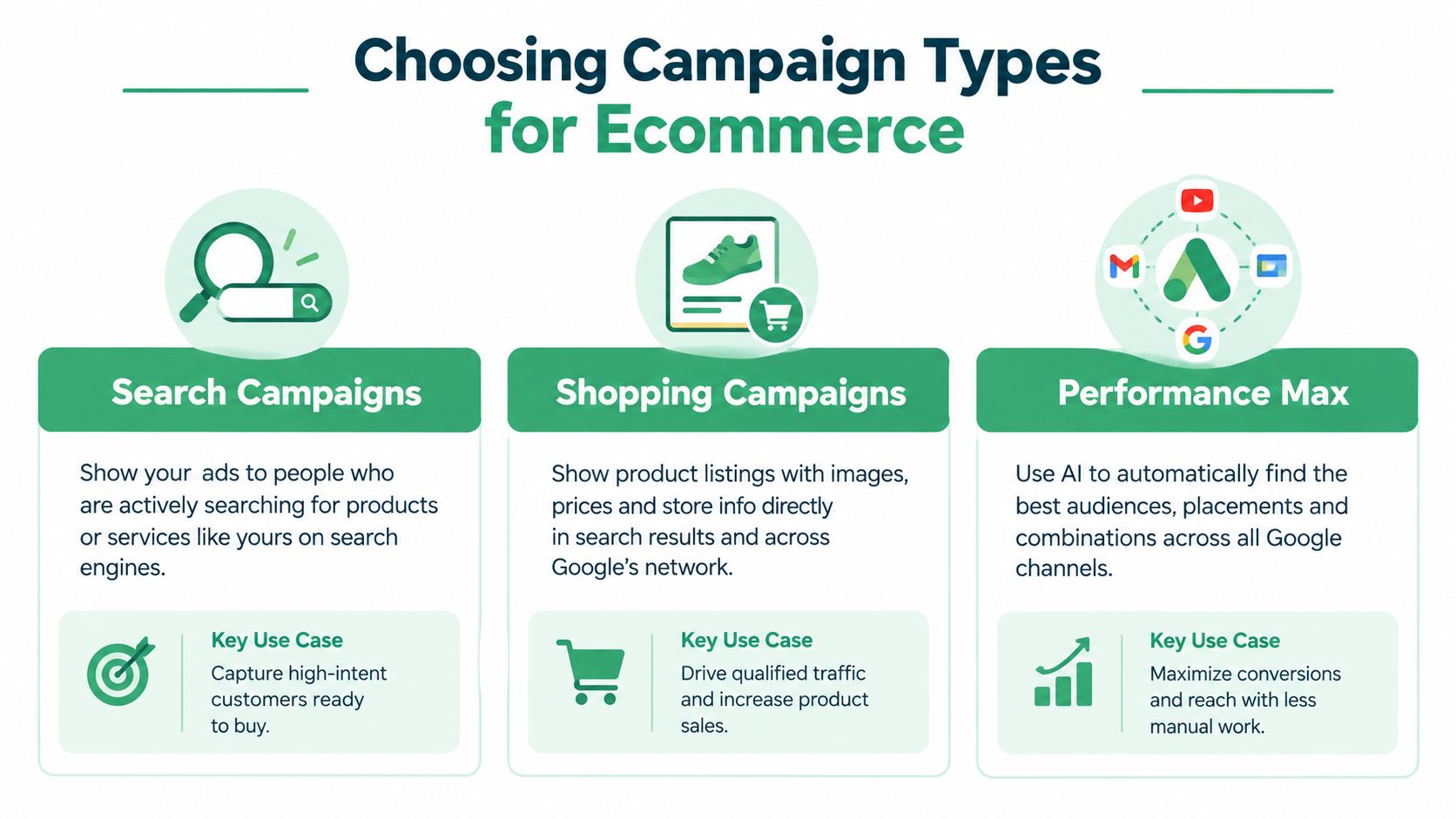
The right campaign depends on the question you're trying to answer. Search, Shopping, and Performance Max can all contribute to ecommerce growth, but they don't offer the same level of control or depend on the same inputs.
| Campaign type | Primary role | Strong fit | Main dependency |
|---|---|---|---|
| Search | Capture declared keyword intent | Branded demand, specific product searches, launches | Keywords, ads, landing pages |
| Shopping | Present products with visual and price information | Product-led discovery and SKU analysis | Merchant Center feed |
| Performance Max | Expand across Google inventory using automation | Broad reach and coordinated channel coverage | Feed, creative assets, conversion signals |
Search campaigns are useful when the query itself gives you valuable context. Someone searching for a particular product category or branded item has expressed intent that you can organize through keywords, ad copy, landing pages, and exclusions. Search can also help protect branded demand or test messaging for a new product line.
Shopping campaigns put the product at the centre of the ad. The image, title, price, and availability influence whether the shopper clicks. This format is especially useful when buyers compare several products before visiting a store. A compiled industry estimate reported that Shopping Ads represented 76.4% of U.S. retail search-ad spending in 2024 and generated 85.3% of clicks within Google retail campaigns (the compiled Google Ads statistics). Treat those figures as directional, not as a promise for your category or market.
Performance Max can extend product promotion across multiple Google placements. It offers reach, but it also makes diagnosis more dependent on accurate conversion values, strong feeds, and meaningful segmentation. Use it to expand proven products or reach new demand, not as a substitute for understanding which SKUs make money.
For a broader introduction to campaign planning, a YipSMS Inc. resource on paid ads can provide useful complementary context.
Decision test: If you can't explain which products deserve additional budget, more automation may increase spend without improving the business.
Feed and Merchant Center Best Practices
Your product feed is the inventory file Google uses to understand what you sell. A polished campaign cannot compensate for a vague title, stale price, incorrect availability, or a weak image. Feed work isn't administrative housekeeping. It directly affects eligibility, relevance, and the quality of the traffic your products attract.
Build the feed around the SKU
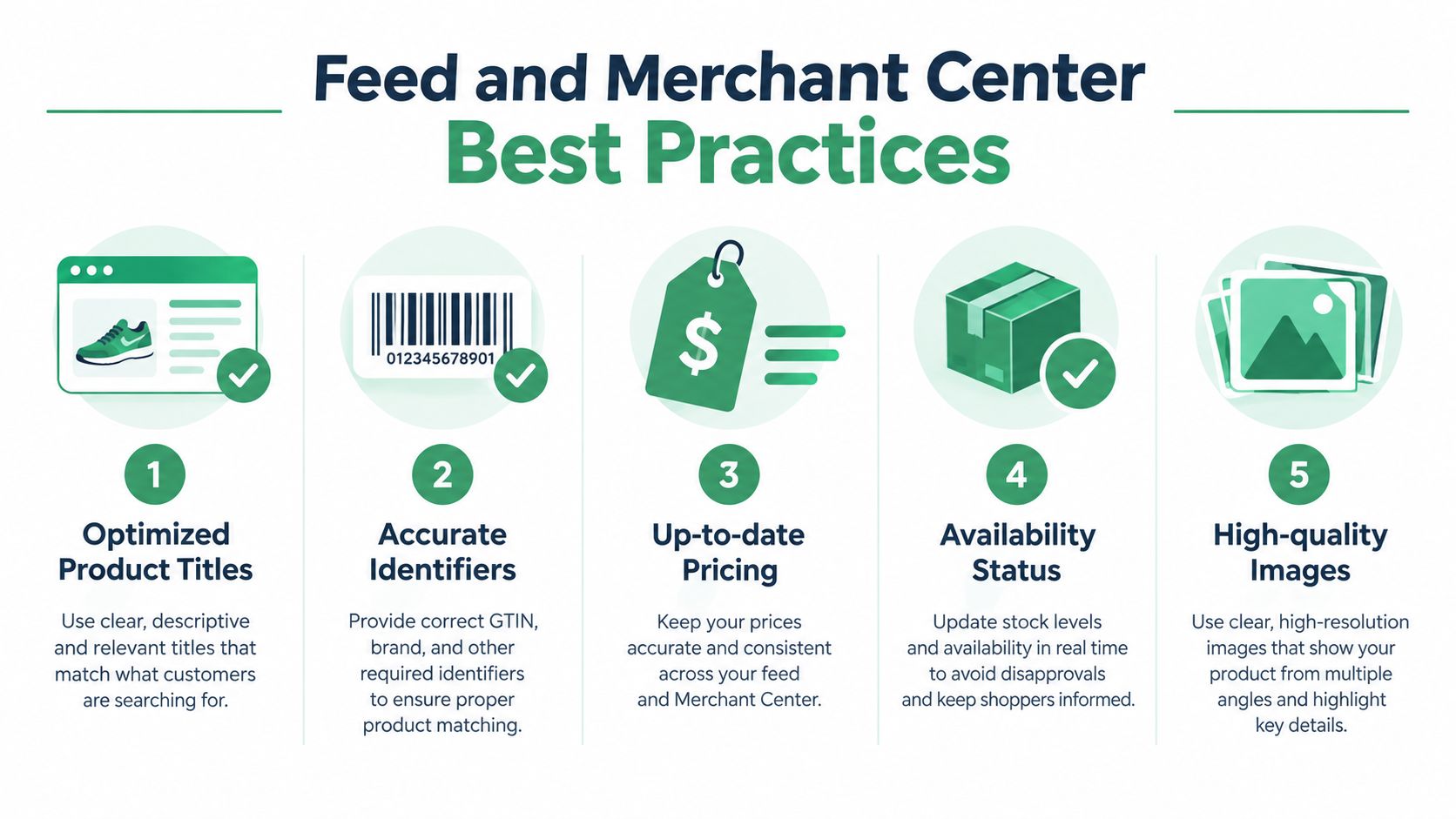
Start with the attributes that identify and qualify each product:
- Product titles: Put the most useful buying details near the beginning, such as product type, brand, material, size, or model. Write for the shopper's search language, not only your internal catalogue name.
- Identifiers: Keep brand, GTIN where applicable, MPN, and SKU relationships accurate. Conflicting identifiers can make product analysis and catalogue maintenance harder.
- Price: Keep the advertised price synchronized with the landing page and checkout. A mismatch can undermine trust and create eligibility issues.
- Availability: Update inventory status frequently enough to prevent ads from promoting products shoppers can't purchase.
- Images: Use clear primary images that show the product immediately. Supporting images can clarify colour, scale, or use without replacing the main product view.
Custom labels can add commercial structure. You might classify products as high margin, low margin, seasonal, clearance, or priority inventory. Those labels won't create profitability by themselves, but they make it easier to segment campaigns, budgets, and reporting by business purpose.
Audit before you optimize bids
Check Merchant Center diagnostics for disapprovals, warnings, price mismatches, missing identifiers, image problems, and availability conflicts. Then compare eligible products with products that have served ads. A product can be present in the catalogue yet receive no meaningful delivery, so don't assume catalogue inclusion equals advertising exposure.
Automate routine feed updates where possible, but keep ownership of the rules. A price feed that changes faster than your site, or an inventory rule that marks backordered items as available, can create problems at scale. For more ideas on optimising retail search clicks, focus on the connection between feed relevance and auction performance rather than treating the feed as a one-time setup.
Bidding and Attribution Strategies
Ecommerce bidding should answer a commercial question: How much purchase value can this click create at an acceptable cost? A generic conversion count can't answer that because it gives equal weight to transactions with different order values, margins, returns, and fulfilment costs.
Set the purchase as the primary conversion action and pass the actual transaction value into Google Ads. Review whether add-to-cart, checkout, or other micro-actions are assisting analysis without becoming the signal that Smart Bidding optimizes toward. For purchases, use a transaction setup that can distinguish separate orders and avoid duplicate value entering the account.
ROAS is conversion value divided by ad cost. The number only becomes meaningful when the value reflects the economics you care about. Suppose a store keeps 40% gross margin after fulfilment. A 3.0x revenue ROAS would produce 1.2x gross-margin return before overhead, so a revenue target that looks efficient in the interface may still be too weak for the business. This example illustrates why break-even ROAS must come from contribution margin, not from a generic industry target.
A benchmark compilation reported a median ecommerce Google Ads ROAS of 3.31 across more than 18,000 brands during 2025, but the comparison becomes unreliable when brands use different conversion definitions, attribution windows, return policies, tax treatment, or channel scopes (the ecommerce PPC benchmark compilation). Use benchmarks as orientation, not as a target you copy into a campaign.
Segment the result before changing the target
Separate performance by:
- SKU or product group: A campaign average can conceal weak products subsidized by strong ones.
- New and returning customers: Acquisition value and repeat-purchase value serve different decisions.
- Margin band: Revenue from a low-margin product shouldn't receive the same treatment as revenue from a profitable bundle.
- Campaign type: Search, Shopping, and Performance Max may report different mixes of intent and attribution.
- Attribution scope: Reported value can shift when windows and models change, so compare like with like.
Use the Google Analytics connection documentation to align analytics and advertising views, but choose one primary source for optimization decisions. Changing measurement systems during a test makes it difficult to identify whether performance changed or reporting changed.
Testing and Optimization Strategies
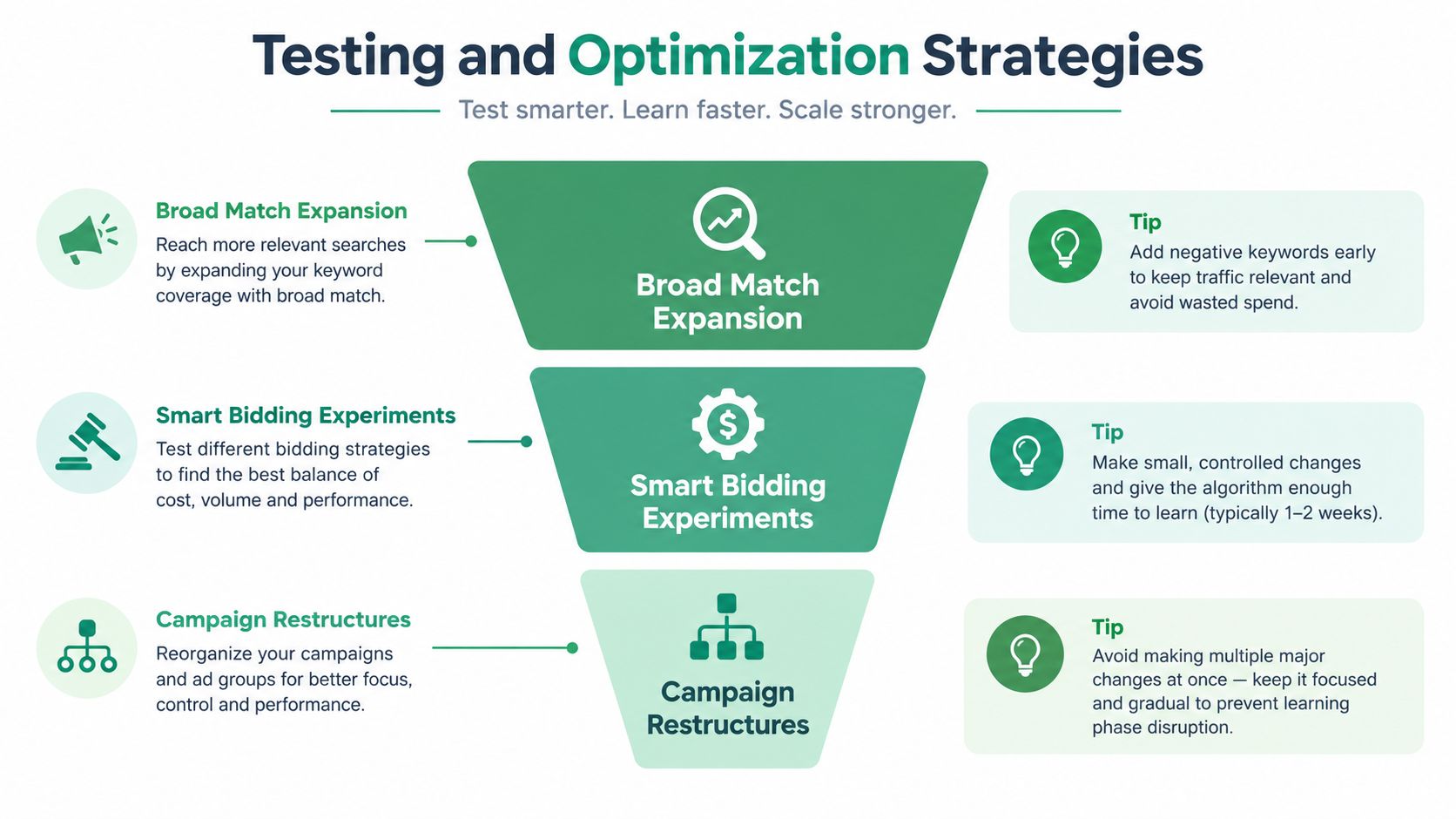
Automation works best when you give it room to discover demand and clear limits on what counts as success. A useful testing loop is simple: form a hypothesis, make a controlled change, observe search terms and product economics, then decide whether to expand, revise, or reverse the change.
Broad match is a good example. It can expose new query categories, but it can also attract irrelevant or commercially weak searches. Google reports that Smart Bidding Exploration with broad match and target ROAS generated 24% of new-customer conversions from newly discovered search terms, while those terms contributed 14% of total conversion value and cost 13% less than the campaign average in one ecommerce case study (Google's ecommerce case study). That result supports testing, not blind expansion.
Use a controlled loop
- State the hypothesis. For example, “Broad discovery can find profitable new-customer queries for high-margin products without reducing contribution margin.”
- Define the guardrails. Set the campaign, product group, budget boundary, target ROAS, and observation period before launch.
- Inspect the new demand. Review search terms by spend, purchase value, margin, product, and customer type.
- Control the leakage. Add negative keywords or restructure when intent diverges. Negative keywords should remove clear waste, not erase every unfamiliar query before it has a chance to prove value.
- Compare economics. Evaluate new-query ROAS against the campaign baseline, then check whether returns, discounts, and fulfilment change the result.
- Document the decision. Keep the winning change, revise the weak one, and reverse edits that damage profitability.
Campaign restructures need extra care because large changes can alter learning conditions and make the before-and-after comparison ambiguous. Test one meaningful variable at a time where possible. For practical bidding and creative tips, connect ad messaging to the same product promise and landing-page experience used in the test.
An AI-assisted workflow can speed up query reviews and proposed budget changes, but it should show explicit diffs and require approval before publishing. NotFair can connect AI agents to Google Ads for live account reads, search-term diagnosis, proposed negative keywords, budget changes, and approval-gated edits with logged history. Its Google Ads negative keyword workflow is relevant when you want faster review without allowing unexamined changes into production.
Conclusion and Next Steps
Profit-aware Google Ads management starts with a change in emphasis. Don't ask only which campaign generates the most conversions. Ask which SKU, query, customer type, and placement creates acceptable contribution after the costs that follow the sale.
Begin with the feed. Correct titles, identifiers, prices, availability, and images, then connect product identifiers to reporting. Next, verify that purchase values enter Google Ads accurately and that non-purchase actions aren't steering primary bidding. Segment performance by product and margin before setting or changing a target ROAS.
After that, test automation in contained steps. Let broad matching and Performance Max discover demand, but review the resulting queries and products against contribution economics. Add exclusions when intent or margin fails, and preserve a clear record of every material change.
A practical operating rhythm is straightforward: audit feed health, check delivery versus performance, review spend and value by SKU, inspect new search terms, and approve only changes with a defined hypothesis. ROAS becomes more useful when it reflects the business you're really running, not just the revenue Google Ads can attribute.
NotFair connects AI agents to live Google Ads, analytics, and CRM data for diagnosis, prioritized action lists, and approval-gated campaign changes. Visit NotFair to review search terms, budgets, negative keyword proposals, and reversible edits without giving uncontrolled automation the final say.