


Meta recommends sending the same web events through both the Meta Pixel and Conversions API with a shared event ID, not replacing the Pixel. That's the answer most popular advice gets wrong when it frames Conversions API vs Meta Pixel as a migration. You don't win by picking the newer pipe. You win by running a consented, deduplicated pipeline where the browser supplies click context, the server supplies confirmed outcomes, and Meta can tell they're the same conversion. If you can't do that reliably, adding server events won't fix measurement. It'll just give you more events to misread.
Table of Contents
- Why Replacing the Pixel Is the Wrong Question
- Conversions API vs Meta Pixel Side by Side
- Fidelity Latency and Privacy on Each Path
- When More Server Events Do Not Improve Ads
- Setups That Fit Ecommerce Leads and Offline Sales
- Build One Event ID Pipeline and Audit It Within a Week
Why Replacing the Pixel Is the Wrong Question
Say a shopper clicks an ad on an iPhone, browses on Safari, then pays through a checkout that blocks the thank-you page script. The Pixel sees the landing and product view but misses the purchase. The server sees payment capture but never saw the click. Neither view is complete, and deleting one doesn't complete the other.
The Meta Pixel is browser-side JavaScript that records page views, leads, and purchases, while Conversions API sends events from an advertiser's server, website platform, app, or CRM directly to Meta, and server events are processed for measurement, reporting, and optimization similarly to Pixel events, according to the Meta Conversions API documentation. The difference is transport, not authority. Meta doesn't trust a purchase more because it arrived from a server. It can only use what it can match, time correctly, and count once.
Why the architecture changed
Apple introduced App Tracking Transparency with iOS 14.5 in April 2021. A peer-reviewed economic study examining Facebook advertising after ATT found a sharp decline in reported conversions and an increase of nearly 50% in cost per conversion, effects that tracked iOS 14.5 adoption and persisted through the study period. The authors caution that part of that decline reflects measurement loss, because Facebook could no longer reliably log conversions from opted-out users. In other words, CPA didn't only get worse. The counter broke.
Meta responded with modeled and aggregated measurement, including Aggregated Event Measurement, and pushed advertisers toward redundant delivery. Pixel-only setups stay exposed to browser controls, app privacy restrictions, connectivity problems, page-load failures, and ad blockers. Conversions API can recover eligible server-side events and support later or offline outcomes, but it doesn't remove consent duties, attribution uncertainty, or matching limits.
My working default is simple. Keep the Pixel for browser context, add Conversions API for confirmed backend outcomes, and send both with one shared event ID. Then judge the setup by match quality, latency, consent, and deduplication, not by whether Events Manager shows a bigger number.
Conversions API vs Meta Pixel Side by Side
| Criterion | Meta Pixel | Conversions API |
|---|---|---|
| Where the event starts | Browser JavaScript on the page | Advertiser server, site platform, app, CRM, or messaging |
| When it is sent | As the page action happens | After the business confirms the outcome; can be later or offline |
| Typical losses | Ad blockers, browser limits, failed loads, connectivity, ATT opt-outs | Missing identifiers, consent gaps, retries, server or gateway failures |
| Strongest events | Page views with URL, fbp, and fbc | Confirmed purchases, qualified leads, subscriptions, refunds, CRM stages |
| Privacy posture | Exposed to browser and cookie controls | First-party consented data; still needs lawful basis and hashing |
| What improves delivery | Browser events Meta can match | Only matched server events; unmatched events may stay in basic counts |
| Double-count risk | Same event counted again if no shared ID | Same event_name plus event_id keeps one copy |
| Health check | Baseline browser volume | About 75% of matching Pixel event volume |
| Setup effort | Snippet or partner integration | Endpoint, hashing, event ID, and deduplication monitoring |
Meta recommends a redundant implementation, sending the same web events through both paths, because the Pixel is vulnerable to browser loading failures, connectivity problems, and ad blockers while server events originate from the advertiser's server, as the Meta help guidance on Pixel and Conversions API explains. That same guidance puts Meta's operational target for Conversions API event coverage at approximately 75% of corresponding Pixel event volume. Treat that as a diagnostic threshold. It doesn't promise incremental conversions, and chasing it by sending junk events defeats the point.
The rows that should change your decision
Start with where the event starts and when it's sent. If your real conversion happens in a CRM, a point-of-sale system, or after payment capture, the browser can't be your only source of truth. If your conversion is a page interaction that only exists in the session, the server has nothing authoritative to add.
Next, read typical losses. Teams blame ad blockers for every gap, then ship a server feed with missing identifiers and consent gaps and call it resilient. A server event that Meta can't match to a person doesn't steer delivery, even if it shows up in a total. That's why the delivery row matters more than the volume row.
The double-count risk row is where cheap setups get expensive. Without a shared event_name and event_id, one purchase can become two conversions, CPA looks better than it is, and you scale into waste. With a shared ID, redundancy becomes insurance instead of inflation.
If you're checking how your account is wired today, the NotFair Meta Ads connector documentation is a useful reference for what's readable at account level before you change anything. Before you choose a setup, mark the two rows in the table that are broken in your account right now. Buy the fix for those rows, not a blanket server migration.
Fidelity Latency and Privacy on Each Path
Fidelity isn't a higher event count. It's events that are matched, timely, and carrying the correct value. A feed can double in size and get worse if the new events are late, duplicated, or attached to no one Meta can recognize.
More events are not better events. A matched, on-time purchase with the right value beats ten server posts Meta can't connect to a click.
The decisive choice in Conversions API vs Meta Pixel isn't which pipe wins, it's whether you can build a trustworthy, consented, deduplicated pipeline, and Meta states that only matched events can support attribution and ad-delivery optimization while unmatched events may still appear in basic measurement, per the Meta Conversions API best practices. That single distinction answers when server-side tracking helps and when it merely produces more unmatchable data.
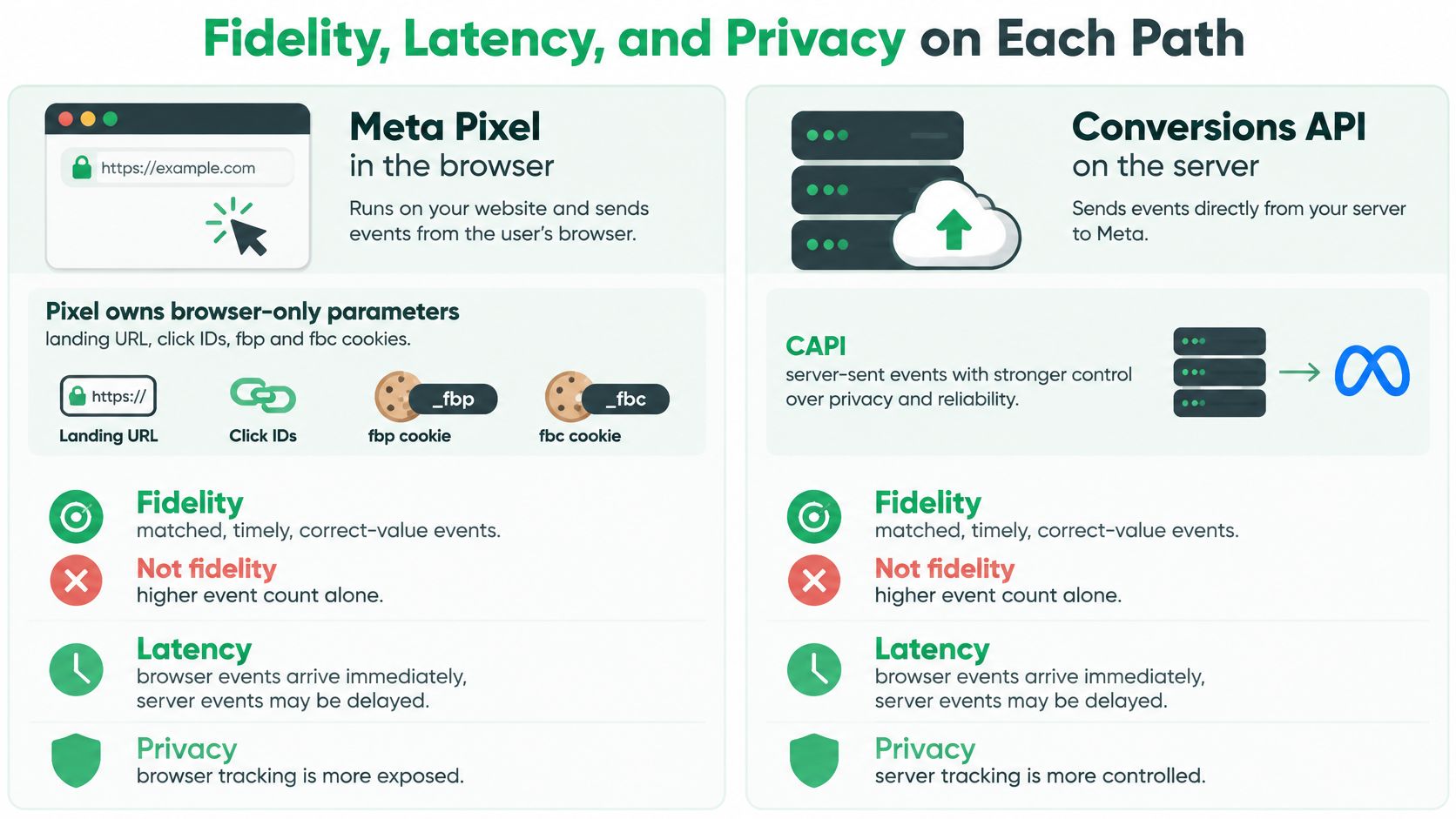
What the browser still owns
The Pixel holds parameters that exist only in the client context. The landing URL, click IDs, and the fbp and fbc cookies are captured at the moment of the visit. If the script never loads, those parameters are gone. A server can't reconstruct a click ID it never received, no matter how good the order data is.
That matters for matching. Browser context plus a confirmed order gives Meta more to join together than either half alone. I wouldn't strip the Pixel from a site that still gets consented browser traffic just because a server feed exists.
What the server can add, and what it cannot invent
Conversions API can restore a purchase the browser never sent. It can attach order value, currency, and hashed email or phone that your payment system already holds, which often helps match quality. It can also send CRM, app, messaging, and offline conversions the browser never sees.
It can't invent identifiers, consent, or timing. Send a server purchase with a weak identifier set and it may land in basic measurement without helping optimization. Send it after a refund without flagging the refund and you've trained delivery on revenue you returned.
Latency and privacy do not flip on the server
A Pixel purchase is available as the thank-you page loads. A server purchase should wait for payment capture, so a small delay is correct. An overnight batch is not. Offline and CRM events are supposed to be late because the outcome is late. Web checkout events shouldn't be, or they miss the window where they'd help learning.
Privacy doesn't become solved because data moves server to server. Consent still governs whether you may send an identifier, fields should be minimized and hashed where required, and regional consent setups create a common failure. The banner suppresses browser events for non-consented users while a plugin keeps posting server events for the same people. Compare browser and server counts, match quality, event age, and consent state by market before you call the server feed more accurate.
When More Server Events Do Not Improve Ads
Start with the failure that flatters you. A checkout posts a purchase when the order is created, the webhook retries, and your integration posts it again with a fresh ID. Reported conversions rise, CPA falls, and the account looks healthier while the bank account doesn't. Server-side tracking improves optimization only when the new events are matchable, on time, and equal to the business outcome.
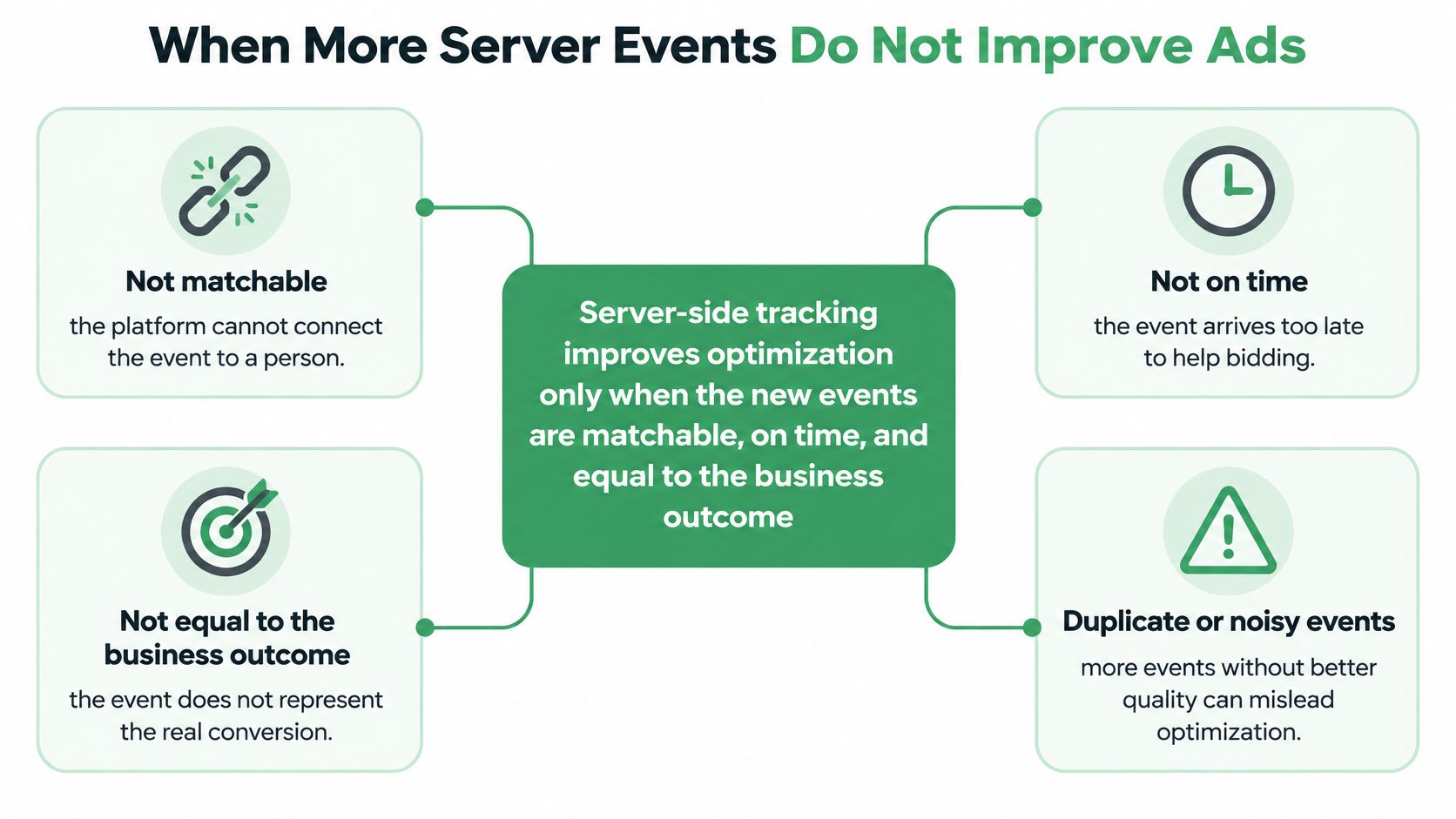
Four ways volume misleads delivery
- Duplicate purchases: Order creation plus a retried webhook counts one sale twice, so bids chase a CPA you never achieved.
- Unqualified leads: Sending every form submission as the conversion teaches delivery to buy cheap form fills, including spam and job seekers.
- Late batches: Yesterday's orders uploaded overnight can patch reporting, but they arrive too detached from the click to help learning much.
- Wrong values: Refunds posted as positive purchases, or values that disagree with the payment processor, train value bidding on money you didn't keep.
Each case has the same shape. The event total goes up, someone screenshots Events Manager, and optimization gets worse underneath. Unmatched events can still appear in basic counts, so a rising total is compatible with zero improvement in delivery.
Events that are worth adding
Contrast those with outcomes the Pixel can't supply. Captured payments after the processor confirms, subscription starts, and renewals that happen without a browser session are authoritative server events. Qualified pipeline stages that sales has accepted tell delivery what a good lead looks like, not just what a form fill looks like. In-store and messaging conversions belong on the server path because there's no page to fire from.
Notice what these share. The business system, not the browser, is the source of truth, and the event means money or a sales-accepted step toward money. If you can't say that sentence about an event, don't optimize to it yet.
If match quality is poor, latency is high, or values disagree with the payment system, pause that server event for optimization and keep it in diagnostics until it reconciles.
That pause isn't failure. It's how you stop a noisy feed from setting budgets. I'd rather optimize on fewer, reconciled conversions than scale against a server feed that's partly fiction.
Setups That Fit Ecommerce Leads and Offline Sales
| Situation | Run | Why this mix |
|---|---|---|
| Ecommerce checkout | Pixel plus CAPI on captured payment | Recovers blocked purchases and keeps browser click context |
| Lead gen with a CRM | Pixel on the form, CAPI on the qualified stage | Stops delivery from optimizing to cheap unqualified submits |
| Subscriptions | Both, with start, renew, and refund as distinct events | Avoids treating a refund or retry as a new customer |
| Offline or messaging sales | CAPI or offline events, Pixel only for the site | The browser never sees the outcome |
| App plus web | Web Pixel plus CAPI for app and web events in one dataset | Covers outcomes outside a single browser session |
| Low-volume content site | Pixel first, add CAPI when volume justifies it | Server work will not create matchable conversions that do not exist |
| Multi-market agency | Both, plus per-market overlap and CRM checks | Plugins and consent modes do not behave the same everywhere |
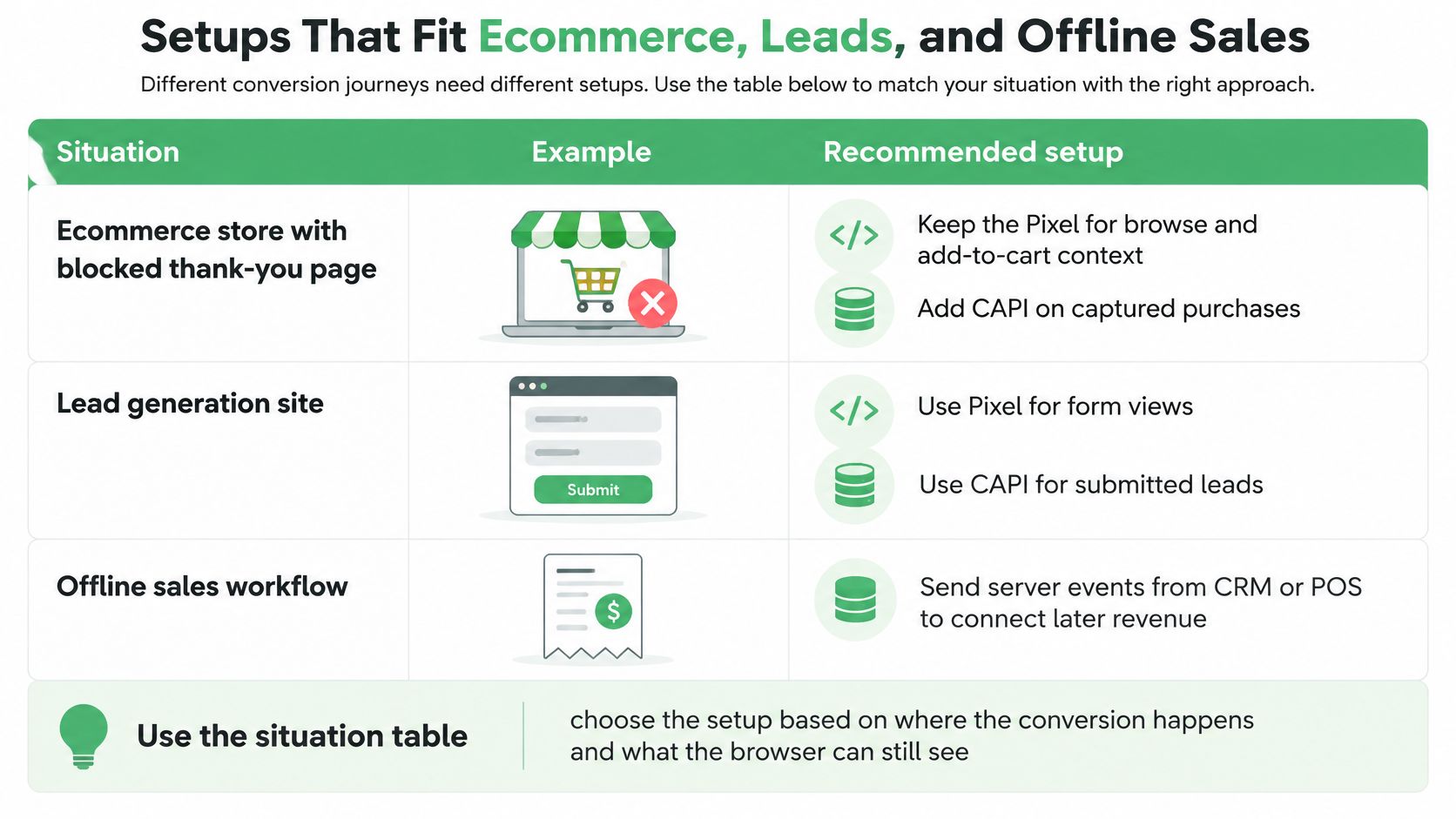
Three accounts, three different mixes
Say an ecommerce store loses purchases because the thank-you page is blocked or abandoned after payment. Keep the Pixel for browse and add-to-cart context, then send the purchase through Conversions API on captured payment with one purchase ID shared by both paths. Send refunds later as their own events. Don't post a second purchase to correct the first one.
Say a B2B team optimizes on raw form submits and sales rejects most of them. The Pixel can record the submit for diagnostics and funnel analysis. Conversions API should send the CRM stage sales accepts, tied to the same lead ID, with a value only if that pipeline value is real and consistently defined. You're not hiding leads from Meta. You're telling it which leads were worth buying.
Say a retailer sells on the site, in a shop, and through WhatsApp conversations. The browser sees only the first of those. Server or offline events carry the shop and messaging outcomes, while the site Pixel stays for web traffic and remarketing pools. Forcing those sales through a page event would be fabrication, not tracking.
A low-traffic content site sits at the other end. Pixel first is fine until conversion volume justifies building and monitoring a server pipe. The shared rule under every row is blunt. Pixel alone is fragile, Conversions API alone drops client context, and both without a shared ID is the most expensive option because it looks successful.
Build One Event ID Pipeline and Audit It Within a Week
Build the pipeline as one procedure, not as a Pixel task and a separate server task owned by different people. Running both systems means the same conversion can arrive from the browser and the server, and Meta requires a shared deduplication key, normally the same event_name and event_id, so it retains one event rather than double-counting, according to the Meta deduplication help guidance. Everything below exists to protect that key.
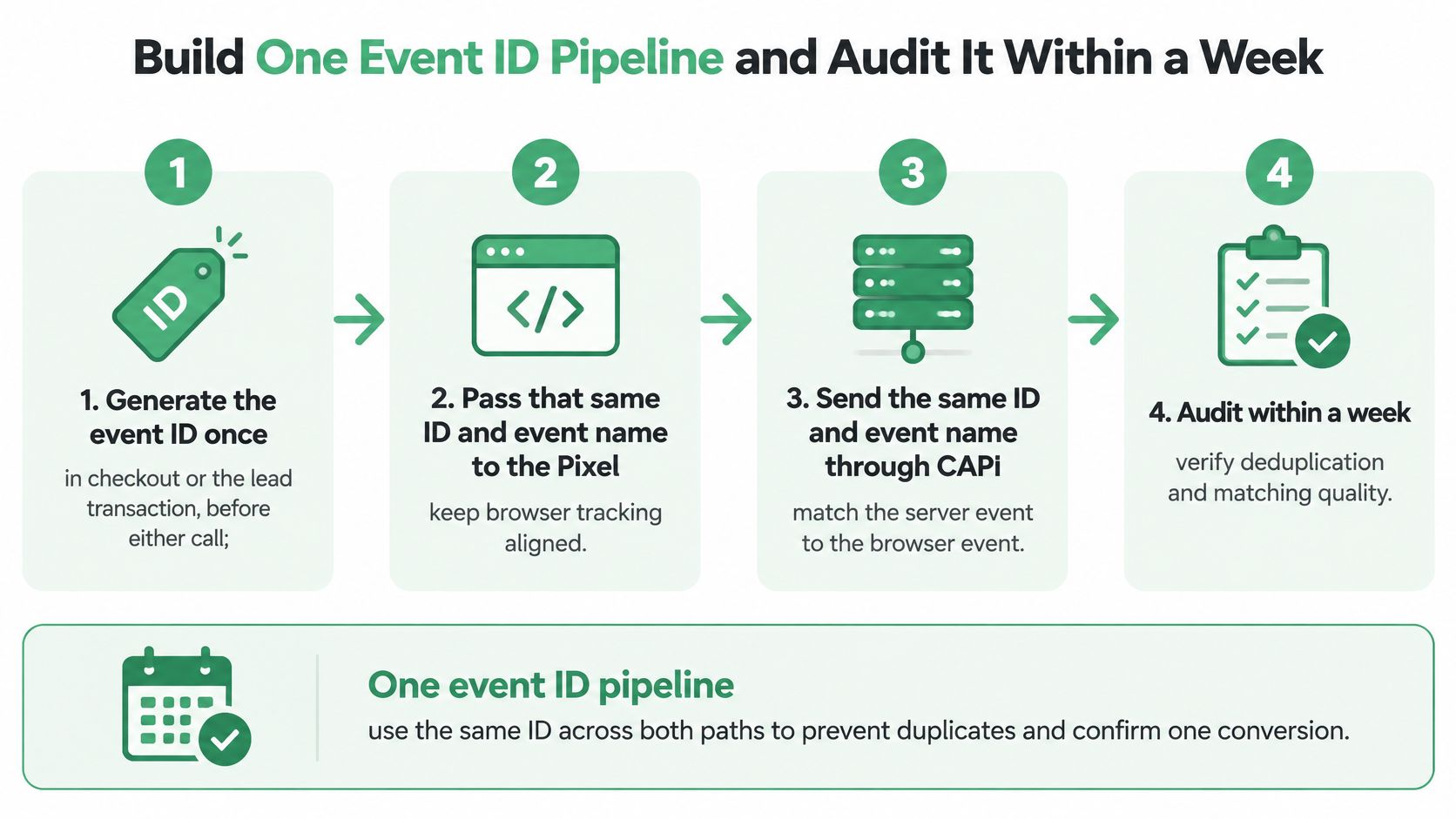
The ordered setup
- Generate the event ID once. Create it in the checkout or lead transaction, before either call fires, and store it with the order or lead record.
- Pass it to the Pixel unchanged. Send the same ID and event name with the browser event so the client copy carries the key.
- Send Conversions API after confirmation. Post the server event only when the backend confirms payment capture or the qualified stage, reusing the stored ID instead of minting a new one.
- Add lawful customer fields. Include only identifiers you collected with a lawful basis, normalized and hashed where required, plus value and currency that match the processor.
- Verify the browser still fires. Confirm the Pixel sends its browser-context events, then read Events Manager for coverage, deduplication-key adoption, and match quality together.
For Shopify, the practical wiring of checkout events, webhooks, and server posts is where most ID mistakes happen, so a worked walkthrough of server-side tagging for Shopify stores is worth reading before you touch a live checkout. Whatever your stack, don't let a plugin generate IDs independently on each path. That's deduplication in name only.
How duplication actually hides
A missing ID is the obvious case. One purchase arrives twice with nothing to join them, reported conversions inflate, and CPA looks artificially low. You'll scale spend into that error if nobody reconciles against orders.
An ID regenerated on retry does the same damage. Your server code creates a fresh ID every time a webhook refires, so Meta sees distinct events. Generate the ID from the transaction, persist it, and make retries reuse it. Idempotency isn't polish here. It's the whole mechanism.
An ID reused across orders flips the error. A template variable that doesn't update, or a test ID left in production, makes legitimate purchases look like duplicates of one another. Meta suppresses real conversions and delivery learns from too few sales.
The fourth case is subtler. Browser and server events carry matching names but different values or timestamps, perhaps because the Pixel sent the cart total and the server sent the captured amount after a discount code settled. They may deduplicate and still be wrong. Deduplicated is not the same as correct.
Audit rule: Never read coverage alone. A high server event count with weak deduplication-key adoption is a warning, not a win.
The one-week audit
Within the first week, pull a sample of purchases or qualified leads and reconcile them against the payment processor or CRM. Check that each sampled outcome appears once, with the same value, a sensible timestamp, and a consent state you'd defend. Agencies running several markets should do this per market, because plugins, gateways, and consent banners don't behave identically everywhere, and one Events Manager score can hide a broken region. Tools such as NotFair, which connects AI agents to ad and analytics accounts for live read access and approval-gated changes, are one option for pulling account data into that review alongside Events Manager itself.
Cross-check the same conversions in your analytics before you trust any single platform's count, and the NotFair Google Analytics connector documentation outlines what GA4 data can be read alongside ad account data for that comparison. Expect the numbers to differ by attribution model. Don't accept differences you can't explain by model, timing, or consent.
Finish with a decision per event, not a vibe. Events that reconcile can inform CPA targets and bidding. Events that don't stay in diagnostics until they do, however good they make the dashboard look. That's the honest resolution of Conversions API vs Meta Pixel. Run both, join them with one ID, and only optimize on what survives reconciliation.
If your Pixel and server feed don't reconcile yet, NotFair can help you diagnose the account with live Meta Ads and GA4 reads in one session, then draft fixes behind approval gates with diffs and one-call undo before anything changes. Start by connecting your accounts and asking which conversion events are matched, duplicated, or missing, so your next budget move rests on events you'd defend in the CRM.