Start now

Comparison

NotFair vs the official Google Ads MCP

By Yuting Zhong, co-founderChecked Nov 14, 2026We make NotFair.

Google's official Ads MCP is free, but you host it yourself. It can read your account and add assets and labels. It can't change campaigns, budgets or bids. NotFair is hosted and can, after you approve each change.

Choose NotFair if

  • You want an AI agent to change campaigns, bids, budgets, keywords or ads.
  • You'd rather sign in with Google than set up a Cloud project.
  • You want to see each change before it runs, with undo on supported changes.
  • You switch between Claude, ChatGPT and Cursor.

Choose Google's official MCP if

  • Reporting, plus asset and label edits, is all you need.
  • You already have a Google Cloud project with the Ads API turned on.
  • You want free, open-source (Apache-2.0) software you run yourself.

At a glance

Google Ads tools

NotFair
121
Google official
7 (v0.0.6)

Who runs it

NotFair
NotFair (hosted)
Google official
You (your laptop or Cloud Run)

Change campaigns, budgets, bids

NotFair
Yes, after you approve
Google official
No

Price

NotFair
Free for 7 days, then 300 operations/mo free or Growth $99/mo
Google official
Free software; Google Ads API quotas apply

What approval looks like

NotFair shows the change and waits

  1. Connect your accounts

  2. Ask, review, approve

  3. See the result

    Change applied, logged with who approved it.

Demo account. NotFair shows the change and waits for your OK.

Comparison

NotFair and Google official

Hosting

NotFair

YesHosted, nothing to install
More

Hosted remote MCP at https://notfair.co/api/mcp/notfair. Nothing to install.

Google official

NoSelf-host: local or Cloud Run
More

You run it yourself, locally or on Cloud Run. It is not a Google-hosted end-user MCP.

Sign-in

NotFair

YesSign in with Google
More

Sign in with Google. No customer developer token. No customer Cloud project.

Google official

n/aYour Cloud project, Ads API and OAuth
More

A Google Cloud project with the Google Ads API enabled, plus OAuth 2.0 or application default credentials. Developer tokens sunset 9 September 2026. Production access needs an approved Cloud-project access level.

Tools

NotFair

Yes121
More

121 Google Ads tools, counted from NotFair's live tool list, checked by an automated test.

Google official

Limited7: 3 read, 4 edit
More

7 tools in v0.0.6, documented 2026-11-13: list_accessible_customers, search, get_resource_metadata, create_asset, upload_video_asset (local only), manage_labels, manage_label_associations.

Campaign, budget, bid changes

NotFair

YesAfter you approve
More

Campaigns, bids, budgets, keywords, ads, assets, and more, after you approve each change.

Google official

NoCannot change them
More

Cannot create, modify, pause, or enable campaigns, ad groups, ads, budgets, or bids.

Image assets

NotFair

YesUpload PNG/JPEG and link them
More

Upload supplied PNG/JPEG assets and link, unlink, or replace supported serving relationships.

Google official

LimitedCreate image assets; can't link to campaigns
More

create_asset can create IMAGE assets (local path, or base64 on remote HTTP, up to 20 MB). The official server cannot link assets to campaigns, ad groups, or asset groups.

Video assets

NotFair

YesUses existing YouTube video IDs
More

Use existing YouTube video IDs for supported campaign and asset-link workflows; source-file upload to YouTube is not provided.

Google official

LimitedUploads to YouTube (local only); can't attach
More

upload_video_asset uploads a local video file to YouTube in local mode only. create_asset can then create a YOUTUBE_VIDEO asset from that ID. Remote HTTP cannot use upload_video_asset. The official server still cannot attach that asset to a campaign.

Safety

NotFair

YesExact change, your OK, log, undo where supported
More

Shows the exact change, waits for your OK, logs who approved it, and offers undo on supported changes.

Google official

LimitedConfirms its 4 edit tools; optional read-only mode
More

Asks you to confirm its 4 edit tools. Optional strictly read-only mode. Confirmation is a checksum of request parameters and does not replace access control.

Manager accounts

NotFair

YesFinds child accounts; pick per call
More

Finds child accounts under a manager account. You pick the account per call.

Google official

LimitedSet login customer ID yourself
More

Lists directly accessible customers. MCC child access uses GOOGLE_ADS_LOGIN_CUSTOMER_ID or per-call login_customer_id. You operate the runtime.

Works in

NotFair

YesClaude, ChatGPT, Codex, Cursor, OpenClaw, Hermes
More

Claude, ChatGPT, Codex, Cursor (hosted URL add; no Cursor plugin), OpenClaw, Hermes.

Google official

YesAny MCP client you can point at your server
More

Any MCP client that can run a local server or call a self-hosted HTTP endpoint.

We read Google's developer guide (updated Nov 13, 2026) and the v0.0.6 release on GitHub, and counted NotFair's tools from our live tool list. We didn't run Google's edit tools on a live account.

  1. Google Ads MCP developer guide
  2. googleads/google-ads-mcp
  3. v0.0.6 release
  4. NotFair Google Ads MCP
  5. NotFair pricing
  6. Google Ads MCP servers compared

Setup

Setup, side by side

NotFair

  1. 1Sign in with Google
  2. 2Ask in Claude or ChatGPT
  3. 3Approve the change

Google official

  1. 1Create a Google Cloud project
  2. 2Turn on the Ads API
  3. 3Set up OAuth
  4. 4Run the server locally or on Cloud Run
  5. 5Point your MCP client at it

In Claude

What it looks like in Claude

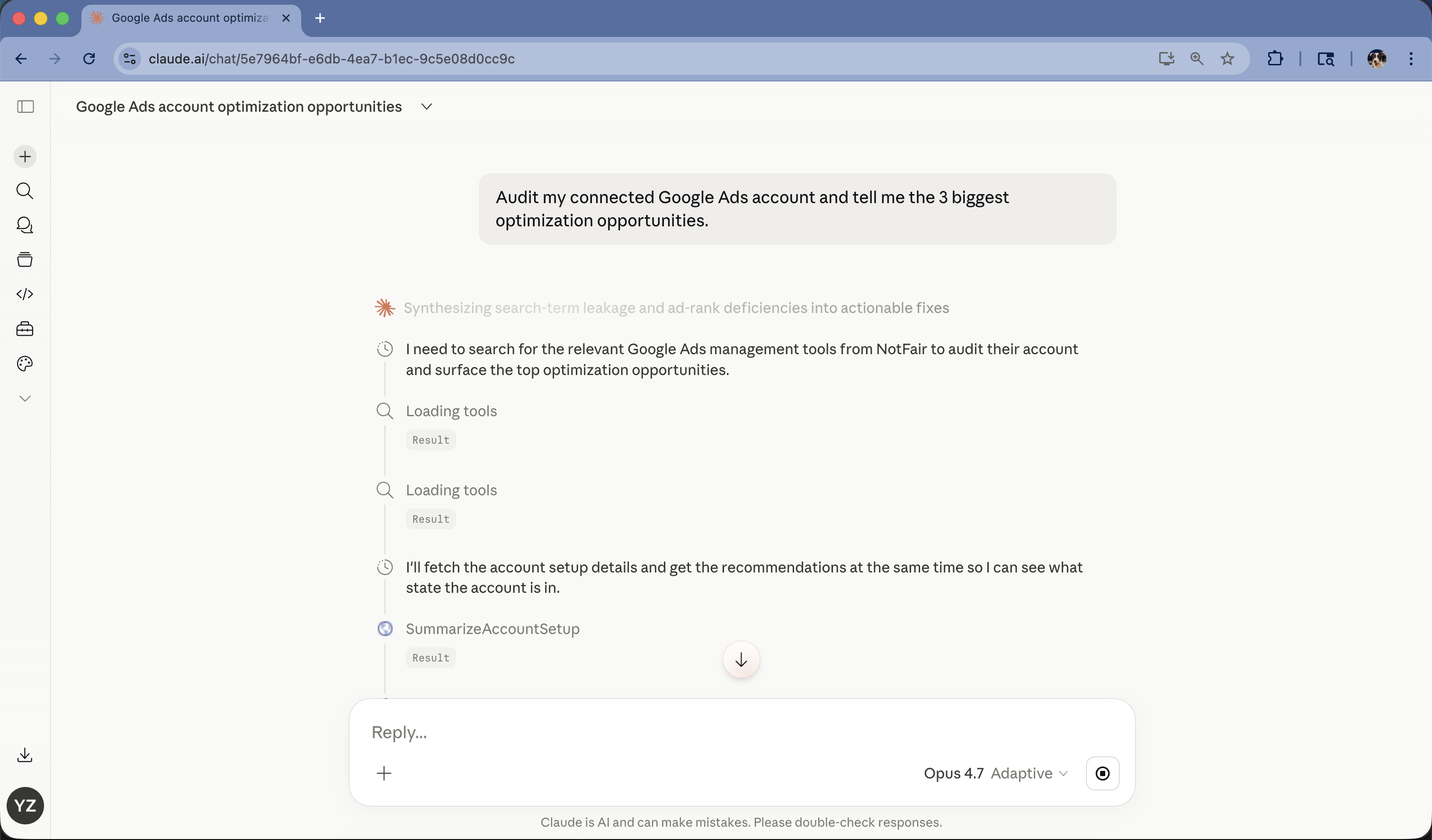
NotFair tools running in claude.ai on a Google Ads audit prompt
NotFair tools in claude.ai on "Audit my connected Google Ads account". Connector setup screenshot, 28 Apr 2026.
NotFair Google Ads setup in Claude. Video on this site as of Nov 14, 2026.

NotFair vs official Google Ads MCP FAQ

What is a Google Ads MCP server?

It lets an AI client such as Claude, ChatGPT, or Cursor read a Google Ads account and, where allowed, apply changes. NotFair is hosted. Google's official server is software you run yourself.

What is the official Google Ads MCP?

Google publishes a first-party Ads MCP you run yourself, locally or on Cloud Run. Version 0.0.6 has 7 tools: 3 reads and 4 edit tools for assets and labels. Developer tokens sunset on 9 September 2026. The developer guide was last updated 13 November 2026 UTC.

Can Google's official Ads MCP change campaigns, budgets, or bids?

No. It cannot create, modify, pause, or enable campaigns, ad groups, ads, budgets, or bids. Edit tools are limited to standalone assets, local video upload, and labels. It also cannot link assets to campaigns.

How many tools does each server expose?

NotFair has 121 Google Ads tools. Google's official server has 7 in version 0.0.6. NotFair's count is from its live tool list, checked by an automated test. Google's 7 are 3 reads and 4 asset or label edits, as of 13 November 2026.

Do I need a Google Ads developer token?

Not for NotFair. Hosted sign-in with Google is enough. Google's official server also no longer uses a developer token after 9 September 2026. You still need a Cloud project with the Google Ads API enabled.

Can either server upload images and videos?

NotFair can upload PNG or JPEG files and link them. Google's official server can create image assets but cannot link them. For video, NotFair uses existing YouTube video IDs. Google's official local mode can upload a video to YouTube, but still cannot attach it to a campaign.

When is Google's official Ads MCP enough?

When reporting plus asset and label edits is all you need, and you will run the server yourself. You also need a Google Cloud project with the Ads API turned on. If an agent must change campaigns, bids, or budgets, use NotFair.

What does NotFair cost?

Free includes 7 unlimited days, then 300 MCP operations per month. Growth is $99/mo monthly, or $950/yr (~$79/mo) annually with unlimited operations. No credit card to start. Google's official MCP is free software you self-host. Ads API quotas still apply.

Next

Connect once. Approve only what you understand.

The free plan includes 7 days of unlimited access, then 300 MCP operations each month. Growth is $99/mo monthly, or $950/yr (~$79/mo) annually. No credit card.

https://notfair.co/api/mcp/notfair