

MCP is an open standard that lets AI assistants connect directly to external business tools and data sources, replacing fragmented integrations with a single universal protocol. It was publicly introduced on November 25, 2024, and by late 2025 the ecosystem had grown to more than 10,000 active public MCP servers.
A performance marketer rarely works in one system. A campaign diagnosis might begin in Google Ads, continue in Google Analytics 4, require a search query check in Google Search Console, and end with a lookup in a CRM. Meanwhile, the AI assistant that could connect those signals is often sitting in a separate chat window with no live account access.
That gap is what the Model Context Protocol, or MCP, addresses. Instead of treating every AI application and business platform as a bespoke integration project, MCP creates a shared way for AI assistants to discover, read, and use external tools and data. For marketing operations, that makes MCP more than a developer convenience. It becomes an infrastructure layer, and a governance boundary, between an AI agent and live advertising spend, customer records, and campaign controls.
Table of Contents
- Understanding Model Context Protocol for Modern Workflows
- The Architecture and Components of MCP
- Connecting AI Agents to Advertising and CRM Systems
- Security Safeguards and Trust Boundaries
- Real-World Examples for Performance Marketers
- Evaluating Hosted MCP Solutions for Agencies
- Getting Started with Your First MCP Integration
Understanding Model Context Protocol for Modern Workflows
Consider a common Monday morning problem. Cost per lead is rising, but the reason isn't obvious from a single dashboard. Google Ads shows spend and conversions. Search terms reveal increasingly broad queries. GA4 shows a change in landing-page behavior. The CRM contains lead quality information that may explain why conversion volume looks stable while sales outcomes weaken.
Without an integration layer, someone exports reports, copies figures into a spreadsheet, switches between browser tabs, and summarizes the results in an AI chat. By the time the analysis is complete, the data may already be out of date. The workflow is slow because the marketer, not the system, has to stitch together every context.
MCP changes the interaction model. An AI assistant can use an MCP server to request permitted information from connected systems at query time, then combine the returned context into one analysis. The assistant might identify search-term drift, compare it with conversion data, and surface related CRM outcomes without asking the operator to prepare a series of manual exports.
The core definition is straightforward: MCP is an open protocol for connecting AI applications to external data sources and tools. Anthropic publicly introduced it on November 25, 2024, describing it as a universal protocol intended to replace fragmented, one-off integrations with a single standard. The initial release included the protocol specification and SDKs, local MCP server support in Claude Desktop, and an open-source repository of MCP servers. Anthropic's launch announcement provides the historical context for that transition from product idea to public ecosystem standard.
Why standardization matters to marketing teams
Traditional integrations often bind one AI client to one vendor API. That can work for a single workflow, but the maintenance burden grows as teams add more platforms, accounts, and AI clients. MCP gives the client and the connected server a common interface, so the marketing team can focus on the business workflow rather than rebuilding the connection for every conversational tool.
That doesn't mean MCP replaces APIs. An MCP server usually sits above APIs, databases, files, or other systems and presents selected capabilities in a format an AI host can discover and call. The server still needs careful implementation, authentication, permissions, and error handling.
Practical rule: Treat MCP as the controlled access layer around your marketing systems, not as permission for an AI assistant to browse everything your company owns.
The important question isn't only “what is model context protocol?” It's also “what should this assistant be allowed to know or change?” A useful practical overview of MCP for marketing workflows can help teams connect the protocol concept to campaign diagnosis, reporting, and operational decisions.
The Architecture and Components of MCP
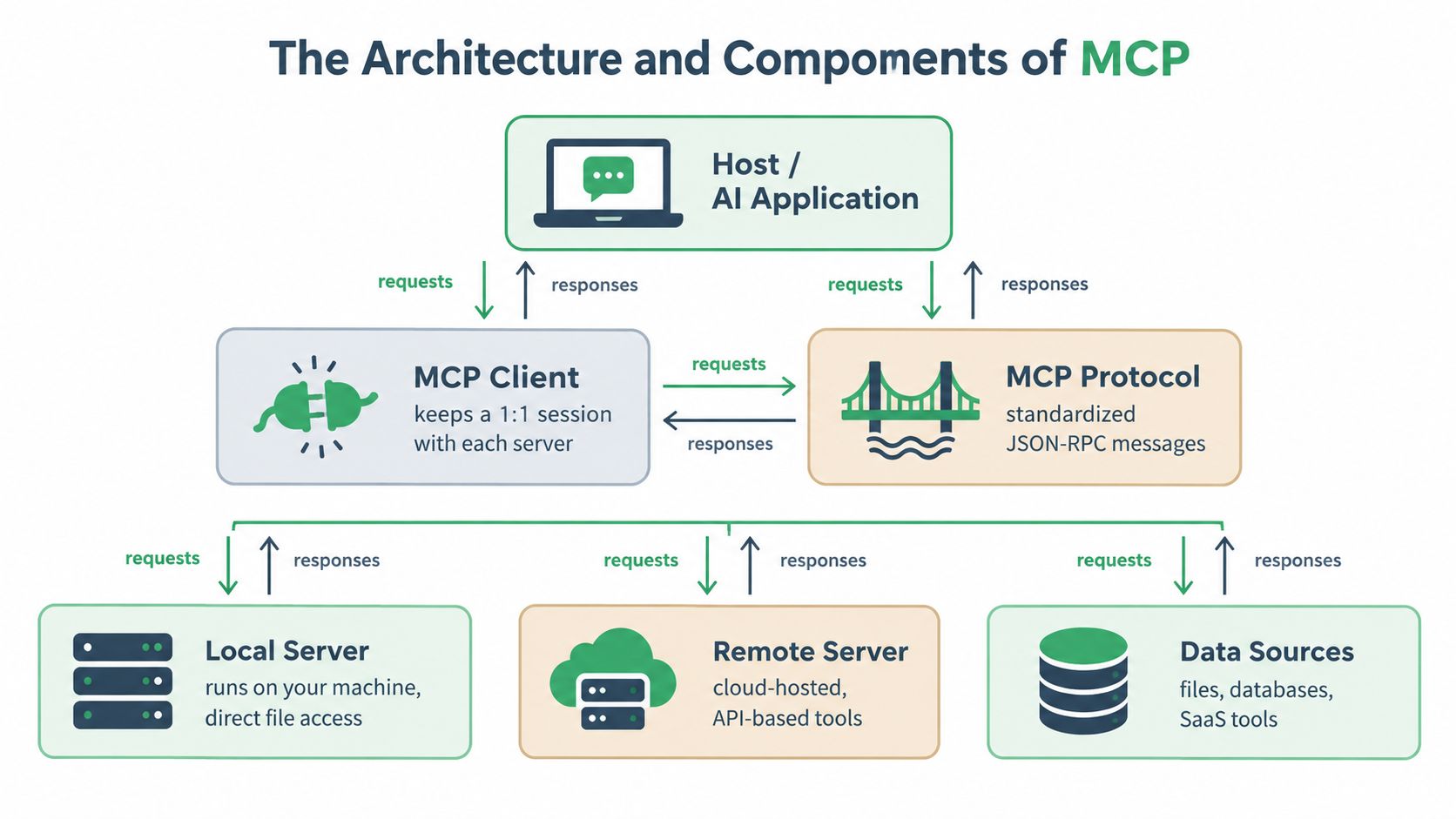
MCP uses a host, client, and server architecture. For a marketing operator, the easiest analogy is an office with a coordinator, dedicated account representatives, and specialist systems.
The host is the AI application where the user interacts with the model. It owns the conversation and coordinates the work. The client runs inside that host and maintains a separate connection to each MCP server. The server exposes approved tools and resources, then communicates with the underlying system, such as an advertising platform, CRM, database, or local file store.
A single host can work with several client instances at once. One client might connect to an advertising server, another to analytics, and another to a CRM server. Each client keeps a one-to-one session with its server, while the host orchestrates the resulting context for the model.
How requests move through the system
MCP's core protocol is JSON-RPC-based. In practical terms, the client sends a structured request, the server validates and processes it, and the result returns in a structured response. Capability negotiation allows the connected parties to identify what they support before the workflow proceeds.
That separation matters when a conversation becomes long or involves several tools. Each request carries its own protocol version and capabilities, which helps reduce hidden state drift across extended agent sessions. The host can ask one server for data, interpret the result, and then request a related operation from another server without forcing every system to share an internal state model.
The protocol supports two main transport modes:
- Local communication:
stdioconnects an AI host to a local process, which suits development environments or tools running on the same machine. - Remote communication: Streamable HTTP connects clients to hosted servers and can support streaming responses. Remote deployments can use standard authentication methods such as bearer tokens and API keys.
The transport choice reflects the operating model. A developer testing a local data utility may prefer stdio. An agency connecting multiple client accounts to a hosted advertising service will generally need remote communication, centralized authentication, and operational monitoring.
Tools, resources, and operational boundaries
A server can expose callable tools, read-only resources, and reusable prompts. A tool might retrieve campaign data or prepare a proposed budget change. A resource might provide a restricted report or database view. The distinction is useful because reading a defined resource isn't the same as granting an agent unrestricted write access.
Teams building or evaluating servers should inspect the capability surface, input schemas, returned data, and failure behavior. For practitioners who want to understand observability around agent-connected systems, analytics for coding agents offers useful context on measuring tool-driven workflows, even though the same operational thinking applies to marketing agents.
The protocol specification is actively versioned rather than frozen. The published specification includes dated releases such as 2025-03-26 and 2025-06-18, with later documentation describing a 2026-07-28 release and changes including a stateless core, multi-round-trip requests, header-based routing, cacheable list results, authorization hardening, and an extensions framework. The MCP specification documentation is the right place to verify implementation details before deploying a production connector.
Connecting AI Agents to Advertising and CRM Systems
The useful marketing workflow begins with read access. An agent shouldn't start by changing bids or pausing campaigns. It should first retrieve the evidence needed to explain what is happening.
A connected setup can expose selected data from Google Ads, Meta Ads, GA4, Google Search Console, and CRM systems such as GoHighLevel. The exact tools depend on the server implementation and permissions, but the operating pattern is consistent:
- The marketer asks a question in an AI client.
- The host determines which connected capabilities are relevant.
- The MCP client sends structured requests to the permitted servers.
- The servers retrieve current data from the underlying systems.
- The host combines the responses and presents an analysis.
- The marketer decides whether a proposed action should be approved.
Suppose the question is, “Why is lead efficiency deteriorating in the highest-spend search campaign?” The agent can inspect search terms, keyword behavior, conversion signals, landing-page analytics, and CRM pipeline context. It can then separate a traffic-quality problem from a tracking problem or a sales-quality problem.
Live reads versus static reporting
A CSV export is useful for a snapshot, but it creates a second copy of the data that can become stale. A live MCP read lets the agent query the connected system when the question is asked. That distinction is especially important for campaign diagnostics, where search terms, spend, learning status, conversion counts, and pipeline outcomes can change while a report is being prepared.
The agent also needs boundaries. A read tool should return only the fields and accounts required for the diagnostic. If a marketer wants to compare paid search with organic demand, the server can provide relevant advertising and Search Console data without exposing unrelated customer records.
Connecting an AI client to advertising accounts should therefore be approached as a staged operating model. Begin with read-only diagnosis, validate the quality of the returned context, and only then consider approval-gated actions. Guidance on connecting Google Ads to ChatGPT illustrates the kind of client-to-platform workflow teams are beginning to operationalize.
The result isn't just faster reporting. It changes the unit of work from “open four dashboards and summarize them” to “ask one business question, gather the permitted evidence, and review the recommended next step.”
Security Safeguards and Trust Boundaries
Connecting an AI agent to a marketing platform isn't automatically safe because the connection uses a standard. MCP can make access more consistent, but an MCP server may also expand what the AI client can see and do.
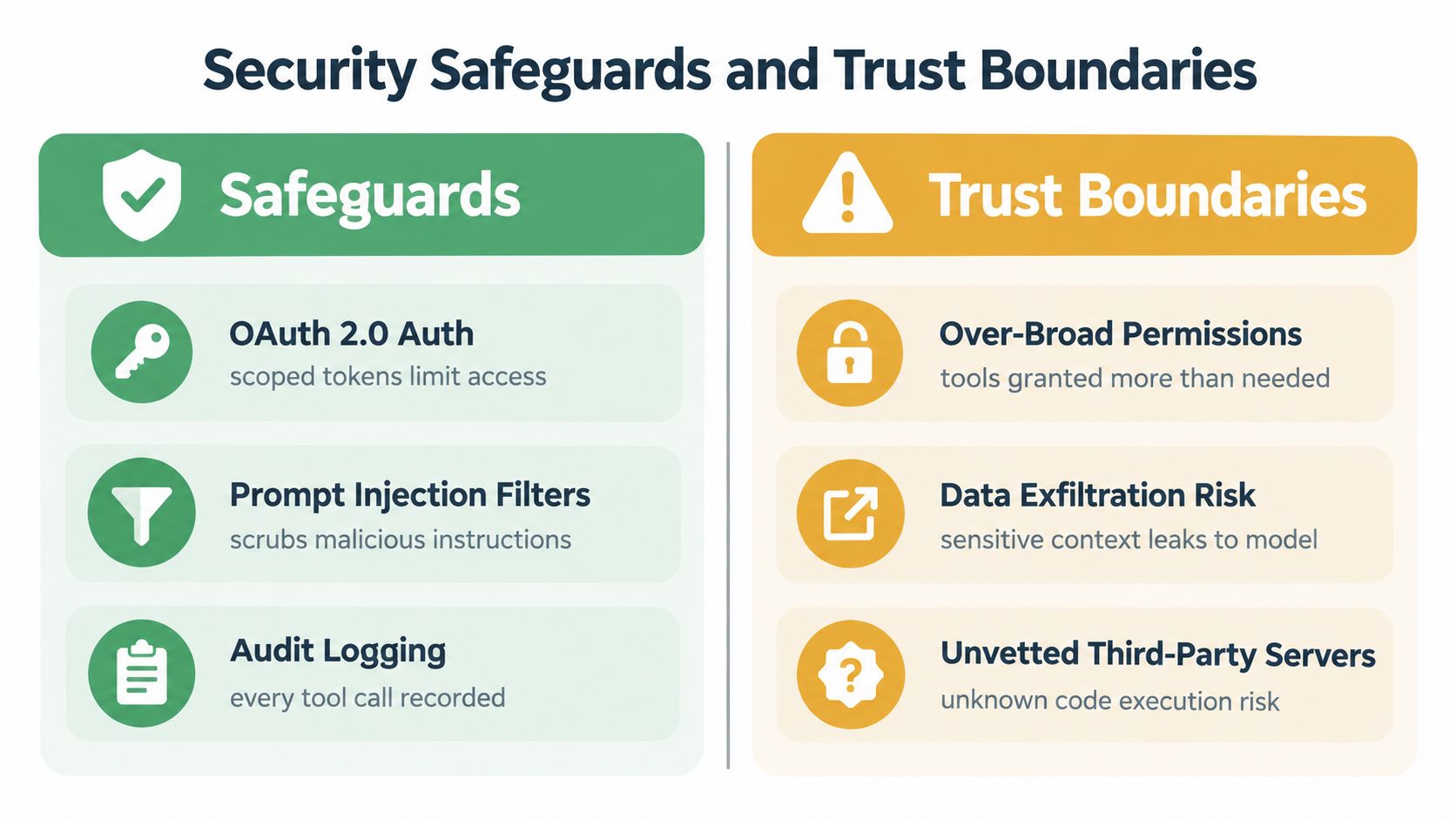
The trust boundary sits between the model-driven application and the connected system. If a server can retrieve customer records, inspect account performance, or trigger campaign changes, a prompt, credential, tool description, or server implementation can influence activity across sensitive systems.
The relevant risks include:
- Credential exfiltration: Secrets or tokens may be exposed through unsafe handling, tool output, logs, or error messages.
- Firewall bypass: A connected server may provide a route into internal resources that weren't intended to be reachable by the AI client.
- Internal network reconnaissance: An unsafe tool can reveal information about systems and services inside the organization.
- Arbitrary code execution: Local or poorly governed servers may execute operations beyond the marketer's apparent request.
- Data exfiltration: Sensitive context can leave the intended environment through tools, OAuth flows, or unexpectedly detailed responses.
These aren't reasons to reject MCP. They're reasons to evaluate it like a production access layer. MCP's security best-practices guidance specifically highlights these risks and emphasizes explicit consent, constrained resource exposure, and careful authorization.
Controls that work in campaign operations
Least privilege should be designed into the server, not left to the model's judgment. A diagnostic agent may need campaign spend, search-term, and conversion data. It probably doesn't need unrestricted access to billing settings, customer exports, or every account in an agency's portfolio.
Effective controls include:
- Scoped authentication: Use OAuth or service credentials that grant only the required account and operation scopes.
- Read and write separation: Publish diagnostic tools separately from tools that mutate budgets, ads, bids, or targeting.
- Approval gates: Require a human to approve a proposed change before execution.
- Explicit data limits: Return the smallest useful resource set rather than entire tables or customer records.
- Audit logging: Record the user, tool, arguments, result, and outcome for every meaningful call.
- Input validation: Reject malformed, ambiguous, or unsafe arguments before they reach the advertising or CRM API.
Security boundary: If an agent can spend money or change customer-facing campaigns, every write operation should be visible, attributable, and reversible.
Marketing leaders should ask who owns incident response. The answer cannot just be “the AI vendor.” The agency or internal team still owns account permissions, approval policy, escalation, and the decision to revoke access. The provider owns the server implementation and its operational controls, but governance must be shared and documented.
Real-World Examples for Performance Marketers
A useful MCP workflow starts with a familiar business problem and ends with a reviewable decision. Consider a search campaign where lead efficiency is deteriorating. The agent reads current search terms, identifies queries that don't match the intended offer, checks whether those queries generated meaningful conversions, and groups the findings by likely cause.
The useful output isn't “optimize the campaign.” It's a specific proposal:
- Add a defined group of irrelevant search terms as negative keywords.
- Reclassify terms that belong in a separate campaign or ad group.
- Flag landing-page or tracking issues where clicks continue but conversion signals are absent.
- Identify which proposed changes affect the greatest amount of exposed spend.
- Prepare a change set for human review.
That last step is the difference between an assistant and an uncontrolled automation script.
The draft-and-approve pattern
The agent should produce a diff, not a vague recommendation. A marketer needs to see the current state, the proposed state, the reason for the change, and the systems or campaigns affected. The review should make it possible to reject one item while approving another.
For example, a budget recommendation could show the existing daily budget, the proposed value, the campaign name, and the evidence that led to the suggestion. A keyword proposal should identify the exact term and match behavior rather than asking the operator to trust a summary.
This pattern works because it keeps decision authority with the person accountable for the account. The AI handles retrieval, comparison, and preparation. The marketer reviews the commercial context.
Reversibility changes adoption
A write tool becomes more credible when the team can inspect its history and undo a change through a defined operation. One-call undo isn't a substitute for review, but it lowers the risk of an approved action behaving differently than expected.
The same principle applies to Meta Ads, CRM updates, and other systems. Start with actions that are narrow, logged, and reversible. Avoid broad tools such as “manage account” when a narrowly scoped operation such as “draft a campaign pause” is sufficient.
Operational insight: The safest agent isn't the one that promises never to make a mistake. It's the one whose mistakes are visible, bounded, and recoverable.
Evaluating Hosted MCP Solutions for Agencies
Agencies usually face two legitimate choices. They can run local or self-managed MCP servers, or they can use a hosted service that manages connection infrastructure and account routing.
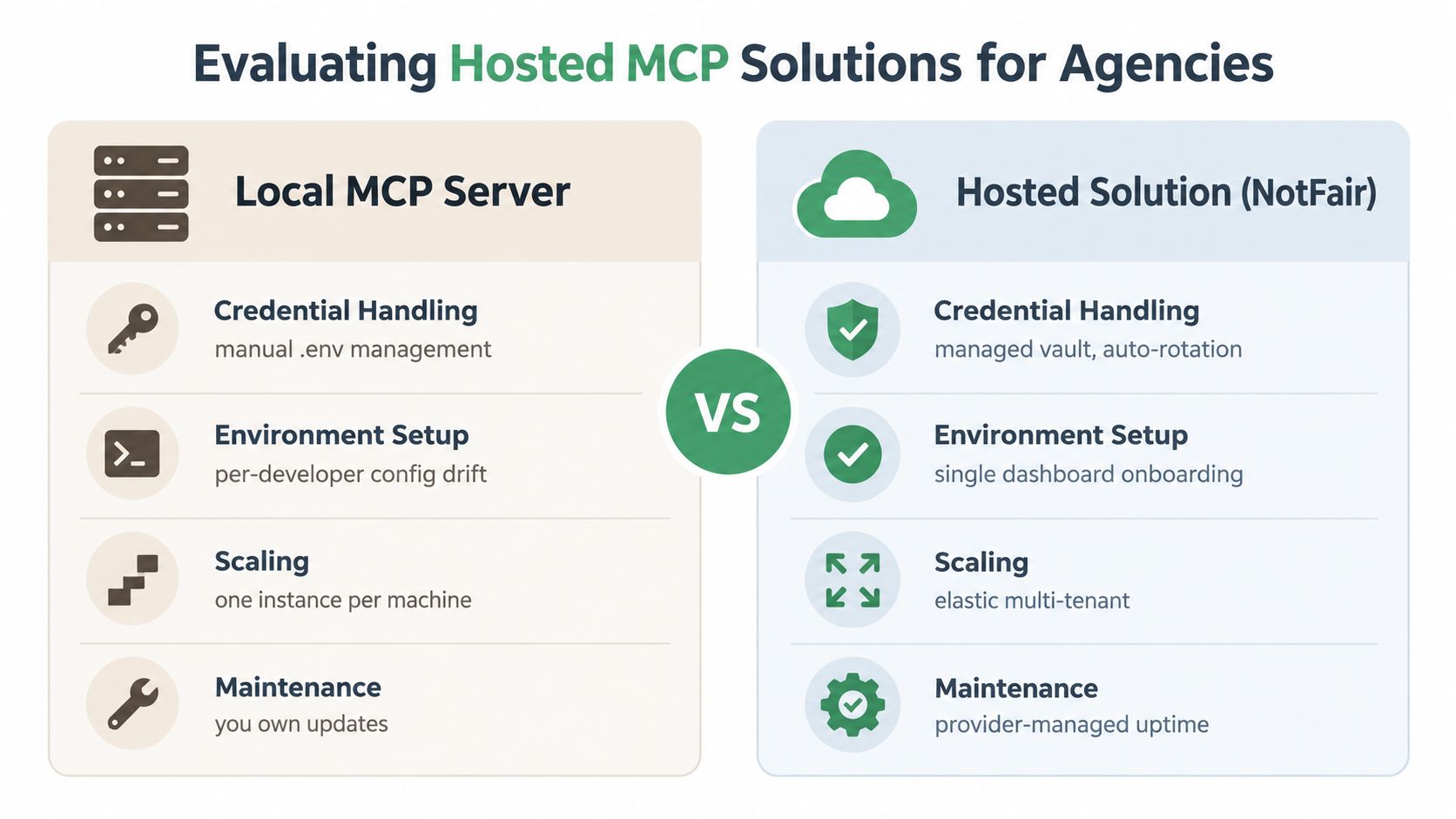
A local server gives the technical team direct control over code, runtime, deployment, and data paths. It can be appropriate when an agency has engineering capacity, strict infrastructure requirements, or a need to customize the server around proprietary systems. The trade-off is operational ownership. Someone must manage local credentials, environment configuration, updates, monitoring, and the differences between each developer or operator setup.
A hosted solution reduces that local setup burden. OAuth sign-in, centralized account management, and remote delivery can make onboarding easier across a distributed agency team. The provider typically manages the service layer, while the agency still needs to review permissions, account scopes, tool behavior, and contractual responsibilities.
A practical comparison
| Decision area | Local MCP server | Hosted MCP solution |
|---|---|---|
| Credentials | The agency manages local secrets and account configuration | The provider manages the connection flow and authentication layer |
| Environment | Each user or machine may require setup and maintenance | Operators can use a shared onboarding process |
| Customization | The team controls server logic and deployment | The team works within the provider's supported capabilities |
| Scaling | The agency owns capacity, monitoring, and updates | The provider owns service operations, subject to its terms |
| Governance | Policies must be implemented and enforced internally | Provider controls supplement the agency's own approval policy |
Hosted delivery doesn't remove security review. It changes where some operational responsibilities sit. An agency should ask how tokens are stored, how account separation works, whether writes are approval-gated, what gets logged, how access is revoked, and how the provider handles failures.
Client compatibility also matters. A practical service should fit the AI tools the team already uses, whether that's Claude, Codex, Cursor, OpenClaw, or another MCP-compatible client. Agencies comparing advertising coverage can review a hosted Meta Ads MCP integration alongside local alternatives and assess which operating model fits their client-account governance.
Managed support can be valuable when the bottleneck isn't just engineering. Some agencies need scheduled reporting, prioritized diagnostic findings, or a strategist who can help translate technical connectivity into campaign operations. That service layer should be evaluated separately from the protocol itself.
Getting Started with Your First MCP Integration
Start with one read-only workflow, not a broad automation program. A high-spend campaign diagnostic is usually a better first use case than autonomous budget management because the team can compare the agent's findings with existing reports before allowing changes.
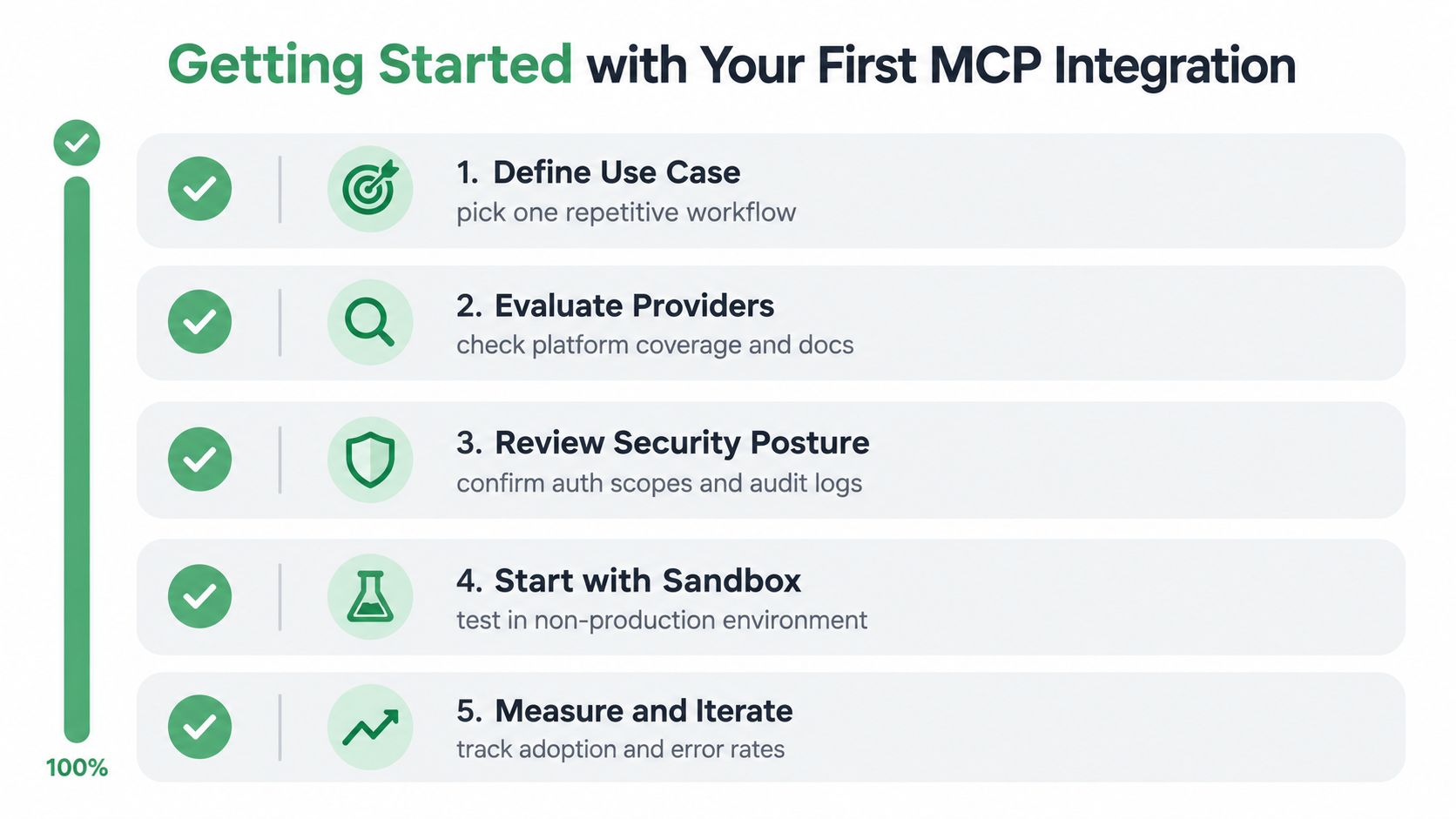
Use this sequence:
- Define the workflow: Choose one repetitive question, such as identifying wasted search demand or reconciling paid conversions with CRM outcomes.
- Check platform coverage: Confirm that the server can access the exact account, fields, and operations the workflow requires.
- Review permissions: Inspect OAuth scopes, account isolation, data retention, audit logs, and write controls.
- Test safely: Connect a non-production account or use read-only permissions before enabling any campaign action.
- Set the approval policy: Decide which changes require review, what evidence the agent must provide, and how the team will undo an approved action.
- Measure operational quality: Track whether the agent returns complete data, selects the right tools, produces useful recommendations, and handles errors clearly.
Before connecting an account, ask the provider to demonstrate a complete request path. You should be able to see what the user asks, which tool the model calls, what data the server returns, and what approval step occurs before a write.
The first client connection should feel deliberately boring. Authenticate, run a read-only query, compare the result with the source platform, and document the discrepancies. Expand only after the team understands the data shape and the consequences of each available tool.
MCP is valuable because it gives AI assistants a consistent way to reach live systems. Its business risk comes from the same capability. For performance teams, the right adoption model is therefore not “connect everything and automate.” It's controlled access, clear ownership, visible proposals, and reversible execution.
NotFair provides hosted MCP servers that connect AI clients to advertising, analytics, search, and CRM platforms, with live reads and approval-gated campaign operations. If your team wants to test MCP with a governed marketing workflow, visit NotFair and review the available connectors and setup options.