

Many accounts underperform because someone chose a campaign type by default, not because it fits the job. A Search campaign can capture a person actively looking for a service. A visual campaign can introduce a product before that person searches. Put the wrong format in front of the right audience, or optimize it toward the wrong conversion, and even polished ad copy won't fix the underlying mismatch.
The best way to compare the types of Google Ads is to ask three questions: What buying decision should this campaign influence? How much control over targeting and placements does the team need? And can the account measure the outcome that matters, such as a qualified lead or profitable sale?
Google Ads began as a search-focused product, but it now serves multiple formats and objectives across Google properties and partner inventory. Its history reflects a shift from impression-based billing at launch to click-based auction pricing, then to a broader advertising system under the Google Ads name. Those changes matter because campaign type affects more than creative format. It shapes where ads can appear, what signals inform bidding, and how clearly a marketer can diagnose results. Google Ads' evolution from AdWords
Don't pick a campaign because it's newer, easier to launch, or recommended by a default setup flow. Start with the customer's buying moment, then check whether the campaign preserves enough control and measurement for your business.
Table of Contents
- 1. Search campaigns
- 2. Display campaigns
- 3. Video campaigns
- 4. Shopping campaigns
- 5. App campaigns
- 6. Performance Max campaigns
- 7. Demand Gen campaigns
- 8. Smart campaigns
- How the 8 Google Ads campaign types differ by intent, targeting basis, bidding focus, and control
- Match the Campaign to the Job, Then Measure the Right Outcome
1. Search campaigns
When someone searches for a service or product, they're expressing intent. Search campaigns let advertisers respond to that intent with ads on search results pages, aligning keywords, ad copy, landing pages, and bids with what the person is looking for. That makes Search a strong option for capturing existing demand, especially when a business can connect a query to a meaningful next step.
A B2B software company, for example, might separate branded searches from nonbrand searches for a specific product category. It can then optimize the nonbrand campaign toward qualified demo requests, rather than treating every form submission as equal. Keep keyword groups tied to intent and landing-page relevance. Creating many narrowly split campaigns without a measurement or budget reason adds work without necessarily improving control.
Keep query control tied to lead quality
Search gives advertisers more direct control over queries and network settings than broad cross-channel automation. That control still requires attention: review search terms, apply negative keywords carefully, and watch for irrelevant queries without blocking useful demand. A Google Ads negative keyword management guide can help teams think through where exclusions belong.
Don't let the bidding system optimize toward a conversion just because it's easy to count. Where possible, import qualified-lead or closed-sale outcomes so bidding receives a signal closer to revenue. Judge CPA alongside lead quality, conversion delay, and changes in the search-term mix.
Before changing budget: Check the actual queries, conversion actions, and qualified outcomes. If CPA looks better but lead quality has fallen, the campaign may be finding cheaper forms, not more valuable customers.
2. Display campaigns
Display solves a different buying decision from Search. It puts visual ads in front of people across websites, apps, and Google properties, including Gmail and YouTube placements where eligible. A shopper may not be actively searching for your product when they see the ad, so judge Display by its role in awareness, audience-based prospecting, or remarketing, not by whether it behaves like a high-intent search campaign.
An online furniture retailer might use dynamic remarketing to show eligible visitors the sofa or table they viewed, while excluding recent purchasers. That setup is only useful if the audience rules and exclusions match the business. A recent buyer may need a complementary-product message, for instance, rather than another ad for the same item.
Separate reach from re-engagement
Prospecting and remarketing often need different budgets, exclusions, and success measures. Separate them when that distinction makes results easier to interpret or prevents one audience from consuming spend intended for the other. Don't split campaigns just to create more rows in the account.
Placement quality matters. Review where ads serve, apply suitable content exclusions and brand-safety controls, and use visuals that communicate the offer quickly. Cheap clicks aren't proof of value if visitors don't engage or convert.
The first diagnostic is placement-level performance. Check whether the audiences and sites match the intended use, then compare conversion quality with what you'd expect from other sources. Where possible, assess whether Display is generating incremental outcomes rather than claiming credit for people who would have converted anyway. That distinction is especially important in remarketing, where previous site visitors already showed interest.
3. Video campaigns
Video campaigns use video creative to reach audiences primarily on YouTube, with eligible formats and settings potentially extending to Google video partners. They fit jobs that benefit from explanation or storytelling, such as introducing a product, building consideration, or reaching people before they search. Choose the objective and bidding option for the result you need, whether that's reach, views, or another supported outcome.
A SaaS company launching a new workflow could use a short product demonstration to show the problem and how the feature solves it. The useful diagnostic isn't only how many people watched. Check whether the campaign also supports relevant downstream signals, such as qualified website visits or changes in branded search activity, and compare those signals with the campaign's actual objective.
Build for the viewing environment
Put the problem, product, and brand early, particularly in skippable placements. Create assets for the way people watch, including vertical video for Shorts where appropriate. Don't judge a campaign on views alone if the business needs qualified prospects.
Google's video campaign options vary by objective and subtype. For current formats and setup, use Google Ads documentation on ad types. Avoid building plans around older Video action campaign instructions: Google transitioned that campaign type to Demand Gen.
The following embedded video shows an example of video advertising creative in practice:
For teams developing video creative, a ShortGenius AI video ad maker is one production option to consider. Whatever tool you use, verify that the finished assets fit the placements and communicate the offer clearly.
4. Shopping campaigns
Shopping campaigns help retailers present product information before a shopper clicks. Standard Shopping uses product data from Google Merchant Center, typically showing details such as an image, title, price, and retailer name. Unlike a keyword-led Search campaign, product matching depends substantially on feed information and relevance signals, so feed quality is part of campaign management, not a separate housekeeping task.
A specialist cycling retailer might use custom labels to distinguish high-margin accessories from lower-margin bicycles. That lets the team evaluate product performance against profitability rather than allowing campaign averages to hide weak economics. A product category with strong revenue may still deserve less budget if its margins or fulfillment costs make the sales less valuable.
Fix the feed before raising spend
Check product titles, images, identifiers, availability, and shipping information before increasing budgets. Use labels to organize products by margin, seasonality, clearance status, or bestseller status, then inspect results at product and category level. A Google Ads ecommerce audit can help frame that review.
Shopping can interact with Performance Max when both campaigns advertise overlapping products. Don't assume the two campaign types provide clean, independent demand pools. Review how products are assigned and where results are reported before drawing conclusions from one campaign's totals.
Tinuiti reported that more than 95% of retail advertisers running Google Shopping listings had adopted Performance Max in Q4 2024. That's a measure of adoption, not proof that Performance Max is the right choice for every retailer. Tinuiti's Q4 2024 Digital Ads Benchmark Report provides the context for that benchmark.
Before changing budget: Check product-level performance, margins, feed accuracy, and overlap with Performance Max. If the feed is weak, more spend can amplify poor matching rather than fix it.

5. App campaigns
App campaigns promote mobile applications across eligible Google inventory, including Search, Google Play, YouTube, Discover, and the Display Network. Advertisers provide the app information, assets, budget, and goal; Google automates much of the targeting, bidding, and ad assembly. That can reduce manual channel work, but it also means the campaign's optimization is only as useful as its conversion signals.
A subscription fitness app might begin by measuring installs, then move toward trial starts or paid subscriptions once those events are tracked and provide enough signal for optimization. The business decision is not just how cheaply the app can acquire an install. It's whether acquired users activate, stay, and generate value.
Optimize beyond the install
Before scaling, validate that installs, purchases, subscriptions, and other important events are recorded correctly. Choose an optimization event that reflects business value while still producing enough data to guide delivery. If subscription events are sparse or misconfigured, a lower-funnel goal may not give the campaign a reliable signal.
Supply varied creative assets and localize them for important markets. Then compare cost per install with retention, subscriber quality, and lifetime value. A low install cost can mask poor user quality, while an apparently expensive install may be worthwhile if those users convert into durable subscribers.
Before changing budget: Verify event tracking and the quality of users acquired, not just the reported number of installs. If the campaign is optimizing to an event that doesn't represent a valuable user, correct the measurement before increasing spend.
6. Performance Max campaigns
Performance Max suits advertisers who want Google to allocate budget across eligible channels from one goal-based campaign. That reach can include Search, Shopping, YouTube, Display, Gmail, Discover, and Maps. The trade-off is less placement control and less channel-level clarity than separate campaigns can provide. Use it when cross-channel coverage matters more than direct control over each network. The campaign documentation describes campaign setup; it does not establish how Performance Max compares with Search controls.
An ecommerce brand might combine a product feed with lifestyle images and video, then judge sales against margin and new-customer goals. For lead generation, import qualified-lead or closed-sale outcomes where possible, so the campaign can optimize toward business results rather than form volume alone.
Treat aggregate ROAS as a starting point
Set up conversion actions and values before launch. Then check asset, product, channel, and search-term reporting, along with landing-page expansion and brand controls. Blended ROAS can conceal weak results in one part of the campaign, even when the overall figure looks healthy. Compare attributed revenue with margin and new-customer quality before raising spend.
Fluency's published benchmarks report growing Performance Max use and spend share, but those figures should not be treated as a forecast for an individual account. The source also presents ROI comparisons and notes that its sample is not established as globally representative. Use Fluency's Performance Max benchmarks as context, not as proof that automation will add incremental value in your account.
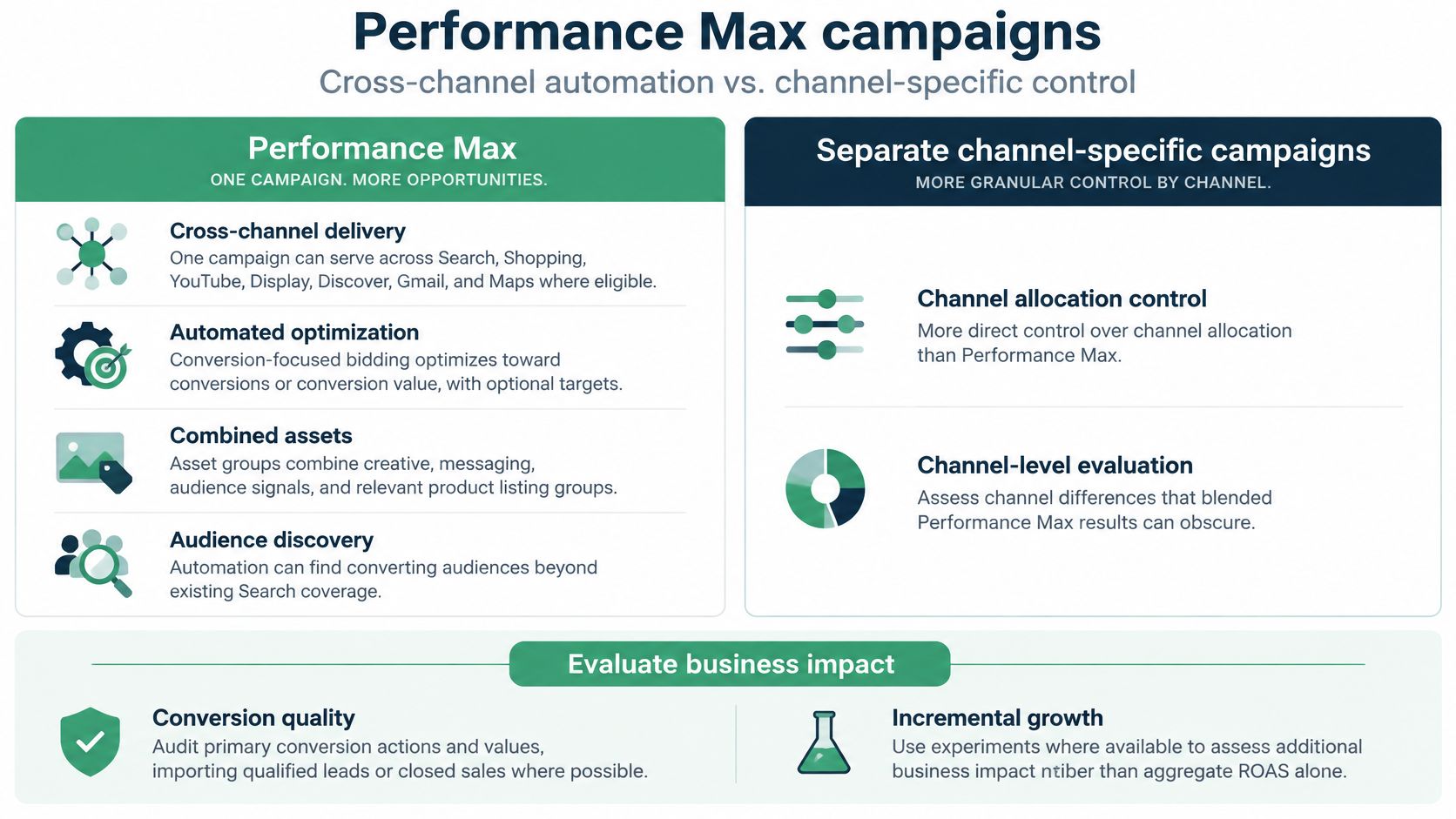
A comparison of native and automated Google Ads management can help teams assess where automation fits. Before changing budget: Verify conversion quality, brand traffic, product and asset results, and whether an experiment or another incrementality method supports the claim that Performance Max generated additional business.
7. Demand Gen campaigns
Demand Gen uses visual and video ads to create interest and drive action across YouTube, including Shorts, Discover, Gmail, and eligible Display Network inventory. It suits advertisers who want to reach people before or beyond an active search, using creative-led experiences rather than waiting for a query that signals immediate intent.
A direct-to-consumer skincare brand could test product demonstrations and image carousels against first-party and lookalike audiences, then assess new-customer purchases. That test needs meaningful creative differences. Changing only a small detail in the copy won't reveal whether the audience, visual concept, or offer is doing the work.

Match assets to the placement
Adapt asset dimensions and messaging to the placements you intend to use. Where a particular environment needs a dedicated test, use available channel controls rather than assuming every placement performs alike. Measure qualified conversions and incremental customer growth alongside platform-reported CPA.
Demand Gen can also change how advertisers approach older campaign structures. Plan migrations around the current campaign functionality instead of relying on legacy Discovery or Video action setup instructions. A campaign that inherits old assumptions may have assets or goals that no longer fit the way the team wants to reach customers.
Before changing budget: Check creative performance by placement, the quality of acquired customers, and whether the campaign is reaching new buyers or taking credit for existing demand. If the campaign reports conversions but doesn't produce a meaningful business outcome, revisit the goal and measurement setup first.
8. Smart campaigns
Smart campaigns offer a simplified workflow, primarily for small businesses with limited time for campaign management. The advertiser supplies business information, goals, budget, and ad content, while Google automates much of targeting and delivery. Availability and creation paths vary by account and product experience, so verify that the option exists in the account before building a plan around it.
A small repair business with a limited service area might use a simplified campaign to generate calls. But a call isn't the same as a booked job. The owner needs a way to identify which inquiries come from within the service area, involve work the business handles, and lead to completed jobs.
Choose simplicity with a measurement plan
Set service areas and business hours accurately to reduce irrelevant inquiries. Track qualified calls and completed work rather than treating every interaction as equally valuable. If the business needs detailed search-term management, negative keywords, campaign segmentation, or deeper reporting, standard Search may provide more useful control.
This is a trade-off between management effort and diagnostic depth. A simpler workflow may make it easier to get started, but the business still needs to verify that the campaign reaches the right customers and generates profitable work. Don't keep a campaign unchanged merely because it's easy to maintain.
Before changing budget: Confirm that the campaign is available, review where inquiries come from, and compare qualified calls with completed jobs. If the account needs query-level controls or more transparent reporting, evaluate whether standard Search better fits the business.
How the 8 Google Ads campaign types differ by intent, targeting basis, bidding focus, and control
Use this comparison to match each campaign to the buying decision it serves, identify where Google controls delivery, and choose the first account check before adjusting spend.
| Item | Primary Intent | Targeting Basis | Bidding Focus | Control Level |
|---|---|---|---|---|
| Search campaigns | Capture active demand and drive conversions | Keywords, match types, and negative keywords | Maximize conversions or conversion value, with optional target CPA or target ROAS | High: direct keyword, messaging, and landing-page control |
| Display campaigns | Build awareness and re-engage visitors | Audiences, first-party data, contextual signals, and placements | Maximize conversions or target CPA when optimizing for conversions; otherwise, use the campaign's selected goal-based bidding | Moderate: flexible targeting and creative, with placement oversight |
| Video campaigns | Build awareness, reach, or consideration | Audiences, exclusions, and suitability settings | Target CPM for reach, target CPV for views, or conversion-focused bidding when the campaign supports it | Moderate: audience and suitability controls; formats and bidding options vary by setup |
| Shopping campaigns | Promote retail products and support product discovery | Merchant Center product data and relevance signals | Maximize clicks, maximize conversion value, or target ROAS, depending on campaign setup | Moderate: product groups and negative keywords, but no positive keyword bidding |
| App campaigns | Drive app installs and valuable in-app actions | App information, assets, goals, and automated targeting | Install volume, selected in-app actions, or conversion value | Low: Google automates much of targeting, bidding, and ad assembly |
| Performance Max campaigns | Grow conversions across Google channels | Asset groups, audience signals, and product feeds where relevant | Maximize conversions or conversion value, with optional targets | Low to moderate: broad automated delivery with selected controls |
| Demand Gen campaigns | Create interest and drive action through visual advertising | First-party data, lookalike segments, and channel controls | Maximize conversions or target CPA, based on the conversion goal | Moderate: audience and eligible inventory controls |
| Smart campaigns | Simplify local and small-business advertising | Keyword themes and business information | Automated conversion optimization toward the selected business goal | Low: simplified setup with limited targeting, bidding, and reporting control |
Bidding options depend on the campaign's goal and available setup, so the table is a comparison guide, not a substitute for checking the account. For example, Display bidding should be judged against the selected conversion goal, while Shopping performance needs product-level review alongside the campaign's bidding strategy.
Before changing budgets, verify the campaign's bid strategy and conversion actions in the account. Then check search terms or placements where available, product-level results for Shopping, and the quality of reported conversions. This helps distinguish a bidding problem from weak targeting, poor creative, or unreliable measurement.
Match the Campaign to the Job, Then Measure the Right Outcome
Choose a campaign type based on the buying moment it serves, the control your team needs, and the conversion data you trust. Search is built to meet declared intent. Display and Demand Gen can introduce or re-engage audiences with visual creative. Video can explain and build consideration, while Shopping presents product information to people evaluating retail offers. App campaigns need meaningful downstream events, and Performance Max requires confidence in both conversion signals and the trade-offs of automated delivery. Smart campaigns may suit businesses that need a simpler workflow, provided the account can still measure valuable outcomes.
The campaign name alone doesn't tell you whether budget is working. A lower CPA can reflect weaker leads; a strong ROAS can include returning customers who would have purchased anyway. For ecommerce, review results by product and margin. For lead generation, compare reported conversions with qualified leads and closed sales. For upper-funnel campaigns, look beyond clicks and platform-attributed conversions to the business signals the campaign was meant to influence.
Measurement quality also shapes how safely a team can rely on automated bidding. Verify consent implementation, conversion actions, attribution settings, and any imported CRM outcomes. When conversion data mixes observed and modeled results, don't assume every reported outcome has the same evidential weight. That doesn't make modeled measurement useless, but it does make validation and consistent comparisons important.
Before moving budget, inspect search terms for Search campaigns and placement or channel reporting for visual and automated campaigns. Check conversion quality, product economics, and customer type where those distinctions matter. Then make one clear change, record the expected outcome, and set a review point. A controlled test is more useful than a broad budget shift whose effect can't be traced.
The practical question isn't which campaign type is best in general. It's which format solves the next buying decision without surrendering more control than your business can tolerate, and whether your measurement can prove that it worked. Keep Search where query visibility matters, use feeds and creative assets that match the campaign's job, and don't treat automation as a substitute for diagnosis.
NotFair connects AI agents to Google Ads and other advertising, analytics, and CRM platforms for account diagnosis and campaign operations. Its approval-gated changes include explicit diffs, logged history, and one-call undo, which can help teams review edits before they affect budgets or targeting. Visit NotFair to explore how its tools can support a more controlled Google Ads workflow.