

The most common advice about a Google Ads API integration is to start by adding endpoints: campaigns, keywords, budgets, reports, then more. That's rarely the hard part. The difficult work is controlling when an integration is allowed to write, especially when an account's schema, client library, or conversion data hasn't been verified.
A reliable integration reads live account data, drafts a specific change, shows a human the difference, and records what happened. If the change can't be reviewed and reversed, more automation can make a small mistake harder to contain.
Table of Contents
- Set Up Access and a Test Account First
- Quotas That Shape the Integration
- How to Authenticate and Mutate Safely
- Campaign Keyword and Budget Workflows for Agents
- Tell Measurement Doubt From Request Failure
- Freeze Writes During Version Upgrades
Set Up Access and a Test Account First
Before your first query, put the access path in place. Each prerequisite solves a different problem, and setting them up in order makes initial failures easier to diagnose.
- Create a Google Cloud project and OAuth 2.0 client. Enable the Google Ads API and create an OAuth client ID. Your client library needs the client ID and client secret to authorize a user.
- Choose a manager account. Link the customer accounts the integration needs to reach. This gives your team a clear account hierarchy instead of a pile of disconnected credentials. Document which manager account is allowed to act for each customer; NotFair's account-scoping guide is a useful reference for keeping that boundary explicit.
- Request a developer token. Google issues tokens through the manager account's API Center. A new token starts with Test Account access; production access requires a separate request for Basic or Standard access.
- Create a test account under the manager. Use it to test authentication and requests without changing live campaigns or spending a customer's budget.
Then use the official client library for the language your team already maintains, such as Python, Java, PHP, Ruby, .NET, or Perl. Pin it to a supported major version rather than automatically taking every new version. For a quick reference alongside Google's own resources, the SourceLoop ads API documentation provides an integration guide.
This setup exists because the previous interface is no longer a viable target. Google announced that AdWords API request errors would begin increasing toward 100% on May 31, 2022, and that all requests would fail starting July 31, 2022, as described in Google's Google Ads API documentation on quotas and API lifecycle. The Google Ads API organizes work around resources such as campaigns, ad groups, ads, keywords, customer accounts, queries, and mutate operations. It also requires ongoing version governance: only the three most recent major releases are actively maintained, while older versions are sunset.
Make your first call read-only. Ask for the accessible customer list and confirm that the expected accounts appear under the intended manager. If that check fails, resolve authorization or account scope before writing a query or attempting a mutation.
Quotas That Shape the Integration
Design around the access cap before deciding how often your integration polls. Google's published daily limits are:
| Access level | Production ops per day | Test ops per day | Design implication |
|---|---|---|---|
| Basic | 15,000 | 15,000 | Same cap on test and production; batch reads and writes |
| Explorer | 2,880 | 15,000 | Fine for sandbox volume; production diagnostics must stay consolidated |
| Standard | Unlimited | Unlimited | Required once many accounts poll and mutate every day |
Google's published Google Ads API access and quota guidance also defines what counts as an operation. One Search or SearchStream query counts as one operation regardless of how many results it returns. A mutate request is counted by its individual items, and one request can contain no more than 10,000 mutate operations. Exceeding that limit produces a TOO_MANY_MUTATE_OPERATIONS error.
That distinction changes how you should build an agent. Suppose it checks spend, search terms, keywords, and budgets by making a string of small queries every time someone asks a question. Those reads consume operations even if each query returns only a few rows. A targeted GAQL query can retrieve the relevant set in one operation, while an approved batch of compatible changes avoids sending each item as its own request.
Spend operations on useful work
Cache stable reference data, such as account details that don't need to be fetched on every turn. Use filters and selected fields to keep queries targeted, and set a sensible refresh interval for data that doesn't need immediate rechecking. Don't repeatedly poll the same account just because an agent can.
For mutations, group compatible changes, but don't bundle unrelated edits merely to reduce request count. A batch is not a safety mechanism by itself. Approval and error handling still matter, and a larger batch can make it harder to see which change caused a failure.
Quota management is therefore an architectural choice, not just a cleanup task after a limit is reached. The same workflow that serves one test account may need different access and scheduling once it regularly reads and updates multiple customer accounts. Explorer or Basic can suit a sandbox or limited diagnostic workload; Standard is the practical fit when scheduled reads and approved writes run across many accounts.
How to Authenticate and Mutate Safely
A safe mutation begins with credentials and ends with an auditable, reversible change. Follow the same sequence whether an agent is preparing a keyword edit or an internal service is changing a campaign budget.
- Load credentials. Obtain the user's OAuth 2.0 credentials and developer token from your approved setup. Include the developer token in the
developer-tokenheader on every API call. - Set the customer context. Use the correct customer account for the operation. When a manager account acts on behalf of a client, set
login-customer-idto the manager account. - Build the resource-specific operation. Choose the appropriate
create,update, orremoveoperation for the campaign, keyword, budget, or other resource. Keep the payload narrow so a review focuses on the intended change. - Validate without writing. Send the request with
validate_only=true. This can surface schema, authorization, policy, and field-validation problems without changing the account. - Present a human-readable diff. Show the customer, resource, field, old value, and proposed value. A reviewer shouldn't need to inspect a raw request body to understand what will change.
- Submit only the approved mutation. Use an idempotency strategy and keep persistent request and error logs. Record the approval and the result so the team can trace and reverse the action.
Google's REST authentication and mutation guidance emphasizes this staged workflow, including the developer-token header, customer context, validation, review, and persistent logging. One failure mode deserves special attention: standard mutate requests are atomic. If one operation is invalid, the entire request rolls back.
Practical rule: Use
partial_failureonly for independent edits when the service supports it. Checkpartial_failure_errorin the response body, where individual failures are reported, not in response headers.
Don't enable partial failure for interdependent operations that rely on temporary resource names. Those operations may require all-or-nothing execution, so partial application can leave the intended set incomplete.
Use the test account for the first full pass. A good test rejects an invalid budget change without touching production; then an approved change succeeds, produces a log entry, and has an undo path. For teams building a wider search visibility workflow, a rank tracking API can provide complementary keyword-position data, but it doesn't replace account-scoped approval for Google Ads writes. Keep operational safeguards such as explicit review and reversible actions documented in your mutation safety reference.
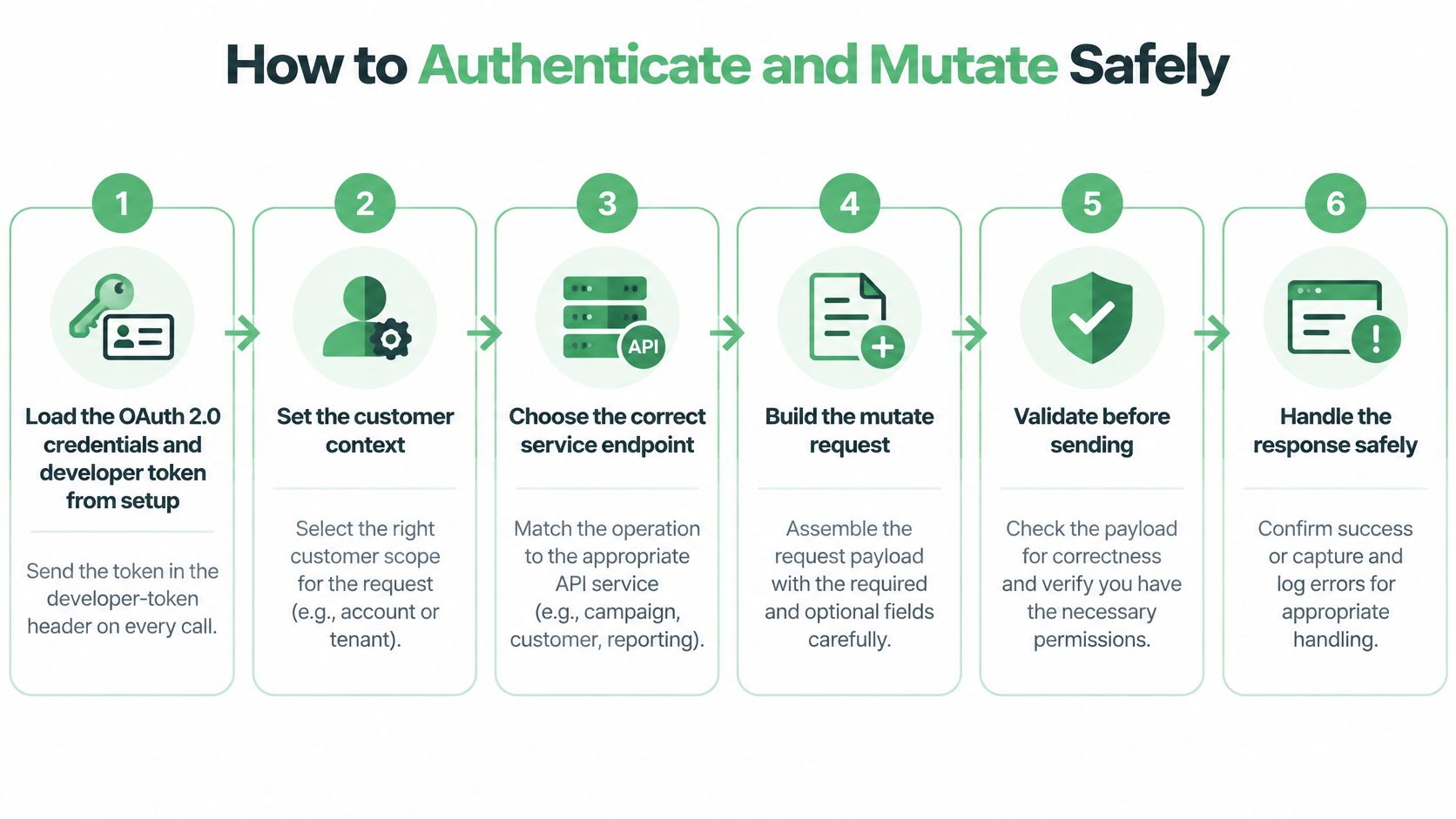
The infographic summarizes the stages, but the control that matters most is straightforward: don't let a successful validation automatically become an approved write. Keep approval as a separate action, and preserve the request, response, reviewer, and undo information.
Campaign Keyword and Budget Workflows for Agents
An API with more mutation endpoints is not automatically safer. For campaign operations, the change-management layer matters: read current state, draft a specific change, show its diff, then require approval before writing.
Campaign status
Read the campaign's name, resource, status, budget, and serving state. If the request is to pause a campaign, identify that campaign precisely and show its current and proposed statuses. The approval should apply only to that resource.
Keywords and search terms
Review recent search terms alongside spend and conversions. Draft proposed negatives with their match types and campaign or ad group scope, so a reviewer can see exactly which traffic the change would exclude. A named list is actionable; “add negatives for irrelevant traffic” is not.
The guide to Google Ads negative keywords covers a related search-term cleanup workflow. The same scope-first review helps when managing AI-powered Google Ads campaigns.
Budgets
Read the current campaign budget and draft the proposed amount. Show both values in micros in the diff, alongside the campaign and approving person, so a decimal-place error is visible before submission.
With NotFair, the user authorizes Google Ads once at notfair.co, then opens an AI client and asks questions about the account. Connecting takes two minutes. The Google Ads server URL is https://notfair.co/api/mcp/notfair. Teams running their own server can apply the same approval-gated workflow.
For a home services audit, connecting Google Ads is a one-click OAuth step that takes 30 seconds. Access is read-only, and no account changes are made until the user explicitly approves them. Apply the same boundary to campaign operations: diagnosis and drafts can inform a decision, but every mutation needs a visible diff and a distinct approval.
Tell Measurement Doubt From Request Failure
A successful API response doesn't prove that a conversion signal is useful for bidding. An accepted upload doesn't establish that the event is eligible, matched to a user, attributed to the intended campaign, or visible in every report. Treating a success response as proof of measurement quality can send an agent toward the wrong optimization.
The Google Ads API's measurement configuration is also changing. The Google Ads API release notes describe unified enhanced-conversions configuration fields introduced in the 2026 API, replacing an older account-level field, as well as consent-related access for YouTube channel insights. When a signal is missing, the cause may be a request error, an account configuration mismatch, consent status, identity resolution, or attribution delay.
Diagnose before changing bids or budgets
Run a measurement preflight before acting on a conversion gap:
- Check configuration: Confirm that enhanced conversions are configured as intended on the account.
- Check consent: Verify the applicable consent status for the audience or signal.
- Allow for lag: Don't interpret a recent gap as a confirmed performance change until the event-lag window has passed.
- Reconcile outcomes: Compare Google Ads conversions with GA4 and CRM records, and note what each system is counting.
An agent should label recommendations based on thin conversion data as low confidence and hold them for human approval. Fresh data can still be incomplete; a rapidly refreshed dashboard doesn't remove attribution delay or resolve mismatched definitions.
| Symptom | Likely cause | First fix |
|---|---|---|
TOO_MANY_MUTATE_OPERATIONS |
More than 10,000 items in one mutate | Split into smaller validated batches |
| Daily operations exhausted | Many small polls on Basic or Explorer | Cache references and consolidate GAQL reads |
| Whole batch rolled back | One invalid operation in an atomic mutate | Use validate_only, fix that operation, then resubmit |
| Some items fail only | partial_failure on independent edits |
Read partial_failure_error and retry only failed items |
| Upload accepted, bidding unchanged | Consent, enhanced conversions, matching, or lag | Reconcile with GA4 and CRM before optimizing |
Prioritize findings by spend at risk, not by how easy they are to explain. An agent can triage a policy error and propose a compliant rewrite, but a person should approve the final change. Log every attempt, including retries, so the team can distinguish a failed request from a valid request whose measurement outcome remains uncertain.
Freeze Writes During Version Upgrades
More endpoints aren't the most valuable feature in a production integration. A change-management layer is more useful when it can tell the team which accounts are ready to upgrade, pause writes for an unverified account, and preserve a clear route back if a change causes trouble.
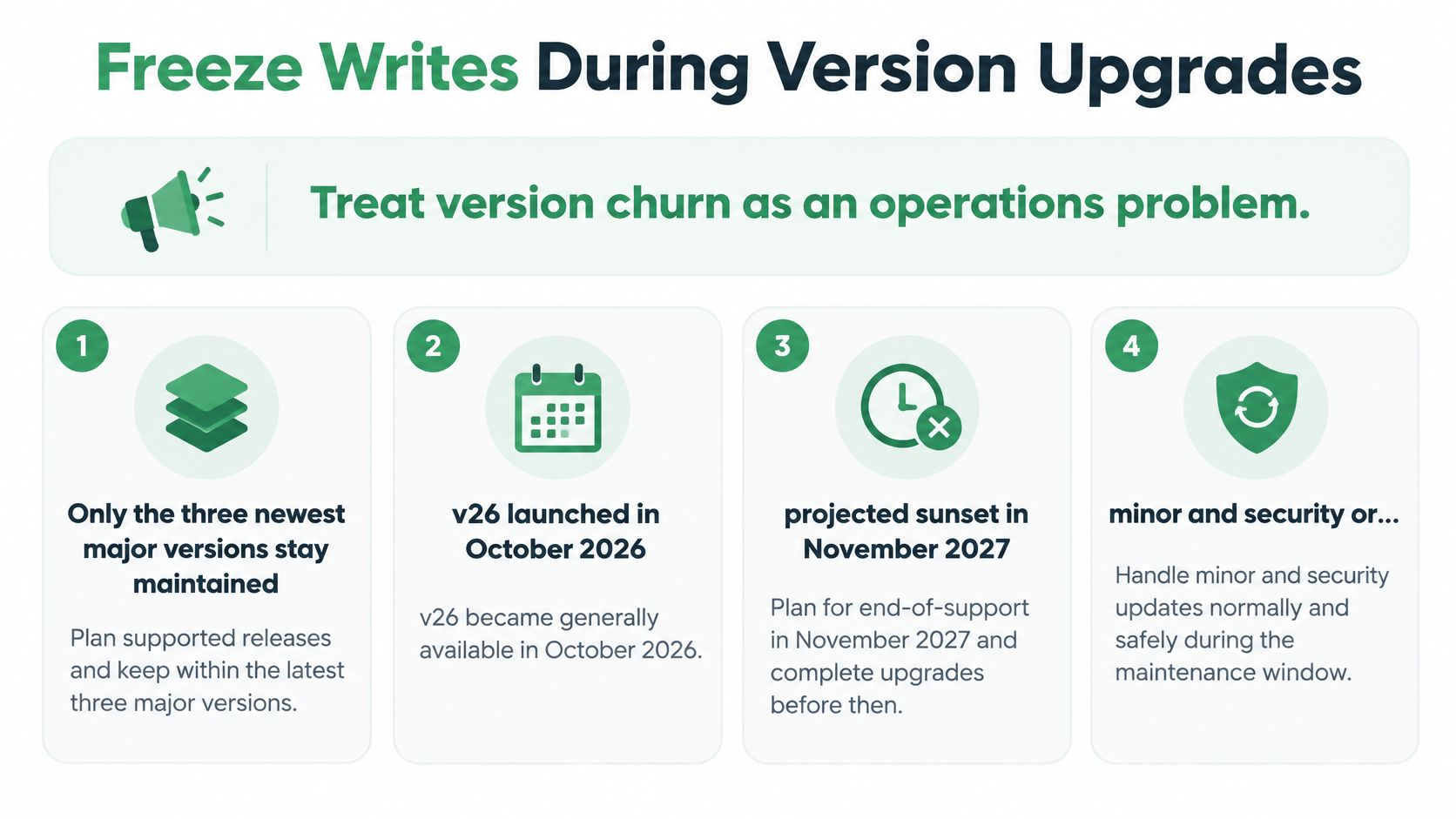
Google maintains only its three newest major API releases; older versions are sunset. The Google Ads Developer Blog's 2026 API updates state that v26 launched in October 2026 with a projected sunset in November 2027. Minor releases and additional security or approval-related updates can also arrive during a major version's lifecycle.
That cadence makes account-by-account readiness important. One customer may use fields another never touches. A version change can remove or rename resources, alter goal schemas, or require a client-library and application-code upgrade. A dependency bump alone doesn't confirm that a customer's requests still behave as intended.
Preflight each account
| Check | What to verify | If it fails |
|---|---|---|
| Resource inventory | Fields and resources each customer account uses | Don't upgrade that account blindly |
| Deprecated fields | Release notes against current queries and mutates | Rewrite requests before sunset |
| Dual-version tests | Same contracts on current and next major | Keep the old client in production |
| Library pin | Client library matches a maintained major | Block deploys that only bump a dependency |
| Write freeze | Schema and library both verified | Pause mutates; keep read-only diagnosis |
Assign one person ownership of the sunset calendar. Scheduled agent jobs should refuse mutations for any account that owner hasn't cleared. Keep read-only diagnosis available so the team can continue examining spend, search terms, keywords, and budgets while writes are paused.
Start a rollout with a read-only audit. After the account passes its checks, approve one small negative-keyword or budget diff, confirm the resulting log entry and undo path, then widen access. Setup guides are available for connecting Google Ads to clients such as Claude, ChatGPT, OpenClaw, Codex, Cursor, Hermes, and Grok Bot; whichever client you use, keep the write gate in the workflow rather than relying on the client to infer readiness.
Teams that schedule a Google Ads weekly review with OpenClaw or another runtime that supports scheduled MCP calls should apply the same rule: scheduled diagnosis can continue, but scheduled mutations must stop when the version is unverified. Users of third-party integrations must follow those services' terms, and NotFair isn't responsible for their availability or content.
NotFair provides a hosted Google Ads MCP server with live account reads, approval-gated campaign operations, visible diffs, logs, and one-call undo. If you want to review Google Ads changes from an AI client without letting automation write blindly, visit NotFair to explore the integration.