

Your Meta Ads dashboard says purchases are falling, but your order system still shows healthy demand. Leads arrive through forms, sales close over the phone, and some customers return on another device. Meanwhile, the browser pixel misses part of the journey, server events arrive late, and nobody is sure whether the reported CPA reflects real performance or duplicated conversions.
That's where the Facebook Conversions API, usually called Meta Conversions API or CAPI, fits. CAPI doesn't magically fix attribution, and it isn't a replacement for the Meta Pixel. It creates another delivery path for conversion events, with its own identity, matching, consent, and deduplication rules.
The practical question isn't just whether CAPI is installed. It's whether your business can prove that the right event was sent once, matched appropriately, reconciled with your source system, and trusted before anyone changes a campaign budget.
Table of Contents
- Why Browser-Only Tracking Stopped Being Enough
- What the Facebook Conversions API Actually Does
- Pixel Versus CAPI and Why You Run Both
- Event Mapping and the userdata Object
- Deduplication as a Quiet Measurement Failure
- Common Implementation Architectures
- Privacy, Consent, and Where CAPI Fits in the Stack
- Auditing Your CAPI Setup Before You Trust the Numbers
Why Browser-Only Tracking Stopped Being Enough
A browser pixel depends on the visitor's browser doing several things correctly. The page has to load, the script has to execute, cookies or identifiers have to remain available, consent must permit the event, and browser protections or extensions must not interfere. A customer can complete a purchase while the pixel records nothing, or records only part of the context.
That creates a familiar performance-marketing problem. Meta Ads reports fewer conversions than your order or CRM system, attribution looks weaker than expected, and campaign decisions become arguments about whose numbers are right. The underlying sale may still have happened. The measurement path failed to carry the signal.
The delivery path matters
The Meta Pixel sends an event from the visitor's browser. CAPI sends an event from infrastructure controlled by the advertiser, such as a web server, app backend, CRM, call-center system, retail system, or offline process. That difference matters because a server can know about a completed order even when the browser never successfully reports it.
Meta describes CAPI as a system intended to support ad targeting and optimization, lower cost per result, and conversion measurement across customer interactions. It can consolidate events from websites, apps, retail locations, call centers, and CRM workflows rather than limiting measurement to browser activity. You can review the broader context in this overview of Facebook advertising measurement.
Practical rule: Treat CAPI as a second event-delivery route, not as a more powerful JavaScript pixel.
This distinction also explains why the two systems are designed to coexist. Browser events can provide useful context from the customer's active session. Server events can represent the business outcome recorded by your own systems. Running both gives Meta two perspectives, provided you identify overlapping events consistently and prevent double counting.
What to do first
Start by listing where your real conversions are created. An ecommerce purchase may originate in a checkout application and become final in a payment webhook. A qualified lead may be created in a form tool, then updated in a CRM after a sales call. A retailer may close the sale in a store with no website session at all.
If you're considering a managed gateway rather than a direct integration, the AdCrunch guide to Conversions API Gateway offers useful implementation context. The important decision is not whether the setup looks simple. It's whether the chosen path can transmit the events your business actually cares about, preserve identifiers, respect consent, and expose enough diagnostics to audit failures.
What the Facebook Conversions API Actually Does
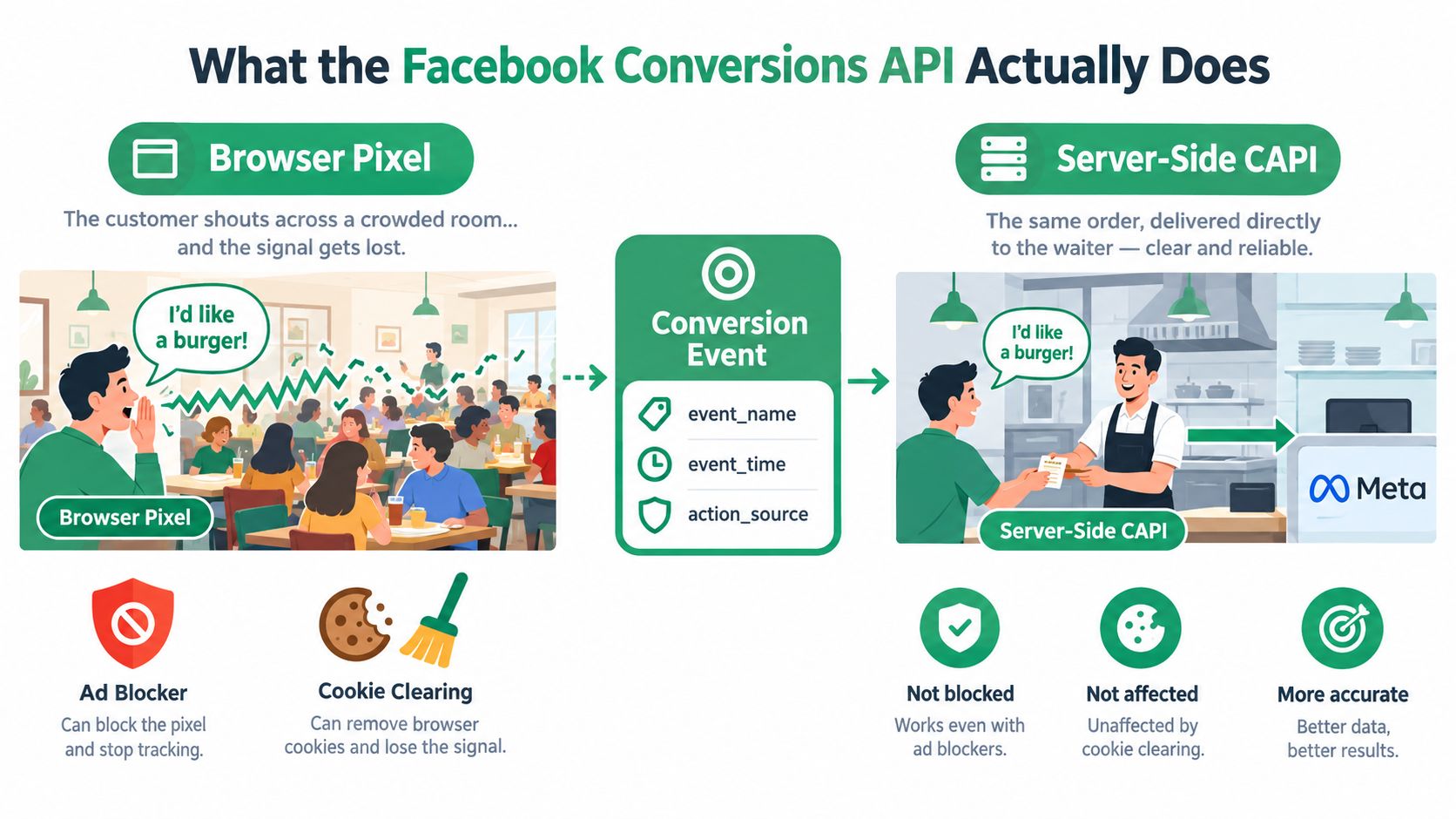
Think of the pixel as a customer shouting an order across a noisy restaurant. The shout may reach the waiter, but other conversations, blocked sound, or a dropped connection can interfere. CAPI is the same order handed directly to the waiter at the counter by the restaurant's own staff.
Technically, your backend sends an HTTPS request to Meta containing structured event data. The request describes what happened, when it happened, where it happened, and which permitted customer identifiers may help Meta associate the event with an account.
The event is the business fact
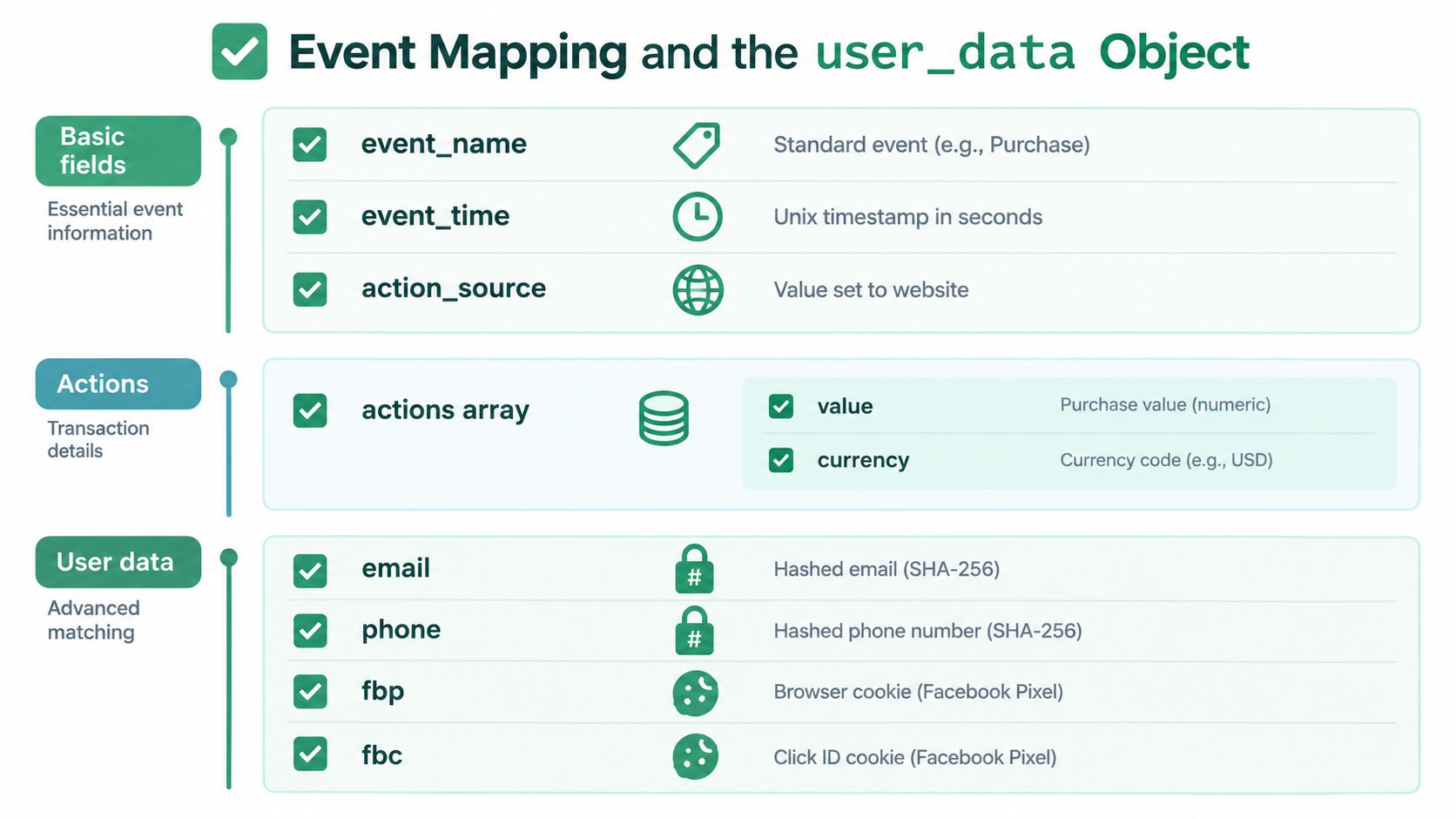
A useful payload usually includes an event name, an event time, an action source, event details, and a user_data object. In practical terms:
event_nameidentifies the action, such asPurchase,Lead, orCompleteRegistration.event_timerecords when the conversion occurred.action_sourcedescribes the origin, such as a website, app, or offline interaction.- The actions array carries the event itself, including details such as purchase value and currency where relevant.
user_datacontains permitted identifiers and context that can help Meta match the event.
The word “server-side” often confuses marketers. It doesn't mean Meta can see every customer action, and it doesn't create a universal customer profile. It means your systems send selected events directly to Meta instead of relying exclusively on a browser script.
CAPI events are processed in a Meta dataset alongside events from the Meta Pixel, Facebook SDKs, offline event sets, and CSV uploads. You can connect this event flow to your operating workflow through NotFair's Meta Ads documentation, particularly if you want account diagnostics to consider measurement quality before campaign changes.
Events can happen outside the website
A purchase is only one example. A backend can send a registration when an account is created, a lead when a form passes validation, or an offline conversion after a sales representative marks an opportunity as qualified. CRM systems, mobile apps, point-of-sale systems, call centers, and offline processes can all become event sources when your organization has permission to use the data.
That makes CAPI less like a standalone attribution product and more like an event-delivery layer. It connects first-party business records with Meta's advertising systems. Attribution and optimization still depend on event quality, identity matching, consent, and Meta's own processing. Sending a successful HTTP request only proves that the request was accepted, not that the event is accurate or useful.
Pixel Versus CAPI and Why You Run Both
The Meta Pixel and CAPI differ mainly in where the event originates and who controls the delivery path. The pixel runs in the visitor's browser. CAPI runs from systems your organization controls.
| Dimension | Meta Pixel | Conversions API |
|---|---|---|
| Event origin | Visitor's browser | Advertiser-controlled server or business system |
| Delivery dependency | Page load, JavaScript, browser settings, cookies, and consent state | Backend processing, integration health, identifiers, and consent state |
| Typical coverage | Browser activity and on-site interactions | Purchases, leads, registrations, CRM outcomes, app events, and offline conversions |
| Data ownership | The browser initiates the transmission | The advertiser chooses when and what to transmit |
| Main strength | Immediate browser context | Durable business events from multiple environments |
| Main risk | Client-side loss or incomplete context | Payload errors, identity gaps, retries, and duplicate delivery |
| Recommended role | Run alongside CAPI | Run alongside the pixel with shared deduplication |
A pixel can capture a product view or checkout interaction while the customer is still on the page. That browser context can be useful for audiences and fast feedback. CAPI can later transmit the finalized purchase from the order system, including a transaction identifier and confirmed value.
Why pixel-only is a weak foundation
Pixel-only tracking breaks when the browser doesn't deliver the event. A customer may reject consent, use an ad blocker, clear browser data, switch devices, or complete the transaction through a process that never returns to the website. The order system may still know exactly what happened, but Meta won't receive that fact unless another integration sends it.
Why CAPI-only is also incomplete
CAPI-only tracking can provide a durable conversion record, but it may lose useful browser context. It also places more responsibility on your backend to capture identifiers, preserve event timing, handle retries, and enforce consent rules.
Meta processes browser and server events together and uses shared event identity to deduplicate overlapping conversions. For the same action, the browser should send an eventID, while the CAPI payload should send the matching event_id. The event name must match too. If the browser sends Purchase and the server sends a differently named event, Meta may not recognize them as the same action.
The reliable pattern is browser context plus server truth, connected by stable event identity.
Event Mapping and the user_data Object
A CAPI payload has two separate jobs. First, it describes what happened. Second, it provides permitted information that helps Meta determine which person or account may be associated with the event. Don't confuse these jobs. Event identity supports deduplication. User identity supports matching and attribution.
Map the event itself
Begin with the fields that define the action:
event_nameshould describe the standard conversion, such asPurchaseorLead.event_timeshould reflect when the business event occurred, not merely when a delayed retry reached Meta.action_sourceshould identify the source of the event, such as a website, app, or offline workflow.- The actions array should carry event-specific details, including
valueandcurrencyfor a purchase where those fields apply. event_idshould identify the individual conversion and remain stable when the same event is retried or transmitted through another channel.
Use the business system as the source of truth for the event. For ecommerce, an order or transaction ID is usually the practical deterministic identifier. For lead generation, create the identifier once at the conversion boundary and pass it to both the browser event and the backend event.
Audit user_data carefully
Meta can use several permitted inputs to associate a server event with a likely person or account:
emfor normalized, SHA-256-hashed email.phfor normalized, SHA-256-hashed phone number.fnandlnfor normalized, SHA-256-hashed first and last names.external_idfor a permitted identifier from your customer system, using the format required by your implementation.client_ip_addressandclient_user_agentas unhashed transport and browser context fields.fbcandfbpas unhashed click and browser identifiers when available and permitted.
Normalize personal values before hashing. That usually means applying a consistent format, such as trimming spaces and standardizing case, before generating the SHA-256 value. Don't hash transport fields such as IP address, user agent, fbc, or fbp when Meta expects them unhashed.
Use multiple valid signals, not random data
A single unusable field doesn't create match quality. An incorrect phone format, stale click identifier, or missing email can reduce the event's matchability. Multiple valid identifiers generally give Meta more opportunity to associate the event correctly, but you should only transmit data your organization is permitted to process.
Matching asks, “Who might this event belong to?” Deduplication asks, “Is this the same event I already received?”
Review the payload as a marketer, not only as a developer. Check whether the purchase has value and currency, whether the lead has a stable identifier, whether click identifiers survive from landing through conversion, and whether the consent state travels with the event.
Deduplication as a Quiet Measurement Failure
A browser event and a server event can describe the same purchase. Meta needs to recognize that relationship and count it once. The standard control is a shared event name and shared event identifier, with the browser using eventID and CAPI using event_id.
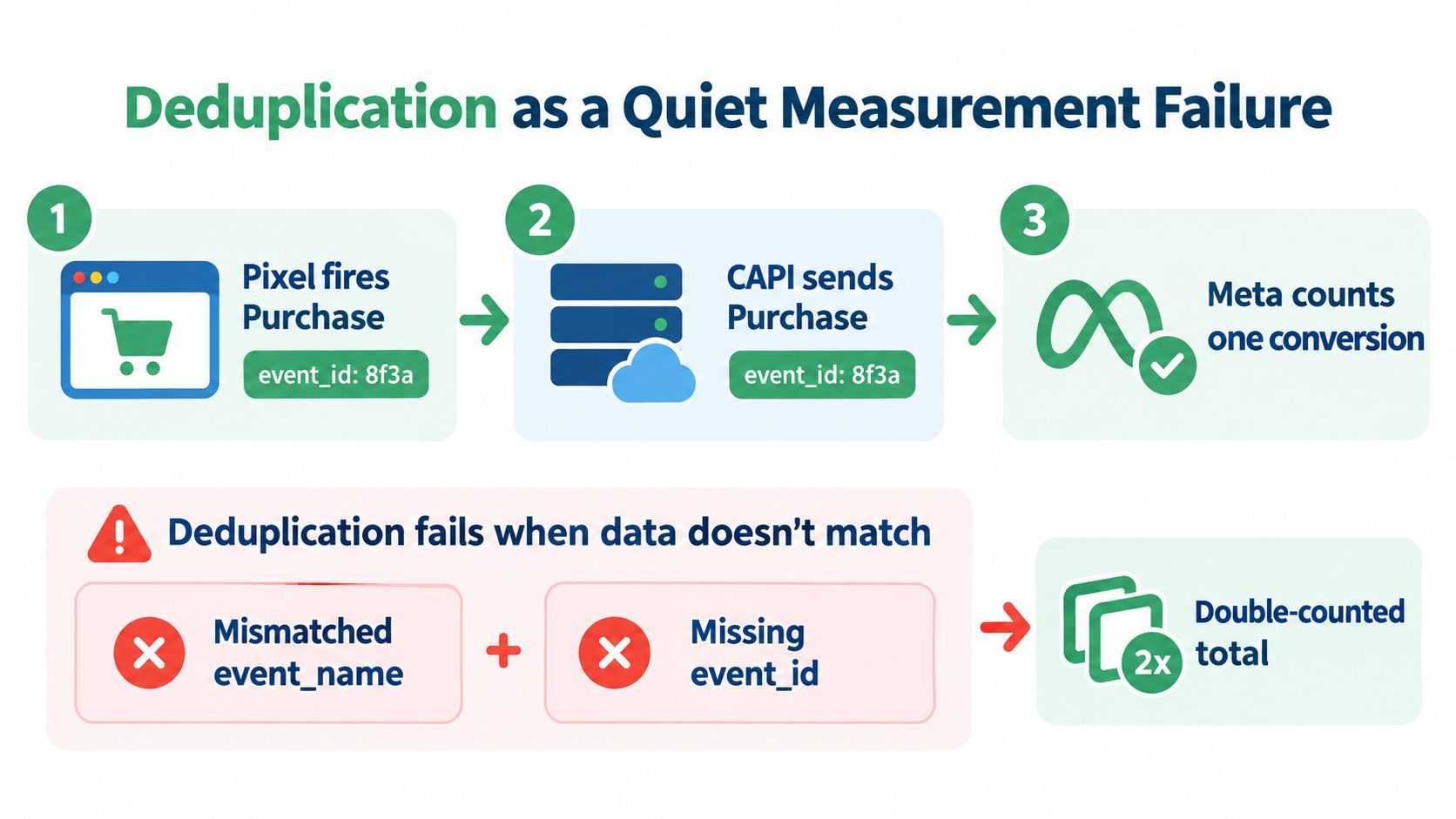
For an ecommerce order, the order ID is a sensible candidate. For a lead, generate one ID when the lead is created, then carry that same value into the browser request and the CRM or backend request. Don't generate a fresh server ID when a webhook arrives. That turns one conversion into two events with no shared identity.
Where implementations quietly break
Checkout retries can create event-ID drift. A customer may retry payment, refresh a confirmation page, or trigger multiple application requests. Your system needs to decide whether those requests represent one order or separate business events.
Webhooks can arrive after the browser event. That delay is normal. It becomes a problem when the delayed server event has a different name or identifier, or when the integration assumes arrival order determines identity.
Payment processors may retry notifications. A webhook retry should usually reuse the original order or transaction identifier. If every retry creates a new CAPI event ID, Meta may receive multiple versions of one purchase.
Identifier reuse can suppress real conversions. The opposite failure is also possible. If your system reuses one identifier for different legitimate actions or different customers, Meta may treat distinct events as duplicates.
A successful API response doesn't prove that the measurement is sound. Check Events Manager for browser and server totals, deduplication status, missing identifiers, and delivery timing. Then reconcile the event stream against your order or qualified-lead system.
Match quality isn't a conversion audit
A strong Event Match Quality result may indicate that Meta can associate events with users. It doesn't prove that every conversion was counted once, that revenue reconciles with the commerce system, or that the consent basis is valid. Matching and deduplication solve different problems.
Watch for browser and server totals that materially diverge, repeated IDs, missing IDs, and unexpected changes after a checkout or CRM release. An AI-operated workflow should flag those conditions before recommending a budget move.
Common Implementation Architectures
Many teams use one of three implementation paths. The right choice depends on where conversion data already lives, how much control your developers need, and who will maintain the integration after launch.
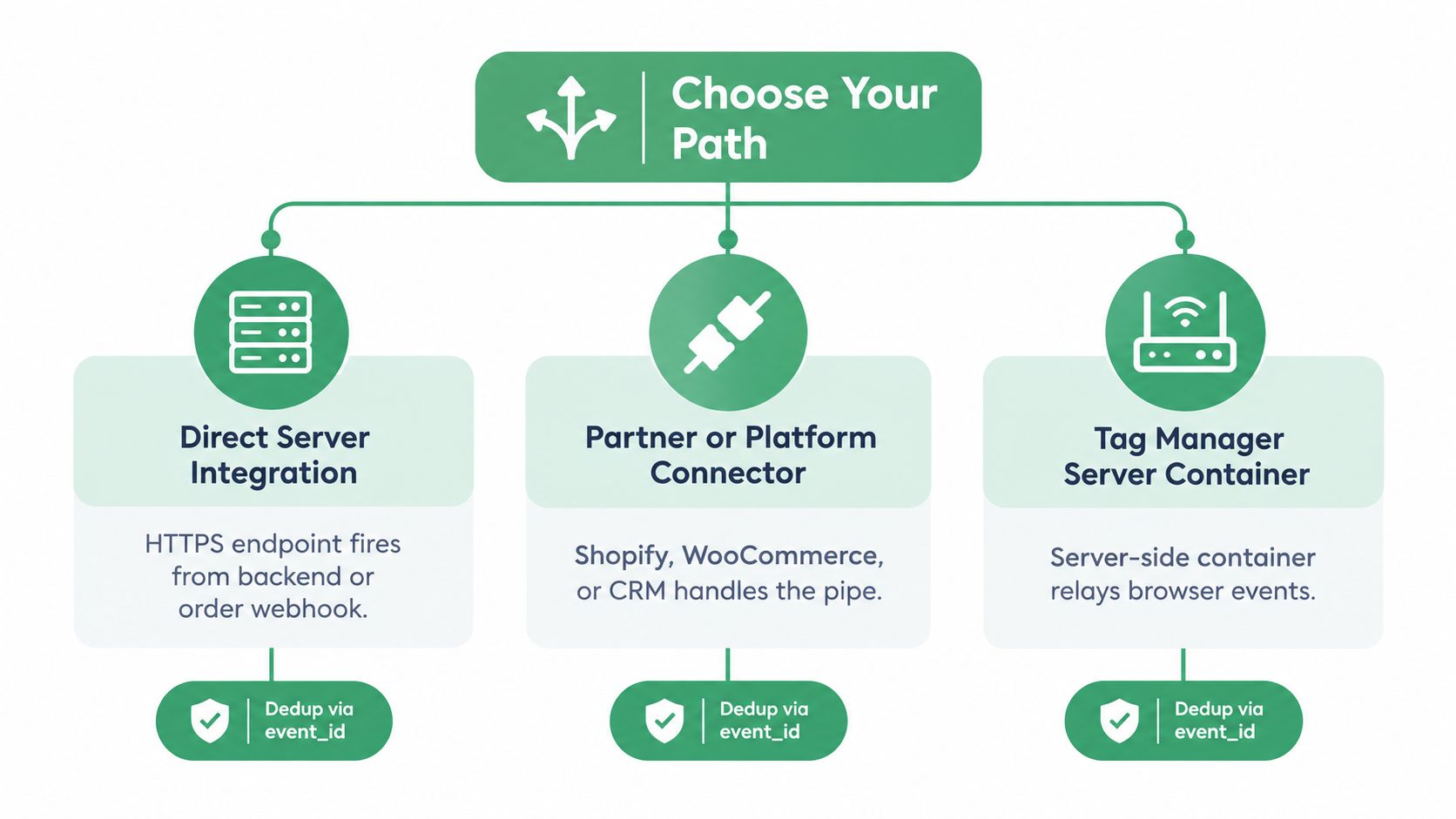
Direct server integration
A developer creates an endpoint or service that sends events from the application backend, order system, or webhook processor. This gives you control over event timing, payload contents, consent checks, retry behavior, and business identifiers.
It's the strongest fit when your company has engineering ownership of the checkout or CRM pipeline. It's also the easiest path to get wrong if nobody owns schema changes, monitoring, access tokens, failed requests, and reconciliation.
Choose this route when you need events that a browser cannot observe, such as qualified opportunities, completed subscriptions, call outcomes, or offline sales. Define the event contract before writing code. Every event should have an owner, a source system, a conversion rule, and a deterministic identity.
Server container or gateway
A server-side tag manager or gateway can receive events from browser, analytics, or application sources and relay selected data to Meta. This reduces the amount of custom application code, and it can support a hybrid setup where browser and server events share a common mapping.
The tradeoff is operational complexity in the container and less direct ownership of the final payload. Someone still needs to verify that the container preserves event_id, maps event names correctly, filters unauthorized data, and handles retries without creating duplicates.
Partner or platform connector
An ecommerce platform, CRM, customer data platform, or measurement partner can provide a managed connection. This is practical when your business already relies on Shopify, WooCommerce, BigCommerce, a CRM, a CDP, or a server-side analytics stack.
The faster deployment comes with a review obligation. Inspect the connector's event mapping, identifier behavior, consent support, retry logic, and diagnostic visibility. A connector that sends Purchase successfully may still omit the order identifier or transmit the event before the transaction is final.
For teams adopting AI-assisted operations, NotFair's Meta Ads MCP service can sit at the account-operations layer, reading live advertising state and supporting approval-gated changes. It doesn't replace the event pipeline. It can, however, help enforce the rule that measurement diagnostics come before budget edits.
Privacy, Consent, and Where CAPI Fits in the Stack
Server-side delivery changes the transport path, not your legal or governance duties. Your organization still decides what data it may process, why it may process it, how long it retains it, and whether it may transmit it to Meta.
The user_data object should contain only permitted customer information. Hashing identifiers can protect the value in transit and match Meta's input requirements, but hashing doesn't create consent and doesn't make an unauthorized data transfer acceptable. The consent state captured in the browser or consent-management system should inform the server payload before the event is forwarded.
For a practical privacy-oriented reference, review this resource on privacy compliance. Apply the same discipline to server events that you apply to browser tags: purpose limitation, access controls, data minimization, retention rules, and a process for handling user rights.
CAPI is one layer in a wider measurement system
Meta events answer questions about paid social delivery and conversion signals. They don't replace your CRM, GA4, or Google Search Console.
- The CRM can confirm whether a lead became qualified revenue.
- GA4 can provide broader website and app behavior across channels.
- Google Search Console can show organic queries, clicks, and index coverage.
- Meta Events Manager can expose browser and server delivery, matching, deduplication, and latency.
- Your order system remains the authority for completed transactions and revenue.
The useful operating model is reconciliation, not dashboard loyalty. If Meta reports a purchase, the commerce system should be able to identify the corresponding order. If a CRM reports a qualified lead, the server event should carry a stable lead identifier and an appropriate consent state.
AI needs measurement guardrails
An AI agent can read an account, compare campaign performance, and draft a budget recommendation. It should not treat every reported CPA as equally trustworthy. A sudden CPA change may reflect genuine demand, a CRM delay, missing user identifiers, duplicate server events, or a browser-to-server coverage gap.
A safer workflow checks event quality before proposing an edit. The agent can inspect deduplication status, match quality by event type, browser/server coverage, delivery latency, CRM reconciliation, and recent implementation changes. NotFair's safety controls for Meta Ads operations are relevant to this pattern because approval gates and change review can keep an uncertain measurement state from turning into an automatic budget action.
Auditing Your CAPI Setup Before You Trust the Numbers
CAPI isn't a set-and-forget installation. Schedule a recurring audit in Events Manager and compare what Meta receives with the systems that create the conversion.
Check these controls:
- Browser and server totals: Compare daily event counts and investigate material gaps.
- Deduplication status: Confirm overlapping events collapse into one conversion.
- Identifier completeness: Look for missing
event_id, missing click identifiers, and unstable order or lead IDs. - Event Match Quality: Review it by event type, not only as an account-wide impression.
- Payload fields: Verify event name, event time, action source, value, currency, and consent handling.
- Delivery latency: Investigate delayed webhooks, queue failures, and retry storms.
- Business reconciliation: Match purchases to orders and leads to CRM records.
Use decision rules, not vague concern. If deduplication falls, block budget changes until the event identity is fixed. If match quality declines, investigate normalization, permitted CRM identifiers, and click-ID persistence. If server latency rises, inspect webhook health and queue processing before treating the campaign's CPA as a market signal.
Start with the campaign where bad measurement would cost you the most attention.
This week, select your highest-spend campaign and compare browser and server conversion totals for the latest reporting period available in your systems. Trace a sample of events to orders or qualified leads, verify shared event IDs, and only then use the reported CPA as a basis for a budget decision.
NotFair connects AI agents with live Meta Ads, analytics, Search Console, and CRM data, while approval-gated writes, explicit diffs, logging, and undo keep campaign changes reviewable. Visit NotFair to see how measurement diagnostics can become a required checkpoint before an AI-assisted budget move.