

Claude MCP for marketing means connecting Claude to marketing platforms through Model Context Protocol (MCP) servers, so it can retrieve information or use available tools without requiring a separate custom chat interface for every system. For an ads team, the practical value is asking questions across campaign data and, where a server permits it, preparing or making changes—with access controls and human approval matched to the risk. MCP provides the connection pattern; it does not automatically grant Claude access, verify an analysis, or make a campaign decision safe.
What Claude MCP For Marketing is—and what it is not
MCP is a protocol for connecting an AI application, called a client or host, with servers that expose capabilities such as tools, resources, or prompts. In a marketing setup, Claude is the AI application, an MCP server is the connector, and an advertising or analytics platform is the system being accessed. The server’s actual capabilities determine what Claude can ask for or do. The MCP documentation describes the protocol and its client-server model; Anthropic’s Claude Code MCP documentation explains how MCP servers can be configured for that Claude client.
MCP is a bridge, not a marketing strategy. It does not inherently include account data, decide whether a metric is meaningful, or replace the platform’s own authorization and reporting rules. A server might expose read-only reporting tools, write-capable campaign tools, or a mixture. Those are implementation choices, not guaranteed features of MCP or Claude.
Separate the model, connector, and account
When an answer looks wrong, ask which layer could be responsible. Claude may misunderstand the request; the server may retrieve incomplete or poorly defined data; or the underlying ad platform may report the metric differently than the analyst expects. Treating these as separate layers makes troubleshooting concrete: inspect the question, the tool call and its returned data, then the platform’s own reporting view.
- Claude interprets the request and reasons over the information it receives.
- The MCP server determines which tools are available and how requests are translated.
- The platform account supplies the data and enforces its own permissions and behavior.
Why it matters to paid media and growth teams
Most campaign investigations cross several steps: identify a change, compare the affected segment, check whether tracking or delivery explains it, and decide what to do. MCP can make parts of that sequence available through one conversational workflow instead of requiring an operator to manually switch interfaces for every lookup. The gain is most useful when a team has a repeatable question and a clear source of truth—not when it simply wants an AI to “optimize everything.”
For example, an account manager might ask Claude to compare this week’s spend with the prior period, identify campaigns with rising cost per lead, and return the evidence behind the shortlist. That can make investigation easier to repeat across accounts. But a useful summary is not proof of causation: a higher cost per lead could reflect a budget change, audience mix, conversion delay, tracking issue, or normal variation.
Access to multiple systems can also reduce copy-and-paste work, but only if the team defines what each metric means. Before connecting a server, decide:
- Which question should it answer—for example, “Which campaigns changed spend most?”
- Which platform report or analytics view is authoritative for that question?
- What date range, attribution setting, currency, and conversion definition should apply?
- Should Claude only report findings, draft a proposed change, or be allowed to execute one?
Start with a workflow, not a connector shopping list. If the analyst cannot describe how they would validate the answer manually, adding a natural-language interface may make an unclear process faster without making it more reliable.
How a Claude-to-marketing workflow works
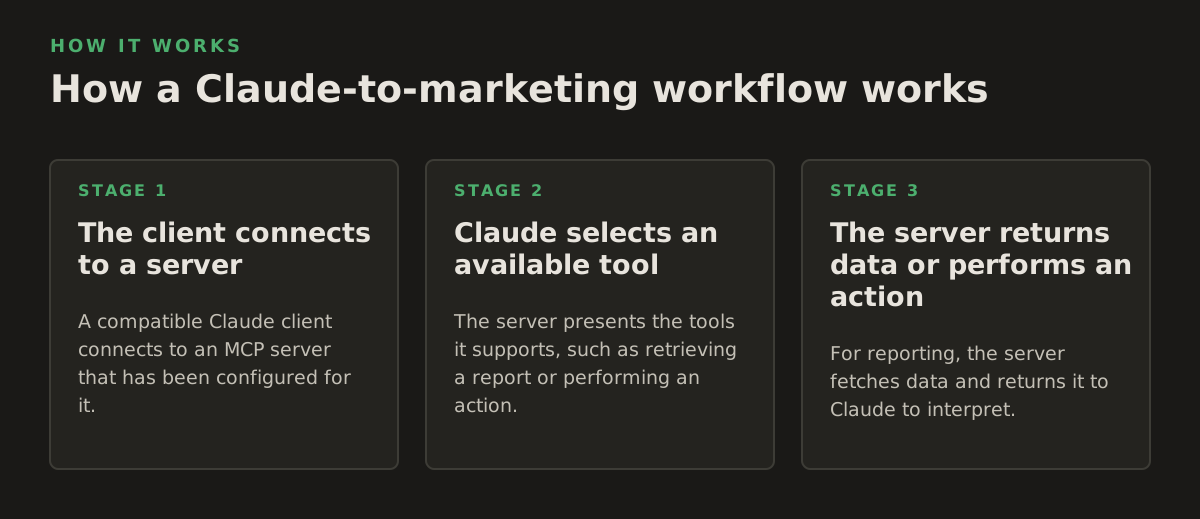
1. The client connects to a server
A compatible Claude client connects to an MCP server that has been configured for it. The connection alone does not mean every available account is authorized: account selection and authentication depend on the client, server, and platform setup. Anthropic’s documentation is the place to check the current configuration steps for the specific Claude client in use; the MCP protocol itself does not dictate a single marketing-account login flow.
2. Claude selects an available tool
The server presents the tools it supports, such as retrieving a report or performing an action. Claude can select an appropriate tool in response to the user’s request, but the tool’s description and inputs matter. “Get campaign performance” needs clear definitions for dates, metrics, and scope. “Change campaign settings” needs precise account, campaign, field, and new value. Ambiguous requests are especially risky when tools can write.
3. The server returns data or performs an action
For reporting, the server fetches data and returns it to Claude to interpret. For a write operation, the server may submit a change to the connected platform. These are materially different outcomes: a recommendation can be reviewed as text, while an executed change can affect live delivery. Google’s Google Ads API introduction describes the API as a way for applications to interact with Google Ads accounts; it is the platform API and the connector’s implementation—not the word “MCP”—that determines which operations are available.
A sensible operational sequence is:
- Ask a bounded question with an account, time period, and metric definition.
- Inspect the evidence returned by the server, including scope and any caveats.
- Request a proposed action separately from the diagnostic step.
- Review the exact change before authorizing any write-capable tool.
- Verify the result in the platform after execution and record who approved it.
For platform-specific connection context, see NotFair’s pages on Google Ads MCP and Meta Ads MCP. Their page labels identify Google Ads MCP and Meta Ads MCP; confirm the current server capabilities and setup details directly before choosing a workflow.
Where the approach breaks: data, permissions, and actions
Reporting definitions can disagree
“Conversions,” “revenue,” or “yesterday” may not mean the same thing across an ad platform and analytics property. Reporting windows, attribution settings, time zones, conversion delays, and filters can change the comparison. Google’s Google Ads API reporting documentation explains that reports are built using the API’s query and reporting framework. In practice, a team should specify the definition it expects and compare Claude’s result with a platform report using the same settings.
Also distinguish a platform-reported metric from a business outcome. A campaign’s reported conversions can be useful for optimization, but they do not by themselves establish incremental lift or prove that the campaign caused a sale. Ask for the underlying rows and definitions, not just a confident-sounding explanation.
Write access raises the stakes
A read-only reporting workflow can still expose sensitive business information, but a write-capable workflow adds the possibility of changing live settings. Do not assume an approval prompt exists simply because the interface is conversational. Confirm whether approval is enforced by the client, the MCP server, an account role, or a separate operating procedure—and test that control before relying on it.
Useful guardrails include:
- Least privilege: grant only the account and operations needed for the workflow.
- Human review: require a named approver for changes that affect live campaigns.
- Change boundaries: limit which fields, campaigns, or action types are in scope.
- Reversibility: record the prior value and define how to undo a change.
- Auditability: preserve the request, evidence, proposed change, approval, and result.
These are operating controls, not capabilities guaranteed by MCP. Meta’s Marketing API overview describes Meta’s API surface; the exact permissions and operations available to a particular integration depend on its implementation and account authorization. Check the platform’s current documentation and the server’s own capability list rather than inferring write access from a product label.
Natural-language instructions can be underspecified
“Cut wasted spend” is not an executable policy. It leaves unanswered how “wasted” is defined, which campaigns are in scope, what evidence counts, and how much change is acceptable. A connector may also return incomplete data or an error. Require Claude to surface missing inputs instead of silently filling them in, and keep diagnosis separate from execution when the evidence is uncertain.
Practical marketing workflows, with bounded examples
The following examples show how to make requests testable. Any numerical limits below are illustrative starting policies, not universal performance benchmarks or recommendations for every account.
- Spend-change triage: ask for campaigns whose spend changed by more than 20% between two specified seven-day periods, then request the spend, dates, and campaign identifiers behind each result. Treat 20% as an example filter, not proof that a change is material.
- Lead-quality investigation: compare two campaigns over a 14-day window using the same CRM-qualified-lead definition. Ask for lead count and cost per qualified lead, then verify that the CRM and ad-platform date ranges align before drawing conclusions.
- Budget-change proposal: ask for a draft that shifts no more than 5% of a campaign’s daily budget, with a reason and current value beside the proposed value. A human should confirm the campaign is eligible and the proposed move fits the account’s pacing plan.
- Tracking anomaly check: compare reported conversion counts across two named sources for the same dates and conversion event. Ask the system to flag the discrepancy, not to “fix tracking” without identifying what changed.
A practical pilot starts with one recurring investigation and read-only access where possible. Have an analyst independently reproduce several outputs in the platform, record mismatches, and adjust the request or data definitions. Only after the read workflow is dependable should the team consider a narrow write workflow—with explicit approvals and a rollback path.
How to choose a setup and put it into practice
Evaluate a Claude MCP marketing setup against the job it must do, not the length of its feature list. Ask the provider or technical owner for a current, concrete account of the server’s available tools, required permissions, authentication model, supported Claude client, and handling of failed or partial requests. If those details are not documented, treat them as unknown and verify them before connecting a production account.
Use a short evaluation checklist:
- Can the team name the tools and distinguish read operations from write operations?
- Can it restrict access to the intended account and data?
- Does the workflow show the inputs and evidence behind a recommendation?
- Can an approver inspect the exact change before execution?
- Is there a reliable way to confirm, record, and reverse a change?
For an agency, begin with a repeatable cross-account diagnostic and keep account boundaries explicit. For an in-house team, begin with a single reporting question tied to a known source of truth. For an MCP developer, document tool inputs, outputs, side effects, and failure behavior so a marketer can tell whether a response is a report, a proposal, or an executed change.
Recommendation: make the first workflow read-only, narrow, and easy to verify; add write access only when the team can state its approval and rollback rules. NotFair describes hosted MCP servers that connect AI clients including Claude with advertising and analytics platforms, alongside approval-gated agents for diagnosing issues, recommending fixes, and executing reversible campaign changes; check the current details at NotFair before deciding whether that approach fits your controls.
Authored with NotFair SEO